
Best Accounting Software for Small Business in 2026 (Reviewed & Ranked)
10
minute read
15
sections
October 8, 2026
last updated
Janak Uparkoti
reviewed by

So, you need accounting software for your small business, and every comparison you open seems to say something different. One site says QuickBooks is the best. Another says Xero. A third says the free option is all you need. Don’t worry. This article will sort it out.
I’ll cover five products: QuickBooks Online, Xero, Zoho Books, FreshBooks, and Wave. I’ll show you what each one costs, what you’ll really pay after the promo ends, and which one suits which kind of business.
Last checked: October 8, 2026. Prices are US list prices and promos change often, so check the vendor’s site before you buy.
Our picks at a glance
- Best overall for growth: QuickBooks Online (Essentials plan, 3 users)
- Best for unlimited users: Xero (Growing plan)
- Best value if you’re on a budget: Zoho Books (Professional plan)
- Best for freelancers and service businesses: FreshBooks (Plus plan)
- Best free option: Wave (Starter) or QuickBooks Free
The right answer depends on your team size, whether you need payroll inside the software, and what you can afford in month 4 and beyond, when the discount ends.
How we chose
I haven’t tested these products myself. I built this comparison from current vendor pricing pages, plan terms, and published reviews, and I’ll tell you when a point comes from the vendor rather than from my own checks.
Every product was judged on the same seven points:
- Accounting depth: invoicing, expenses, bills, bank reconciliation, and reports.
- Real 12-month cost for a three-person service business, including the promo and the price after it.
- Users and accountant access. Do you pay per seat?
- Payroll: built in, an add-on, or missing, and what it costs for five employees.
- Inventory depth.
- Plan caps that might force an upgrade within a few months.
- Room to grow from one person to a team.
Comparison at a glance
| Product | Starting price | Users | Payroll | Best for |
|---|---|---|---|---|
| QuickBooks Online | $38/mo | 1 user on Simple Start; 3 on Essentials | Add-on: $50 + $7/employee | Growing businesses and accountant-led teams |
| Xero | $27/mo | Unlimited | Add-on via Gusto: $36 + $6 per person | Teams that don’t want per-user fees |
| Zoho Books | Free or $20/mo | 1 on Free; 3+ on paid plans | Zoho Payroll on higher plans; price on request | Budget-conscious businesses |
| FreshBooks | $23/mo | Billable clients: 5 on Lite, 50 on Plus | Add-on via Gusto: $40 + $6/user | Freelancers and service businesses |
| Wave | Free | Starter: 1 user | Add-on: $40 + $6/employee | Solo owners with no staff |
1. QuickBooks Online: best overall for growth
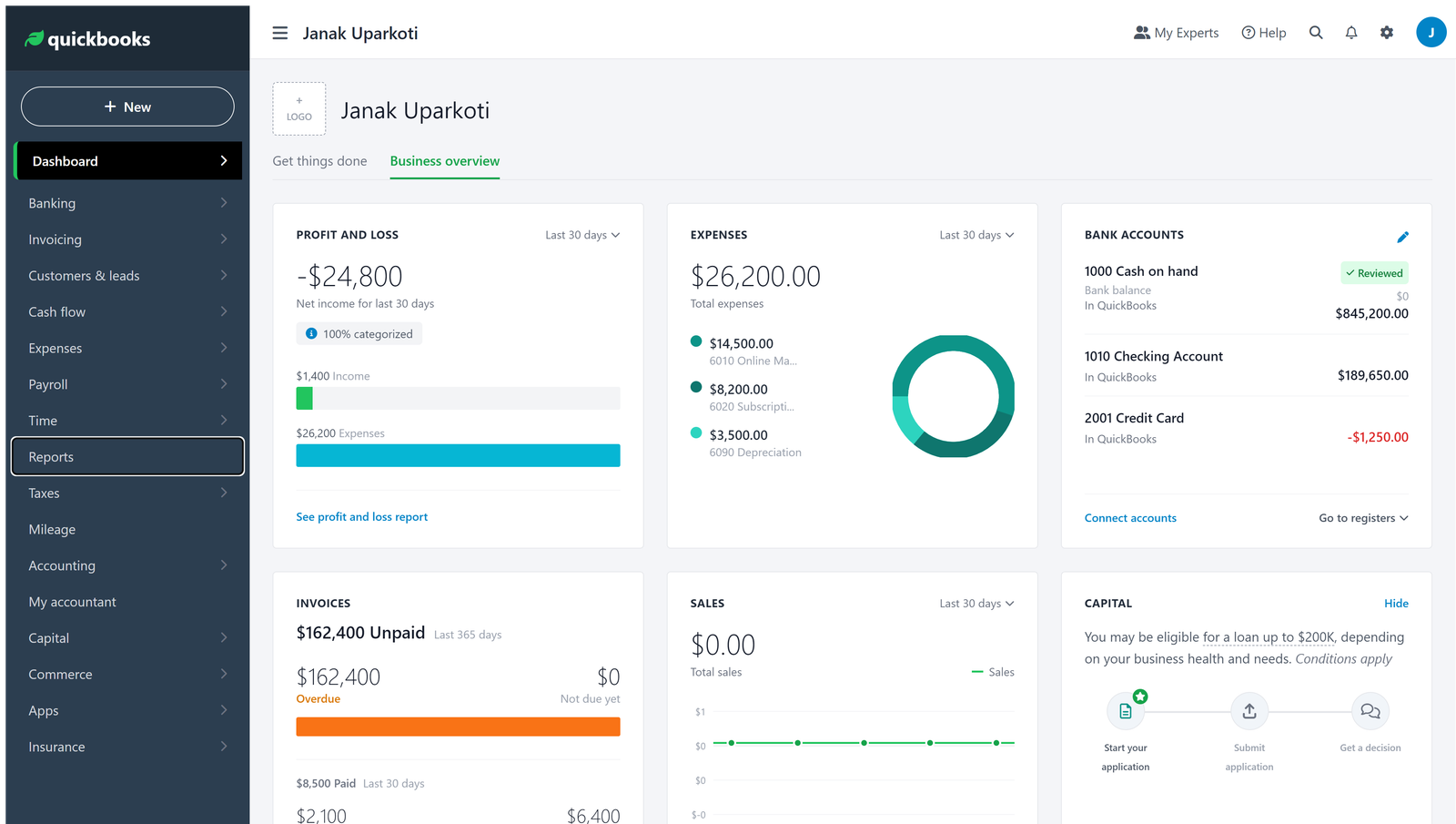
QuickBooks is the one your accountant probably already knows. That matters more than people expect. You can add users, add payroll, and grow into more features without switching products.
Pricing
- Simple Start: $38/mo (1 user)
- Essentials: $85/mo (3 users). Most small businesses start here.
- Plus: $140/mo (5 users)
- Advanced: $340/mo (25 users)
- Promotion: 50% off for 3 months, then full price
- Free trial: 30 days
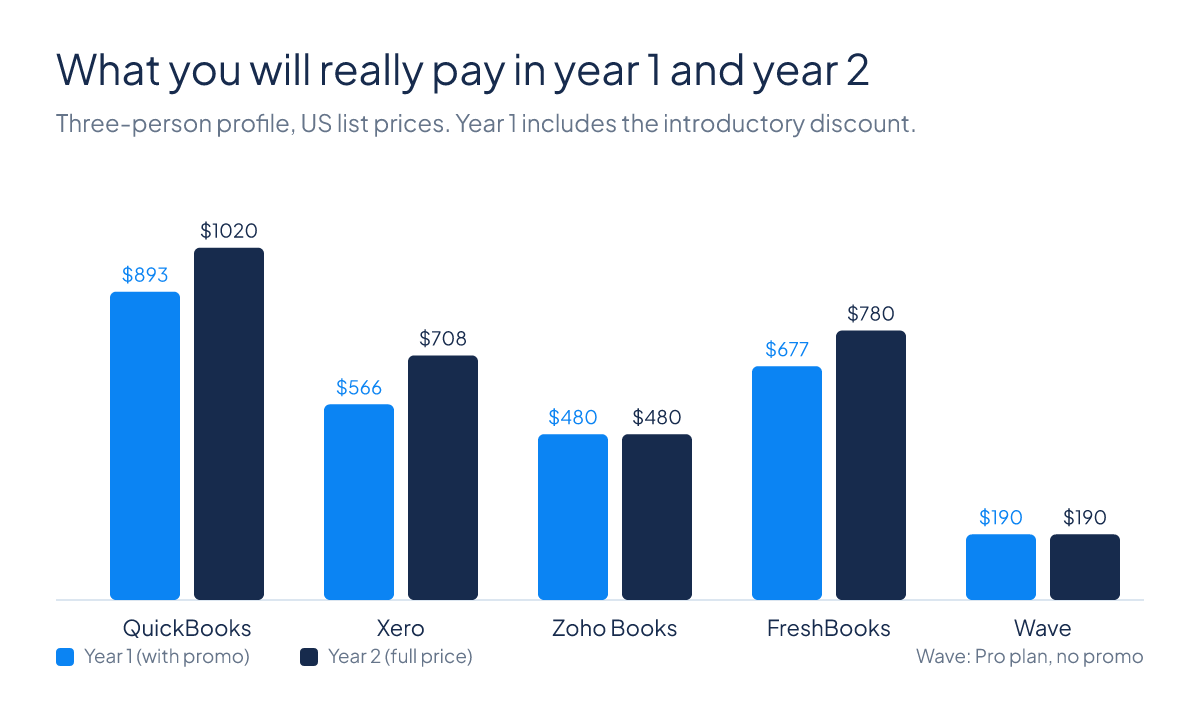
Here’s the math for a three-person business on Essentials. Three months at $42.50 comes to $127.50. Nine months at $85 comes to $765. That’s $892.50 in year 1. From year 2 you pay $1,020 a year, because the discount is gone.
Payroll through Gusto is $50 a month plus $7 per employee. For five employees, that’s $85 a month, or $1,020 a year.
Pros
- Your accountant likely already knows it.
- Inventory tracking is available from the Plus plan up.
- Industry-specific versions exist for contractors, restaurants, and retail.
Cons
- Per-user costs add up on Essentials and Plus.
- The discount lasts only 3 months, so the renewal price comes as a shock if you don’t plan for it.
- Support is online only.
Choose QuickBooks if
You want the software your accountant uses, you’re hiring, and you need inventory. If you hate per-user fees and expect to grow a big team, Xero is usually cheaper.
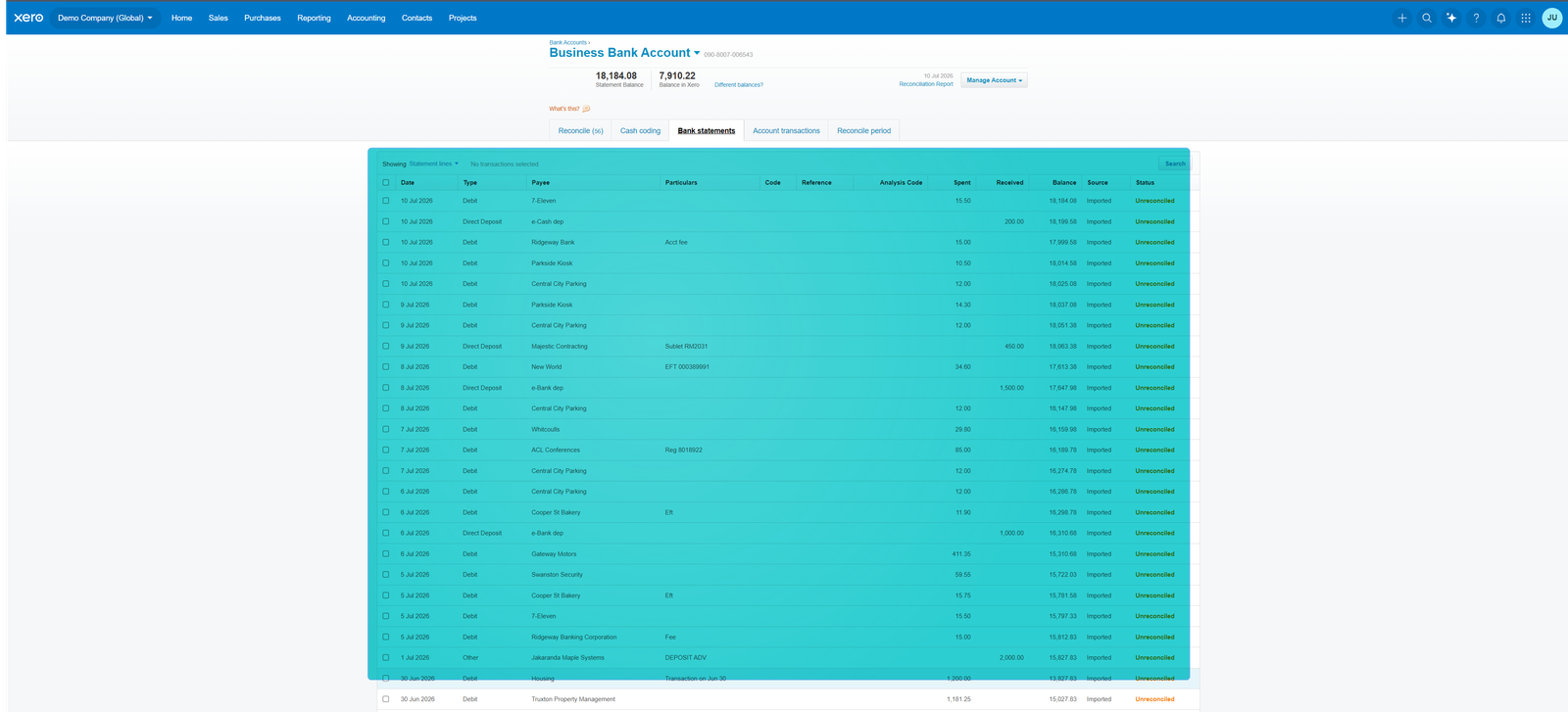
2. Xero: best for unlimited users
Xero’s big advantage is that every plan includes unlimited users. For a growing team or co-owned business, that can save you a lot of money.
Pricing
- Early: $27/mo, with up to 20 invoices and 5 bills a month
- Growing: $59/mo, with unlimited invoices
- Established: $97/mo, with multi-currency and advanced reporting
- Promotion: 80% off for 3 months, then full price
- Free trial: 30 days
Xero raised its US prices on October 1, 2026. Early went from $25 to $27, Growing from $55 to $59, and Established from $90 to $97. Older articles still quote the old figures, so check the current price before you decide.
Take the Growing plan for a three-person business. Three months at $11.80 comes to $35.40. Nine months at $59 comes to $531. That’s $566.40 in year 1. Year 2 is $708 at full price.
Payroll through Gusto is $36 a month plus $6 per employee. For five employees, that’s $66 a month, or $792 a year.
Pros
- Unlimited users on every plan, with no per-seat fees.
- Accountant access is free and built in.
- Multi-currency is available on Established.
Cons
- Early’s cap of 20 invoices a month is tight for an active business, so most people move to Growing quickly.
- Multi-currency and advanced reporting need the Established plan, not Growing.
- Support is online only.
Choose Xero if
You’re building a team and don’t want per-user surprises. Growing with unlimited users often beats QuickBooks Essentials once you have a few people. If you’re working alone or with one partner, QuickBooks may come out cheaper.
3. Zoho Books: best value on a budget
Zoho Books has the cheapest paid plans and a free plan that’s genuinely useful. If you already use other Zoho tools, that’s a bonus.
Pricing
- Free: $0. One user plus one accountant, up to 1,000 invoices a year, and a revenue limit of $50,000 a year.
- Standard: $20/mo, or $15/mo billed annually, for 3 users
- Professional: $50/mo, or $40/mo billed annually, for 5 users, with inventory
- Premium: $70/mo, or $60/mo billed annually, for 10 users
- Free trial: 14 days, not available on the free plan
On the annual Professional plan you pay $480 in year 1 and $480 in year 2. There’s no promo to reset.
Zoho Payroll is included on higher plans, but the price isn’t published. You’ll need to ask Zoho for a quote.
Pros
- The free plan is real, and 1,000 invoices a year is plenty for a bootstrapping solo business.
- Inventory comes with Professional rather than as an add-on.
- No per-user overage fees on Standard and Professional.
Cons
- Payroll pricing is hidden until you ask.
- Support is by email and chat, not phone.
- The interface is dense and takes longer to learn than Xero’s.
Choose Zoho Books if
You’re watching your budget and your accountant is happy to work in Zoho. If you already use Zoho CRM or other Zoho apps, it’s an easy call.
4. FreshBooks: best for freelancers and service businesses
FreshBooks is built for businesses that bill clients for their time: consultants, designers, agencies, and other service providers. Its strengths are invoicing and time tracking. Its accounting features are lighter than the big three.
Pricing
- Lite: $23/mo, up to 5 billable clients
- Plus: $43/mo, up to 50 billable clients
- Premium: $70/mo, unlimited billable clients
- Team members: $11 per extra user per month
- Promotion: 80% off Plus or Premium for 3 months on the Buy Now offer. The offer terms say the free trial doesn’t apply to that deal.
Take a three-person business on Plus with two team members. The promo gives you three months at $8.60, which is $25.80. Nine months at $43 comes to $387. Two team members at $22 a month for the year add $264. That’s $676.80 in year 1. Year 2 is $43 × 12 plus $22 × 12, or $780. I’ve assumed the promo doesn’t cover the team member add-on.
Payroll through Gusto is $40 a month plus $6 per employee.
Pros
- Time tracking is built in.
- Invoicing is clean and client-friendly.
- You can add exactly as many team members as you need.
Cons
- The client caps push you up a tier quickly. Lite stops at 5 clients, and Plus at 50.
- Bank reconciliation is not automatic.
- Accountant collaboration is harder than with QuickBooks or Xero.
Choose FreshBooks if
You bill by the hour or by project and want to track time against clients. If you need real accounting, such as reconciliation, multi-currency, or inventory, look at Xero or QuickBooks instead.
5. Wave: best free option
Wave’s Starter plan is free and works for a solo owner with no staff. If you need more, Pro is the cheapest paid option on this list.
Pricing
- Starter: $0
- Pro: $19/mo, or $190 a year per business. Bank auto-import is part of Pro.
- Promotion: none
On Pro you pay $190 in year 1 and $190 in year 2.
Payroll is an add-on at $40 a month plus $6 per employee.
Pros
- Starter really is free, with unlimited invoicing.
- 1099 contractor tracking is included.
- Pro is the cheapest paid plan here.
Cons
- Bank auto-import is a Pro feature, so on Starter you enter transactions by hand or upload statements.
- Reporting is basic.
- There’s no inventory.
Choose Wave if
You’re a solo owner with no staff and low transaction volume. Once you hire someone or your invoice count grows, plan to move to one of the others.
What you’ll really pay: year 1 vs year 2
Promos feel great for three months. But the year 2 price is the one you’ll be living with.
| Software | Plan | Year 1 (with promo) | Year 2 (full price) | Two-year total |
|---|---|---|---|---|
| QuickBooks Online | Essentials, 3 users | $892.50 | $1,020 | $1,912.50 |
| Xero | Growing, unlimited users | $566.40 | $708 | $1,274.40 |
| Zoho Books | Professional, annual billing | $480 | $480 | $960 |
| FreshBooks | Plus, 2 team members | $676.80 | $780 | $1,456.80 |
| Wave | Pro, annual billing | $190 | $190 | $380 |
The promo is worth a lot in the first three months. On QuickBooks it saves $127.50, and on Xero it saves $162.80. But once it ends, Xero stays cheaper than QuickBooks. Zoho and Wave don’t discount at all, so their two years cost the same.
Payroll costs compared
If you’re hiring your first five people and want payroll inside your accounting software, here’s the monthly cost:
| Software | Payroll provider | Base per month | Per employee | Five employees per month | Per year |
|---|---|---|---|---|---|
| QuickBooks | Gusto | $50 | $7 | $85 | $1,020 |
| Xero | Gusto | $36 | $6 | $66 | $792 |
| FreshBooks | Gusto | $40 | $6 | $70 | $840 |
| Wave | Gusto | $40 | $6 | $70 | $840 |
| Zoho Books | Zoho Payroll | Price on request | |||
Xero Payroll is the cheapest of these for five employees. QuickBooks costs $19 a month more. If you’re on FreshBooks for invoicing, adding Gusto costs about the same as QuickBooks payroll.
The free options compared
| Plan | Price | Limits | Accountant access |
|---|---|---|---|
| QuickBooks Free | $0 | 1 user, 2 invoices and 2 receipts a month, 1 contractor, no accountant access | No |
| Zoho Books Free | $0 | 1,000 invoices a year, revenue under $50,000 a year | Yes |
| Wave Starter | $0 | Unlimited invoicing; bank auto-import needs Pro | No |
If your accountant needs to look at the books, Zoho Books Free is the only free option with accountant access. If you’re working alone, Wave Starter has no invoice limit. QuickBooks Free is the most restrictive, with 2 invoices a month.
Which one should you pick?
Solo freelancer with no employees
Start with Wave Starter, or Zoho Books Free if you want an accountant involved. Move to Wave Pro or Zoho Standard when you need bank imports or more users.
Growing service business with 2 to 5 people
Choose Xero Growing or FreshBooks Plus. QuickBooks Essentials works too, but per-user costs add up quickly.
Retail or ecommerce with inventory
Choose QuickBooks Plus or Zoho Books Professional. Inventory is included on both. Avoid Wave, which has no inventory.
Agency or consultancy that bills by the hour
Choose FreshBooks Plus. Time tracking and client billing are its strengths.
Business with an accountant in the books every day
Choose QuickBooks Online or Xero. Both give your accountant easy access.
Also considered
Sage 50 is built for established businesses with complex inventory and multi-company accounting. It’s overkill for most one-to-ten-person businesses.
NetSuite is an enterprise system. It’s only worth looking at once you have serious revenue or several legal entities.
Frequently asked questions
Do I need an accountant to use this software?
No. QuickBooks, Xero, and Zoho Books all handle the day-to-day bookkeeping for you. An accountant is helpful but optional. FreshBooks and Wave are simpler and assume you’re doing the bookkeeping yourself.
Can I switch later?
Yes, but it takes time. Plan for a few hours of export, import, and checking. Don’t pick on price alone.
Will the software file my taxes?
No. It organises your income and expenses. Your accountant or tax software files the return.
Can my accountant access my books?
On QuickBooks and Xero, yes, and it’s built in. On Zoho Books, yes, but fewer accountants know it. On FreshBooks, accountant access is limited. On Wave, there’s no separate accountant login, so you’d need to share your own.
Is payroll included in the subscription?
Usually not. QuickBooks, Xero, FreshBooks, and Wave sell payroll as an add-on, typically through Gusto. Zoho includes it on higher plans but doesn’t publish the price.
Can I cancel any time?
All of these are month-to-month, with no long-term contract. Some offer a discount for annual billing.
Our verdict
QuickBooks Online is the industry standard for a reason. It’s not the cheapest, but it scales, and accountants know it. Pick it if you’re hiring a team or your business is complicated.
Xero is the smarter choice if you want to avoid per-user fees and expect to grow a team. Unlimited users makes the math work in its favour.
Zoho Books is the value pick. It’s the cheapest on the way in, there’s no promo to reset, and the free plan is real.
FreshBooks suits freelancers and service businesses that bill by the hour or by project.
Wave is for solo owners who want to pay nothing. Once you hire someone, move on.
The best software is the one you’ll actually use. Take the free trial of your top two picks and run one real month of invoices and reconciliations through each. You’ll learn more in an afternoon than from any comparison, this one included.
Not sure which one fits?
Start with the guide on how to choose accounting software. It walks you through your needs before you compare prices.
Official resources: QuickBooks pricing · Xero pricing · Zoho Books pricing · FreshBooks pricing · Wave pricing



