Let’s be honest. “Choosing accounting software” sounds about as exciting as watching paint dry. For many business owners, it feels like a complicated, technical chore. You just want something that helps you send invoices, track expenses, and see if you’re actually making money—without needing a degree in finance.
But here’s the good news: In 2026, accounting software is smarter, friendlier, and more powerful than ever. It’s not just digital bookkeeping; it’s like hiring a super-efficient, 24/7 assistant who handles the numbers so you can focus on your big ideas.
This guide will walk you through the process in plain English. We’ll skip the confusing tech talk and break down exactly what to look for, step by step.

Part 1: Start With Yourself (The “Why” Before the “What”)
Before you even look at a single software website, ask these simple questions:
- What do I truly hate doing? Is it chasing late payments? Sorting through a shoebox of receipts? Doing tax calculations? Your biggest pain point is your best starting point.
- How big is my business? Are you a solo freelancer, a growing team of 10, or a larger company? The needs (and budget) are very different.
- What’s my tech comfort level? Do you want something that works like the apps on your phone, or are you okay with a more complex system?
- What’s my budget? Think monthly or yearly. Remember, your time is also money. A slightly more expensive tool that saves you 10 hours a month is often a bargain.
Part 2: The 2026 Checklist – What Your Software MUST Do
The basics from 10 years ago are now just the entry ticket. In 2026, look for these features.
1. The Non-Negotiable Core Features:
- Invoicing & Payments: It should create professional, customizable invoices in seconds. Crucially, it must include click-to-pay links so clients can pay online via credit card or bank transfer. Getting paid faster is a game-changer.
- Expense Tracking: You should be able to snap a photo of a receipt with your phone and have the software read it, log the amount, and categorize it. No more manual entry.
- Bank Reconciliation: This should be (mostly) automatic. Your software connects to your bank account and matches transactions with your invoices and receipts.
- Financial Reports: At the click of a button, you should see a Profit & Loss Statement (are you making money?), a Balance Sheet (what you own and owe), and a Cash Flow Forecast (will you have cash next month?). These are your business’s vital signs.
- Tax Readiness: The software should track sales tax (VAT/GST) and help categorize expenses so tax time isn’t a nightmare. In 2026, many tools will even prepare your basic tax filing.
2. The 2026 Game-Changers:
- Built-in Artificial Intelligence (AI): This isn’t sci-fi anymore. Look for an AI Assistant that can:
- Automatically categorize bank transactions.
- Predict your future cash flow based on past patterns.
- Flag unusual expenses or potential errors.
- Answer questions in plain English: “What were my top expenses last quarter?” or “Which clients are overdue?”
- Seamless Automation (“Hands-Off” Mode):
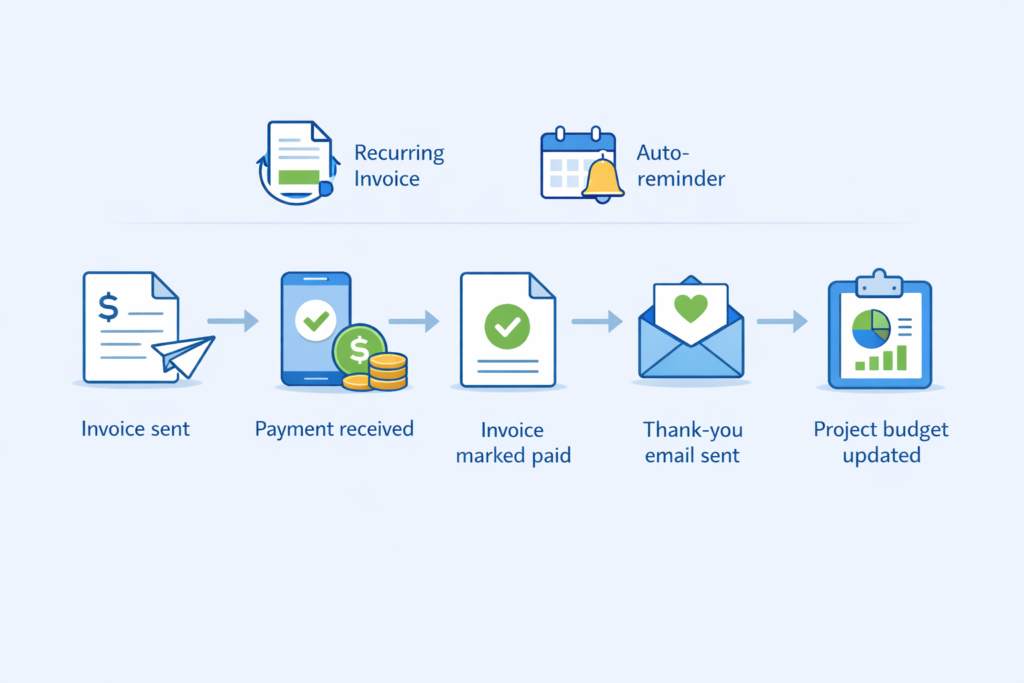
- Auto-Reminders: Set it to automatically send friendly payment reminders to overdue clients.
- Recurring Invoices & Bills: Set once, forget forever.
- Workflows: Create rules like, “When a client pays an invoice, mark it paid, send a thank-you email, and update the project budget.”
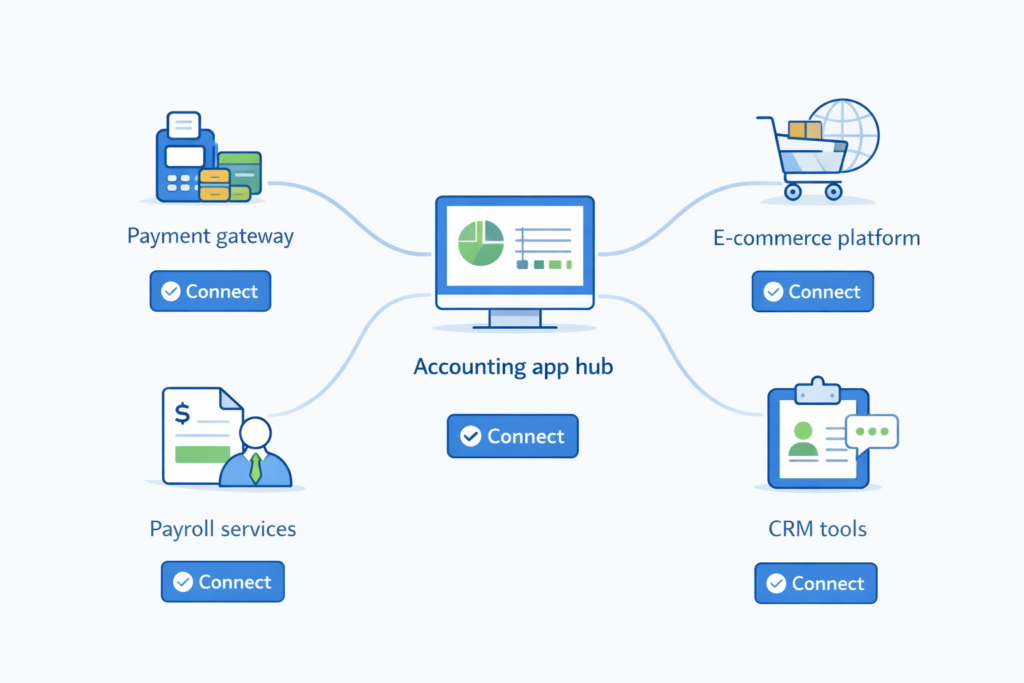
- Ecosystem & Connections (Integrations): Your software shouldn’t live in isolation. It must connect to other tools you use:
- Payment Gateways: Like Stripe, Square, or PayPal.
- E-commerce Platforms: Like Shopify, WooCommerce, or Etsy.
- Payroll Services: Like Gusto or ADP.
- CRM & Project Tools: Like Salesforce or Trello.
- In 2026, these connections should be easy, often just a click in an “App Marketplace.”
3. The Human Factors:
- Stunningly Simple Design: If the dashboard looks like a airplane cockpit, run. It should be clean, intuitive, and not make you want to pull your hair out.
- Real Human Support: When you’re stuck, can you get help? Check for live chat, phone support, or easy email. Read reviews to see what their support is really like.
- Security You Can Trust: This is critical. The software should use bank-level encryption (like 256-bit SSL) and be clear about data protection. Ask: Where is my data stored? Who can access it?
Part 3: The Different Flavors of Software (Picking Your Type)
In 2026, you have three main choices:
- Cloud-Based (Software-as-a-Service – SaaS):
- What it is: You log in through a web browser or phone app. Everything is stored securely online.
- Pros: Access from anywhere, on any device. Updates are automatic. Usually includes backups. Easy collaboration with your accountant or team. This is the standard for most modern businesses in 2026.
- Cons: Requires an internet connection. Ongoing subscription fee.
- Examples: QuickBooks Online, Xero, FreshBooks.
- Desktop Software:
- What it is: A program you install on one specific computer.
- Pros: One-time purchase (sometimes). Can feel faster. Data is on your machine.
- Cons: No remote access unless you set up complex systems. Updates are manual and extra. Risk of data loss if your computer crashes. Becoming rare, mostly for very specific, old-school industries.
- Spreadsheets (Like Excel or Google Sheets):
- What it is: The DIY method.
- Pros: Total control. Extremely cheap (or free).
- Cons: Incredibly time-consuming. Prone to human error. No automation. Hard to scale. Not recommended for any serious business in 2026. It will cost you more in missed opportunities and mistakes than proper software.
Our 2026 Verdict: For 99% of businesses, Cloud-Based software is the clear, modern choice. The benefits of accessibility, automation, and peace of mind far outweigh the monthly cost.
Part 4: Let’s Make a Shortlist (The Big Names in 2026)
Here’s a quick look at the popular players, updated for 2026:
| Software | Best For | 2026 Edge | Simple Word Review |
|---|---|---|---|
| QuickBooks Online | Small to medium businesses, especially in the US. A very safe, all-rounder choice. | Deep ecosystem, tons of integrations, strong AI features for automation and insights. | The “Swiss Army Knife.” Powerful and popular, but can feel a bit cluttered for tiny businesses. |
| Xero | Growing small businesses, tech-savvy users, and those who collaborate a lot. Beautiful design. | Unbeatable bank reconciliation, excellent multi-currency handling, clean interface. | The “Sleek Designer.” Intuitive, modern, and fantastic for businesses that work internationally. |
| FreshBooks | Freelancers, solopreneurs, and service-based businesses (consultants, designers, etc.). | Best-in-class for invoicing and client communication. Super simple and user-friendly. | The “Freelancer’s Friend.” If sending invoices and tracking time is your main job, this is a joy to use. |
| Zoho Books | Businesses already using Zoho’s suite of apps (CRM, Mail, etc.). Value seekers. | Great price, integrates perfectly with other Zoho apps, good automation tools. | The “Team Player.” Excellent if you want all your business tools talking to each other affordably. |
Newer Contenders to Watch: Keep an eye on modern platforms like Wave (great for super small businesses on a tight budget) and Bench (which combines software with a real bookkeeping team).
Part 5: Your Step-by-Step Selection Plan
Step 1: Try Before You Buy (Seriously!)
Almost every good software offers a free trial, usually 14-30 days. Use it! Don’t just look—actually try to:
- Create a dummy invoice.
- Upload a receipt.
- Connect a demo bank account (they provide fake data).
- Generate a report.
- Ask their AI a question.
Step 2: Invite Your Team (or Accountant)
If you work with a bookkeeper or accountant, they likely have a preference. Their expertise can save you money, and working on the same system is magic. Invite them to test with you.
Step 3: Check the Fine Print (Gently)
- Pricing: Does the price jump after the trial? How much does it cost to add another user?
- Cancellation: Is it easy to cancel if it’s not working?
- Data Export: Can you get all your data out easily if you want to leave?
Step 4: Make the Decision & Onboard Smoothly
- Pick the one that felt the easiest and least frustrating during the trial. That feeling matters most.
- Start fresh. For most small businesses, it’s easier to start from today rather than importing years of messy old data.
- Don’t try to learn everything at once. Master invoicing first, then expenses, then reports. Watch the short tutorial videos the company provides—they’re gold.
Part 6: The Future-Proof Mindset (Beyond 2026)
Choosing software isn’t just for today. Think about where your business is going.
- Scalability: Can this software grow with you? Can it handle more clients, more transactions, more users?
- The AI Journey: The AI in these tools will keep learning. Choose a company that is actively investing in and talking about AI improvements.
- Openness: An software with a large “App Store” of integrations can adapt to new tools you might need in the future.
Conclusion: Your Time is Your Most Valuable Asset
In 2026, the right accounting software is not an expense; it’s an investment in your sanity and your business’s growth. It buys you back your most precious resource: time.
The perfect choice isn’t about the most features or the fanziest brand. It’s about the tool that gets out of your way, does the heavy lifting, and gives you clear, confident insight into your business’s finances.
So take a deep breath, start with those questions about your own needs, take the trials for a spin, and make the choice that lets you focus less on the books and more on building your dream. You’ve got this