Xero Review 2026: An Accountant’s Honest Take on Pricing, Pros and Cons
An accountant tests Xero: US prices ($27, $59, $97), the 80% offer, which plan to choose, bank reconciliation, payroll, pros and cons, and an 8.2/10 scorecard.

So, is Xero actually worth paying for? Maybe your accountant suggested it, or you’re fed up with QuickBooks’ per-user pricing. Either way, you want a straight answer before you connect your bank account.
Here it is. Xero is a very good fit for small businesses, agencies and online sellers where more than one person works in the books. It’s less of a fit if you’re a solo freelancer sending five invoices a month.
I’m an accountant, so I don’t judge Xero on how pretty the dashboard is. I care whether it keeps the books accurate, makes reconciliation quicker, and gives you numbers you can actually use.
Verdict
Worth it if more than one person touches the books
Xero is strong, accountant-friendly cloud accounting with no per-user fees. It’s overkill if you send a handful of invoices a month, and US payroll means a Gusto add-on.
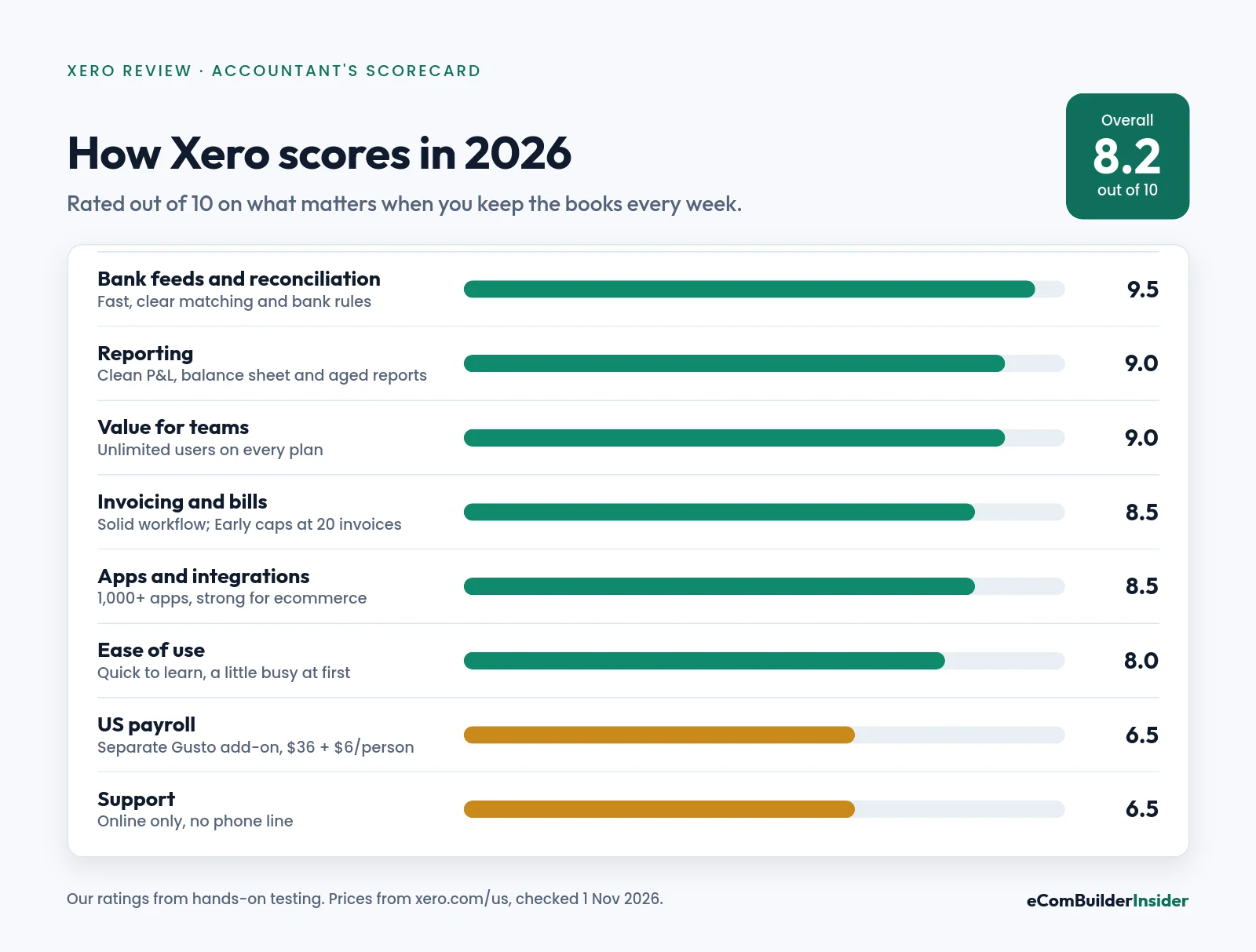
8.2/10
Our overall score
From $27
a month, or $5.40 with 80% off
Unlimited
users on every plan
Partner offer · checked 1 Nov 2026
80% off Xero for 6 months
For organisations new to Xero on Early, Growing or Established, until 31 March 2027. No code needed: the discount applies when you sign up through the link.
Affiliate disclosure
This review contains affiliate links. If you sign up through one, I may earn a commission at no extra cost to you. It doesn’t change my verdict, and I’ll tell you when another product suits you better. Read the full disclosure.
How I Tested Xero
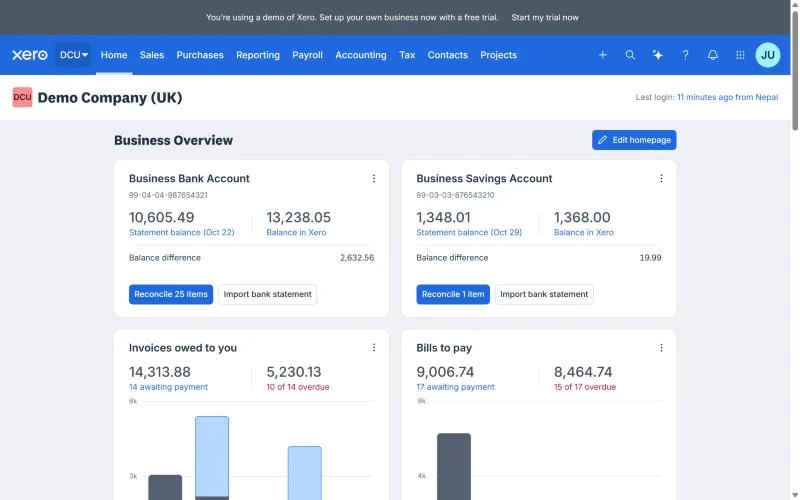
I opened a Xero trial account and worked through the dashboard, invoicing, bank feeds and reconciliation myself. To show you every screen with realistic numbers, the screenshots below come from the Xero demo company (October 2026).
US prices and plan limits were checked on Xero’s US pricing page on 1 November 2026. Where something comes from Xero rather than my own use, I say so. Here’s how I test accounting software.
Xero at a Glance
| Area | My take |
|---|---|
| Best for | Small businesses, agencies, service firms and ecommerce sellers with more than one person in the books |
| Price (US) | $27, $59 or $97 a month; 80% off for 6 months through a partner link |
| Users | Unlimited on every plan, with no per-user fees |
| Bank reconciliation | One of Xero’s biggest strengths |
| Invoicing | Strong; Early is capped at 20 invoices a month |
| Payroll (US) | Add-on via Gusto: $36 a month + $6 per person |
| Multi-currency | Established plan only |
| Inventory | Basic tracking built in; Inventory Plus add-on on Growing and Established |
| Accountant access | Free, and most accountants outside the US already know Xero |

Who Should Use Xero, and Who Should Skip It
Xero is a great fit if you:
- have a co-owner, bookkeeper or accountant who all need to log in, because there are no per-user fees
- want bank reconciliation to be the quick part of your week
- run a consultancy, agency or service business that’s outgrown a spreadsheet
- sell online and want one accounting layer under Shopify, Amazon and your payment apps (see Xero for ecommerce)
You’d probably be happier with something else if you:
- work alone and send only a few invoices a month (try a free option first)
- want payroll from the same company as your accounts in the US (compare Xero vs QuickBooks)
- mainly bill clients for time and want invoicing first (compare Xero vs FreshBooks)
Xero Pricing in the US (2026)
| Plan | First 6 months (80% off) | Then | What it’s for |
|---|---|---|---|
| Early | $5.40/mo | $27/mo | Basics: quotes, 20 invoices and 5 bills a month |
| Growing | $11.80/mo | $59/mo | Unlimited invoices and bills, auto-reconcile, 60-day cash-flow forecast |
| Established | $19.40/mo | $97/mo | Adds multi-currency, projects, expense claims and a 180-day forecast |
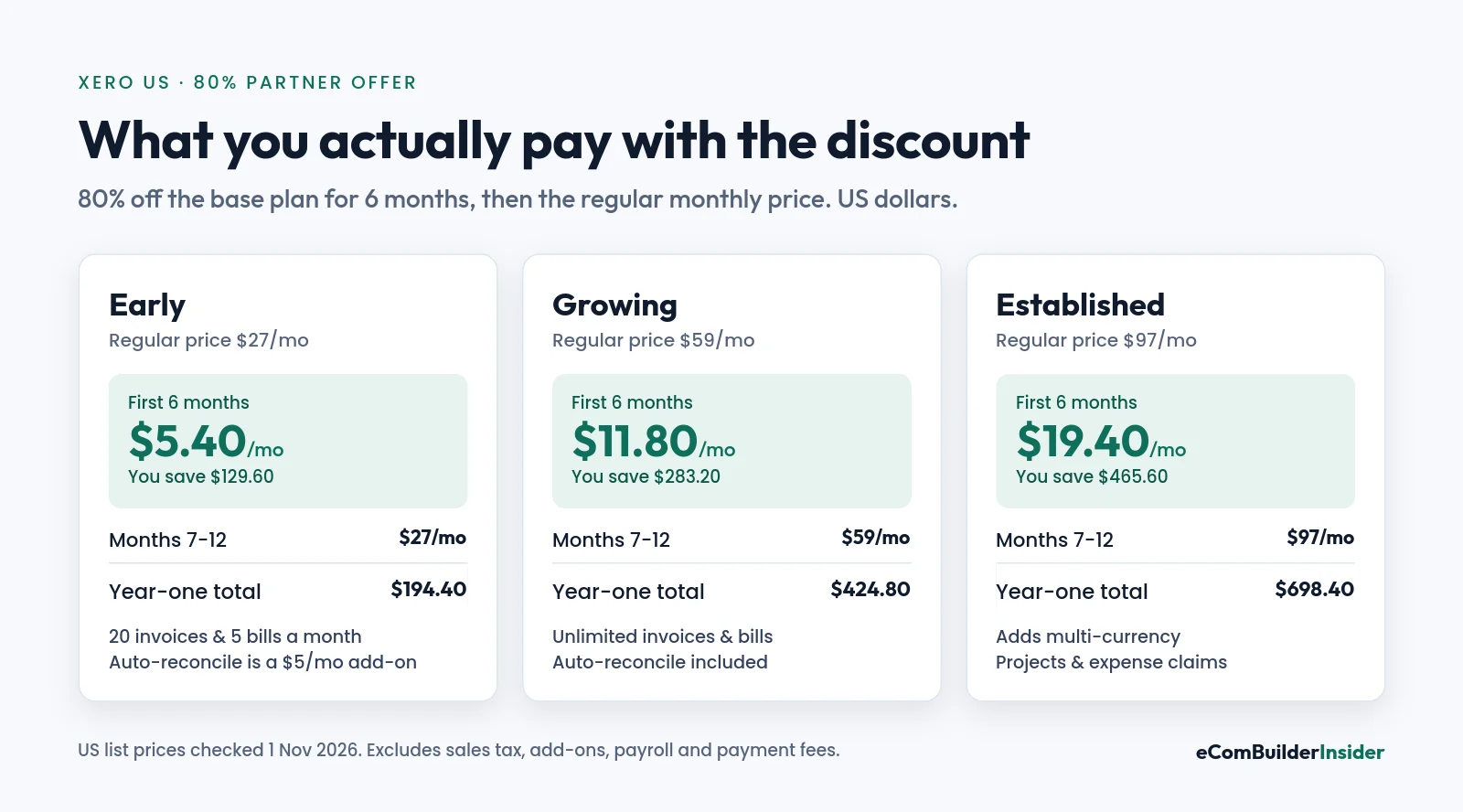
Xero raised its US prices on 1 October 2026. Early went from $25 to $27, Growing from $55 to $59 and Established from $90 to $97. If another site still quotes the old numbers, that’s why.
Here’s what you’ll really pay on Growing. Six months at $11.80 is $70.80, and six months at $59 is $354. That’s $424.80 in year one, then $708 a year once the offer ends. The renewal price is the one you’ll live with, so plan around that.
Signing up before 3 November 2026?
Xero’s own US promotion is 90% off the base plan for 6 months with code DC90626310US on xero.com, ending at 11:59pm UTC on 2 November 2026. It can’t be combined with other offers. After that, the 80% partner offer above is the best available deal.
Prefer to test first? Xero also offers a free month instead of the discount. My Xero free trial guide explains how it works, and the Xero promo code guide tracks the current offer.
Outside the US, plans and offers differ. See the current offer for the UK, Australia or New Zealand. The full plan-by-plan breakdown is in Xero pricing plans.
Which Xero Plan Should You Choose?
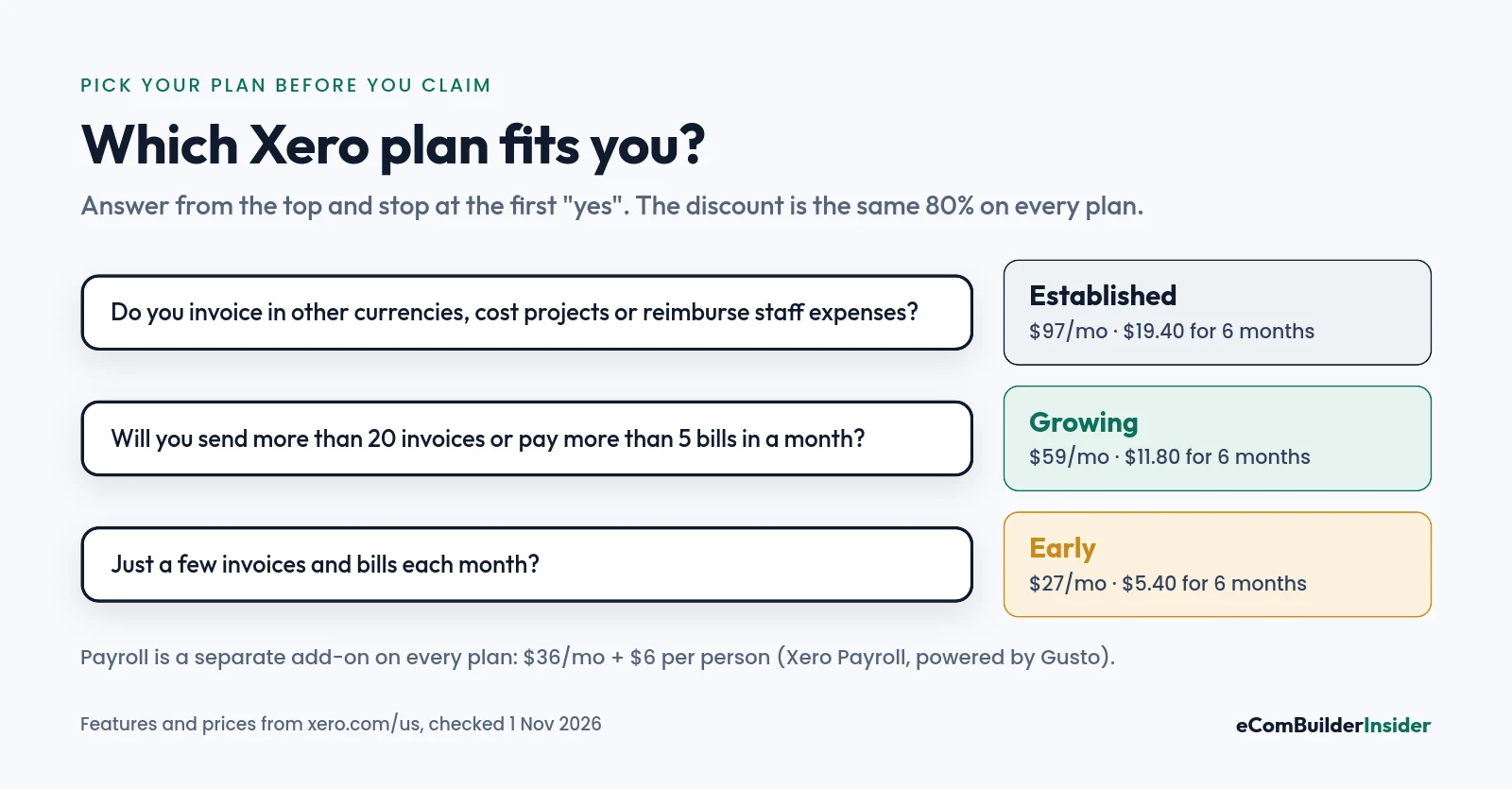
Early ($27)
For a very small business. The 20-invoice and 5-bill monthly caps are tighter than they sound: one busy month and you’re stuck. Auto-reconcile is a $5-a-month add-on here.
Growing ($59)
Where most small businesses land. Unlimited invoices and bills, auto-reconcile included, and performance dashboards. If you’re not sure, start here.
Established ($97)
Only if you need what it adds: multiple currencies, project time and cost tracking, employee expense and mileage claims, or the 180-day cash-flow forecast. Don’t pay for it “just in case”.
Bank Feeds and Reconciliation: Xero’s Strongest Area
This is the part that actually saves you time. Xero pulls transactions in from supported banks, and you match each one to an invoice, a bill, a transfer or a new entry.
It suggests matches and lets you set bank rules, so recurring things like your phone bill or software subscriptions code themselves. On Growing and Established, auto-reconcile clears the obvious matches for you.
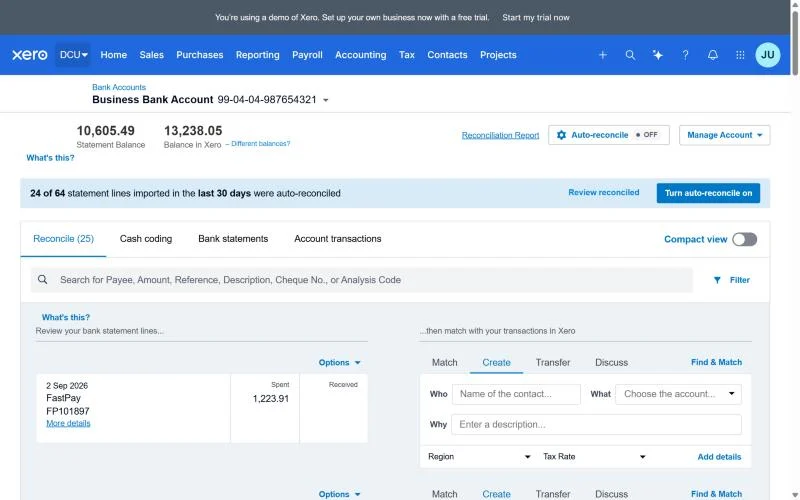
But don’t confuse automation with accuracy. A suggested match still deserves a glance, especially transfers, tax payments, loan repayments and anything unusual. No direct feed for your bank? You can import a statement file instead.
Never reconciled before? Here’s how to do a bank reconciliation, step by step.
Invoicing: Simple, With a Solid Workflow Behind It
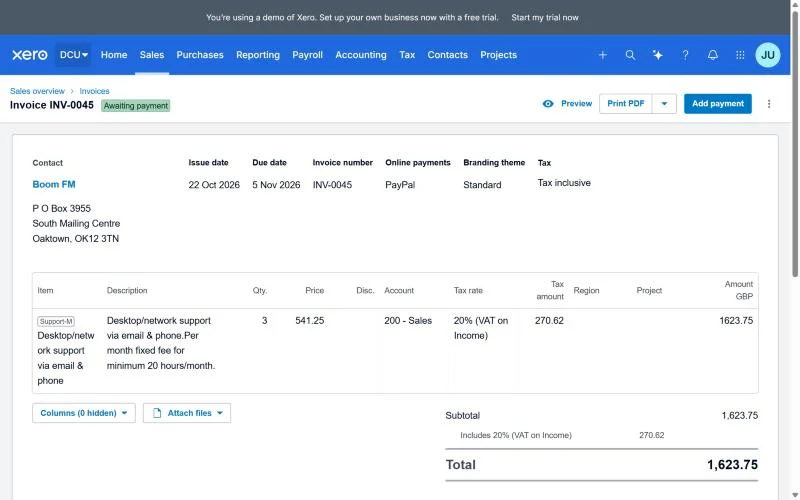
Xero does the invoicing loop well: create an invoice, send it, track it, record the payment. You can accept online payments on invoices, though the fees and providers depend on your country and setup.
The part that matters to an accountant isn’t the template. It’s what happens after you hit send: the invoice lands in accounts receivable, the payment matches cleanly, and overdue balances stay visible. Xero gets that right.
Bills, Expenses and Document Capture
Every US plan includes Smart Document Capture: snap or forward a receipt or bill, and Xero reads it into a draft for you to check. That beats hunting for receipts in a random folder at tax time.
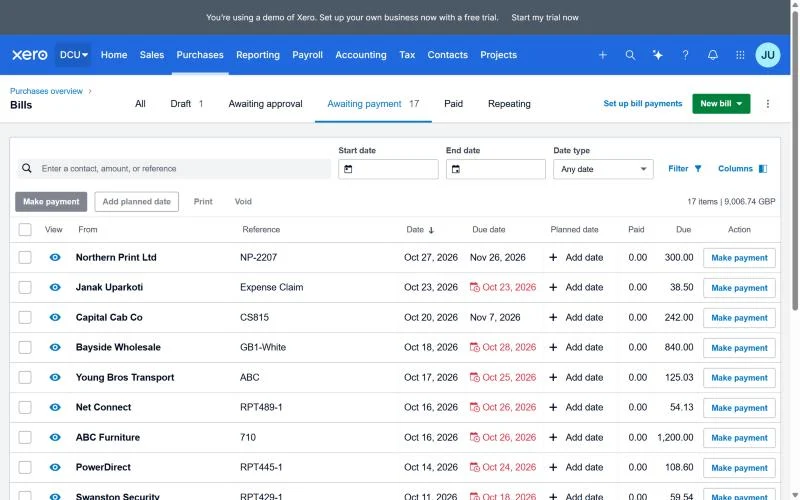
Bill payments by ACH are free on every plan, and fees apply to other payment methods. Employee expense and mileage claims need Established.
One word of caution: capture cuts typing, not checking. Someone still needs to confirm the supplier, the account, the tax and the amount before it hits the books.
Reporting and Cash-Flow Forecasting
The reports are the reason accountants like Xero. You get a clean profit and loss, a balance sheet, aged receivables and payables, and they agree with each other.
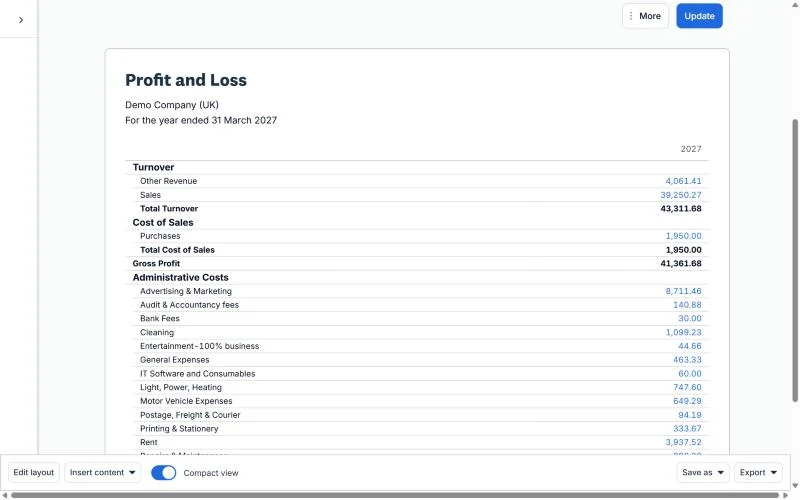
The cash-flow forecast grows with your plan: 30 days on Early, 60 on Growing and 180 on Established.
My tip: don’t try to learn every report. Learn the three your accountant actually asks for, usually profit and loss, balance sheet and aged receivables.
Payroll in the US
Xero doesn’t run US payroll itself. It’s an add-on, Xero Payroll powered by Gusto, at $36 a month plus $6 per employee or contractor on any plan. For five people, that’s $66 a month.
That’s cheaper than QuickBooks Payroll for a small team ($50 a month plus $7 per employee), but it’s a second system to set up. The small business shortlist compares payroll costs across all five products.
Multi-Currency and Ecommerce
Multiple currencies are on Established only. If you invoice customers or pay suppliers abroad, budget for that plan, or check whether you can manage with a payments app that converts for you.
For ecommerce, treat Xero as the accounting layer, not a replacement for your store or inventory system. Shopify, Amazon and payment processors generate lots of orders, fees, refunds and payouts. The hard part is getting the right totals into the ledger and reconciling the payouts, and on a busy store a specialist connector app is usually worth it.
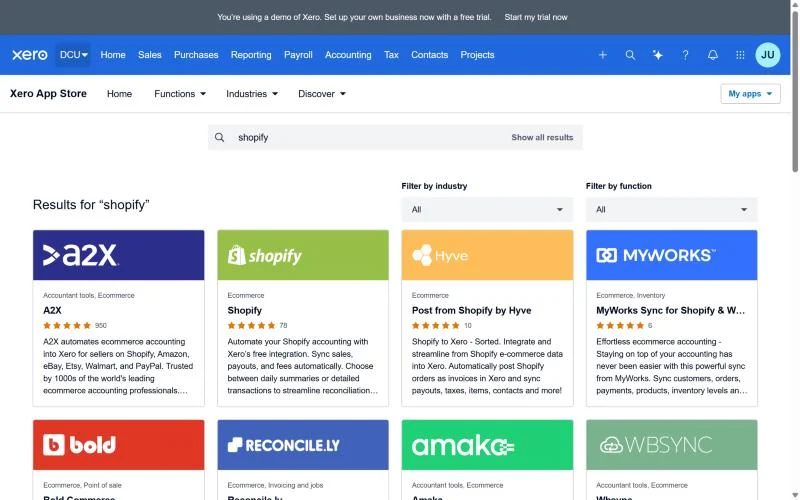
I’ve written a full Xero setup guide for ecommerce sellers, and compared it with other options in the best accounting software for ecommerce.
Apps, Support and Onboarding
Xero connects with over 1,000 apps, from payment tools to inventory and CRM. That marketplace is a big reason it works as the centre of a small business’s setup.
Support is online rather than by phone. New US customers get free, personalised onboarding from a product specialist for their first 90 days, which helps with connecting banks and setting up the dashboard.
Xero Pros and Cons
Pros
- Unlimited users on every plan, with no per-seat fees.
- Bank reconciliation is fast, clear and hard to get wrong.
- Free accountant access, and accountants know it well outside the US.
- Smart Document Capture and free ACH bill pay on every plan.
- Over 1,000 connected apps.
Cons
- Early’s 20-invoice and 5-bill caps push most people to Growing.
- Prices went up on 1 October 2026, and the discount only lasts 6 months.
- US payroll is a separate Gusto add-on.
- Multi-currency and projects need the $97 plan.
- Support is online, not by phone.
How Xero Compares
Down to Xero and one other? These head-to-heads go plan by plan:
| Comparison | The question it answers |
|---|---|
| Xero vs QuickBooks | Unlimited users against per-user plans. The most common decision. |
| Xero vs FreshBooks | Full accounting against invoicing-first software. |
| Xero vs Zoho Books | Two mid-priced options, and the one for a tight budget. |
| Xero vs Wave | Paid depth against a free plan. |
| Xero vs Sage | The two UK favourites. |
| Xero vs MYOB | The Australian decision. |
Decided Xero isn’t for you? Here are the best Xero alternatives. Coming from QuickBooks? See QuickBooks alternatives too.
Free tool · 4 quick steps
Not sure Xero is the one?
Answer four quick questions about your business and get a shortlist that fits your size, budget and the apps you use.
My Verdict
Xero is one of the best small-business accounting tools around, and the one I’d pick for most teams of two or more. The unlimited users and the reconciliation workflow are the reasons.
Choose Growing unless you’re sure you’ll stay under 20 invoices a month, and only move to Established for multi-currency or projects. If you work alone with very few transactions, a free tool will do for now. You can move to Xero when you grow.
Here’s what I’d do: sign up, connect one real bank account, and reconcile a month of transactions. If that feels easy, you’ve found your software.
Partner offer · checked 1 Nov 2026
Try Xero for $11.80 a month on Growing
80% off any plan for your first 6 months, for organisations new to Xero. Valid until 31 March 2027.
Frequently Asked Questions
Is Xero worth it for a small business?
Yes, if more than one person needs access or you want fast reconciliation. For a solo business with a handful of invoices, a cheaper or free tool may be enough.
How much does Xero cost in the US?
$27, $59 or $97 a month for Early, Growing and Established. Through a partner link, new customers get 80% off for the first 6 months: $5.40, $11.80 or $19.40 a month. Payroll is extra.
Is there a free version of Xero?
No, but you can try it free for a month instead of taking the discount.
Is Xero better than QuickBooks?
For teams that hate per-user fees, often yes. For US businesses whose accountant uses QuickBooks, or who want payroll from the same company, QuickBooks can be the better fit.
Does Xero do payroll in the US?
Yes, through Xero Payroll powered by Gusto. It costs $36 a month plus $6 per employee or contractor, on any plan.
Can my accountant access my Xero account?
Yes, at no extra cost. Invite them as a user, and many accountants already have a Xero partner login.
Can I cancel Xero any time?
Yes. Xero plans renew monthly until you cancel, so there’s no long contract.
Everything else I’ve written about Xero is in the Xero Resource Center.