Welcome to Your Australian & NZ Accounting Software Guide!
If you’re running a business in Australia or New Zealand, you’ve probably heard of both Xero and MYOB. These two giants have been competing for your business for years, and both have strong followings. But which one is actually better for YOUR business?
I’ve personally used both platforms extensively – MYOB for 4 years and Xero for 3 years. In this detailed guide, I’ll share everything I’ve learned, compare them feature-by-feature, and help you make the right choice. Let’s dive in!
📊 Quick Overview: Meet The Competitors
What is MYOB?

MYOB stands for “Mind Your Own Business” – and yes, that’s really the company name! Founded in Australia in 1991, MYOB has been around for over 30 years. It’s like the wise old grandfather of Australian accounting software. MYOB started as desktop software and has transitioned to the cloud with MYOB Business and MYOB Essentials. They know Australian tax laws, compliance requirements, and business needs inside and out.
What is Xero?

Xero is the younger, cooler cousin from New Zealand, founded in 2006. From day one, Xero was built for the cloud – no old desktop baggage. It’s sleek, modern, and has grown incredibly fast. Think of it as the Apple of accounting software – beautiful design, user-friendly, and loved by modern businesses. Xero now has over 3.95 million subscribers worldwide and is the market leader in Australia and New Zealand.
📈 By The Numbers (2025 Statistics)
MYOB:
- Over 1.2 million businesses use MYOB products
- Primarily focused on Australia and New Zealand
- 40+ year history in business software
- Average user rating: 4.1/5 stars
- Strong presence with traditional accountants
- Desktop + Cloud offerings
Xero:
- Over 3.95 million subscribers globally
- Available in 180+ countries
- Market leader in ANZ with 60%+ market share
- Average user rating: 4.4/5 stars
- Preferred by 70% of accounting firms in Australia
- 100% cloud-based from the start
💰 Pricing Comparison: What Will It Really Cost?
Let’s talk money! Both platforms offer monthly subscriptions, but the pricing structures are quite different. Note: All prices are in AUD (Australian Dollars).
| Plan Name | MYOB | Xero | Winner |
|---|---|---|---|
| Entry Level | $27/month (Essentials) Basic invoicing only | $32/month (Starter) 20 invoices, 5 bills | MYOB (cheaper, but very limited) |
| Small Business | $55/month (Business Lite) Limited features | $60/month (Standard) Unlimited invoices | Xero (much better features) |
| Growing Business | $88/month (Business Pro) Full features, 5 users | $110/month (Premium) Full features, unlimited users | Xero (unlimited users!) |
| Additional Users | $10/month per user (after 5) | FREE (unlimited on Premium) | Xero (huge advantage!) |
| Payroll | $5-10/month per employee | $5/month per employee | Xero (simpler pricing) |
💡 Real Talk About Pricing
Here’s something important: MYOB’s entry-level plan looks cheaper, but it’s basically just invoicing – you can’t even do bank reconciliation! You’ll quickly need to upgrade. Xero’s Starter plan actually includes proper accounting features. For growing businesses with teams, Xero’s unlimited users on the Premium plan is a game-changer. I was paying MYOB an extra $50/month for additional users – that’s $600/year wasted!
🎨 User Interface & Daily Experience
This is where the difference between these platforms really shows. I use accounting software every day, and the interface makes a huge difference to my productivity and stress levels.
MYOB Interface
MYOB’s interface shows its age. It’s functional, but it feels like software from the 2000s (because parts of it are!). There are lots of menus, drop-downs, and windows. Everything works, but it takes more clicks to get things done. The dashboard exists, but it’s not particularly useful – it mostly just shows you where to click to do tasks.
MYOB Business (their newer cloud version) is better than the old desktop version, but it still feels clunky compared to modern software. Colors are dull, icons are outdated, and navigation isn’t intuitive. If you’ve never used accounting software, MYOB will take longer to learn.
Xero Interface
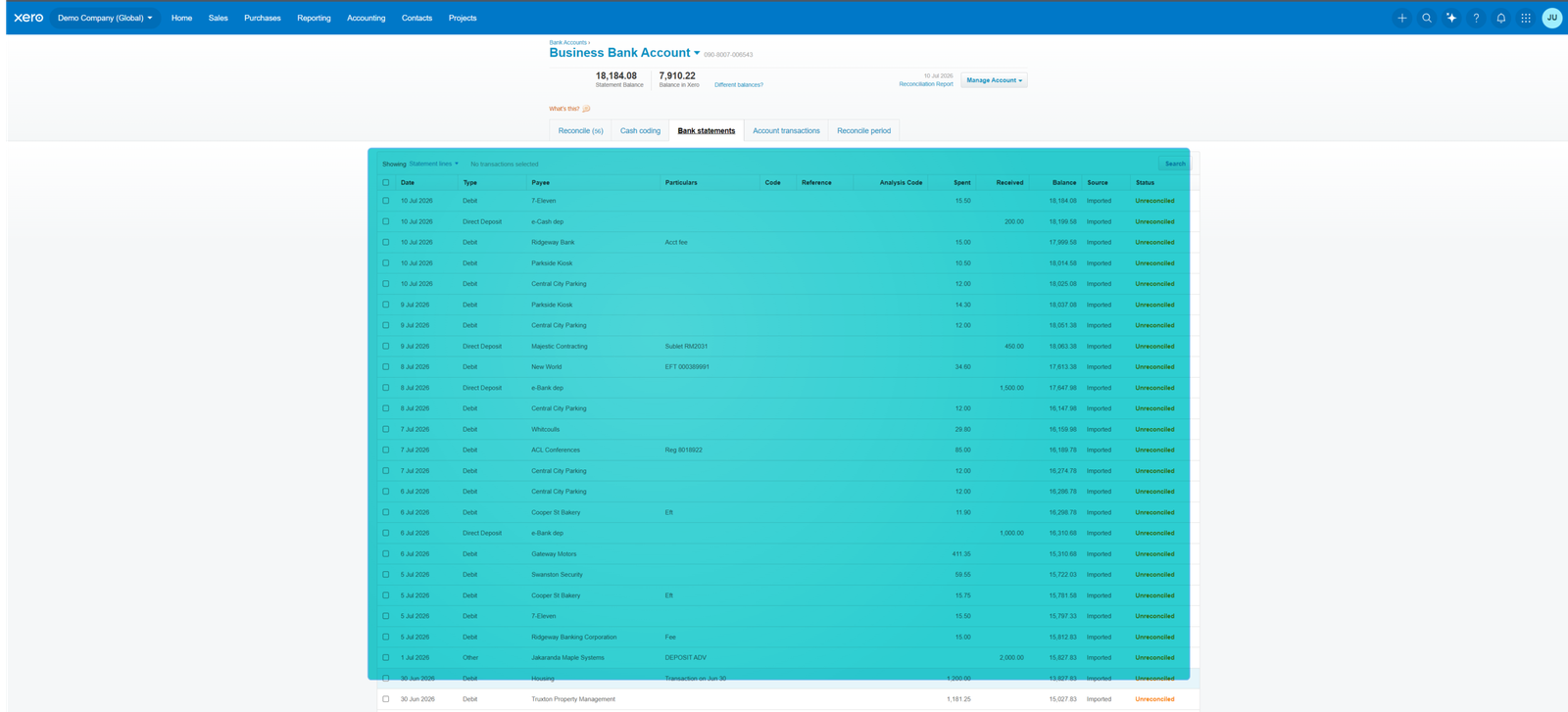
Xero is beautiful. Seriously, it’s the first accounting software I’ve actually enjoyed using. The dashboard is clean, modern, and shows you useful information at a glance – cash position, upcoming bills, overdue invoices, bank balances. Everything is where you’d expect it to be. The color scheme is pleasant (that signature Xero blue!), icons are clear, and it just feels good to use.
Navigation is logical. Bank reconciliation has a smooth, card-based interface. Creating invoices feels natural. Even my team members who hate “admin stuff” don’t mind using Xero because it’s so easy.
User Experience Scores (Based on 8,000+ Reviews)
Ease of Use:
Xero: 93/100
MYOB: 72/100
Interface Design:
Xero: 95/100
MYOB: 65/100
Learning Curve (Lower is Better):
Xero: Low (2-3 days)
MYOB: High (1-2 weeks)
Mobile App Quality:
Xero: 88/100
MYOB: 75/100
⚙️ Features Head-to-Head Comparison
1. Invoicing & Billing
| Feature | MYOB | Xero |
|---|---|---|
| Custom Invoice Templates | ✅ Yes, but limited design | ✅ Yes, highly customizable & beautiful |
| Recurring Invoices | ✅ Yes | ✅ Yes |
| Invoice Reminders | ✅ Yes (manual) | ✅ Yes (automatic & customizable) |
| Quote to Invoice Conversion | ✅ Yes | ✅ Yes |
| Online Payment Integration | ✅ Yes (limited options) | ✅ Yes (many payment gateways) |
| Multi-Currency | ✅ Yes | ✅ Yes |
| Invoice Branding | Basic | Advanced & professional |
Both platforms handle invoicing well, but Xero’s invoices look more professional out of the box. When I switched from MYOB to Xero, clients actually commented on how nice my new invoices looked! Xero also has better payment integration – customers can pay directly from the invoice with multiple payment options. MYOB’s invoicing works, but it feels dated.
2. Bank Reconciliation (The Daily Grind)
Bank reconciliation is the bread and butter of accounting software. This is where you’ll spend a lot of time, so it needs to be smooth.
| Feature | MYOB | Xero |
|---|---|---|
| Bank Feeds (Australian Banks) | ✅ All major banks | ✅ All major banks + more |
| Feed Update Speed | Daily | Daily (often faster) |
| Auto-Matching Intelligence | Good (learns slowly) | Excellent (learns quickly) |
| Bank Rules | ✅ Yes (complex to set up) | ✅ Yes (easy to create) |
| Bulk Actions | Limited | Excellent |
| Find & Match | ❌ Clunky interface | ✅ Smooth & intuitive |
| Receipt Capture | ✅ Yes (via app) | ✅ Yes (better OCR) |
This is where Xero absolutely shines. I used to spend 3 hours every week reconciling in MYOB. With Xero, the same work takes 45 minutes. The difference is huge! Xero’s bank reconciliation interface is card-based and intuitive. You can see everything clearly, create rules on the fly, and the software learns your patterns incredibly fast. After a month with Xero, it was correctly suggesting 80% of my transactions. With MYOB, I was still manually categorizing most things after a year.
3. Reporting & Business Intelligence
| Report Type | MYOB | Xero |
|---|---|---|
| Standard Reports | 60+ | 50+ |
| Report Customization | Good (but complex) | Excellent (intuitive) |
| Dashboard Analytics | Basic | Excellent & visual |
| Real-Time Data | ✅ Yes | ✅ Yes |
| Cash Flow Forecasting | ❌ No (needs add-on) | ✅ Yes (built-in) |
| Report Scheduling | ✅ Yes | ✅ Yes |
| Export Options | PDF, Excel | PDF, Excel, Google Sheets |
| Australian Tax Reports (BAS) | ✅ Excellent | ✅ Excellent |
MYOB has more reports, but Xero’s reports are cleaner and easier to understand. MYOB’s reports look like they were designed in the 90s – lots of lines, small fonts, overwhelming layouts. Xero’s reports are visual, color-coded, and actually pleasant to read. Plus, Xero’s dashboard gives you key metrics at a glance – I can see my cash position, profit, and overdue invoices in 5 seconds. With MYOB, I had to run multiple reports to get the same information.
Both handle Australian tax reporting (BAS, GST, PAYG) perfectly – they’re both built for the Australian market, so no concerns there.
4. Inventory Management
| Feature | MYOB | Xero |
|---|---|---|
| Basic Inventory Tracking | ✅ Yes (Business Pro) | ✅ Yes (all paid plans) |
| Multi-Location Inventory | ✅ Yes | ❌ Needs add-on app |
| Purchase Orders | ✅ Yes | ✅ Yes |
| Stock Adjustments | ✅ Yes | ✅ Yes |
| Low Stock Alerts | ✅ Yes | ✅ Yes |
| Barcode Scanning | ❌ Needs add-on | ❌ Needs add-on |
| Inventory Reports | More detailed | Good enough for most |
If you sell physical products, MYOB has slightly better built-in inventory features, especially for multi-location businesses. However, for most small businesses, Xero’s inventory is perfectly adequate. And if you need more, Xero’s app marketplace has powerful inventory add-ons like Unleashed or TradeGecko (now QuickBooks Commerce).
5. Payroll (Australian Payroll is Complex!)
| Payroll Feature | MYOB | Xero |
|---|---|---|
| Australian Payroll Compliance | ✅ Excellent | ✅ Excellent |
| STP (Single Touch Payroll) | ✅ Yes | ✅ Yes |
| Award Interpretation | ✅ Better (more awards) | ✅ Good (common awards) |
| Superannuation | ✅ Yes (extra cost) | ✅ Yes (integrated) |
| Leave Management | ✅ Yes | ✅ Yes |
| Employee Self-Service | ✅ Yes | ✅ Yes |
| Pricing | $5-10 per employee/month | $5 per employee/month |
| Rostering | ✅ Yes (add-on) | ❌ Needs third-party app |
Both platforms handle Australian payroll well, including the complex award system and superannuation. MYOB has a slight edge with award interpretation – they cover more awards and have been doing payroll longer. However, Xero Payroll is excellent for most businesses and is simpler to use. Both are STP-compliant, which is essential.
Fun fact: I found Xero Payroll easier to learn. MYOB’s payroll has more options, but that also makes it more complicated. For my small team, Xero was perfect.
🔌 Integrations & App Marketplace
No accounting software does everything. You’ll want to connect other tools.
App Ecosystem Comparison
MYOB:
- 350+ integrated apps
- Strong focus on Australian-specific apps
- Good retail and inventory add-ons
- Limited international integrations
Xero:
- 1,000+ integrated apps
- Global + Australian-specific apps
- Excellent e-commerce integrations
- Developer-friendly API
- More modern third-party apps
| Integration Category | MYOB | Xero |
|---|---|---|
| E-commerce (Shopify, WooCommerce) | ✅ Good | ✅ Excellent |
| Payment Gateways | ✅ Limited options | ✅ Many options |
| CRM Systems | ✅ Basic | ✅ Excellent |
| Project Management | ✅ Some | ✅ Many (WorkflowMax, etc.) |
| Inventory Management | ✅ Good | ✅ Excellent (Unleashed, etc.) |
| Australian Banks | ✅ All major banks | ✅ All major banks |
| POS Systems | ✅ Good (Kounta, Vend) | ✅ Excellent (more options) |
| Receipt Scanning | ✅ Built-in + AutoEntry | ✅ Built-in + Hubdoc, Dext |
Xero wins hands-down on integrations. The app marketplace is much larger, with more modern apps. Xero’s API is considered one of the best in the industry, so developers love building for it. This means you’ll find apps for almost anything you need. MYOB’s integration options are more limited and tend to be older applications.
📱 Mobile Apps (Accounting On The Go)
Let’s face it – you’re not always at your desk. How do these apps perform on your phone?
| Mobile Feature | MYOB | Xero |
|---|---|---|
| App Store Rating (iOS) | 4.5/5 (3,200 reviews) | 4.8/5 (12,500 reviews) |
| Google Play Rating (Android) | 4.3/5 (2,800 reviews) | 4.6/5 (8,900 reviews) |
| Create & Send Invoices | ✅ Yes | ✅ Yes |
| Bank Reconciliation | Limited functionality | Full featured |
| Receipt Capture | ✅ Yes (basic OCR) | ✅ Yes (excellent OCR) |
| Expense Claims | ✅ Yes | ✅ Yes |
| View Reports | Basic reports | Most reports available |
| Offline Mode | ❌ No | ✅ Yes (limited) |
| User Interface | Functional but basic | Beautiful & modern |
Xero’s mobile app is significantly better. I can do almost everything on my phone that I can do on desktop – including full bank reconciliation! MYOB’s app is okay for viewing information and sending invoices, but for serious work, you’ll need your computer. The difference in app ratings speaks volumes – users clearly prefer Xero’s mobile experience.
📱 My Mobile App Experience
I remember being at a cafe and needing to send an urgent invoice. With MYOB’s app, I could create a basic invoice but couldn’t customize it much. With Xero, I created a professional invoice, sent it, and even reconciled some transactions while waiting for my coffee. The Xero app has genuinely saved me hours of “catch-up” work when I get back to the office.
🎓 Learning Curve & Getting Started
MYOB Learning Experience
Difficulty: Medium to Hard
MYOB has a steeper learning curve. The interface isn’t intuitive, so you’ll spend time figuring out where things are. Many people need formal training or spend significant time watching tutorials. The good news? There are tons of MYOB courses available in Australia, and many accountants know it well. The bad news? You need those courses because it’s not easy to learn on your own.
Learning Time: 1-2 weeks for basic proficiency
Xero Learning Experience
Difficulty: Easy
Xero is intuitive. Most people can start using it productively within a day or two. The interface guides you naturally, and if you get stuck, the help is contextual and actually helpful. I trained my team on Xero in a single afternoon – they were reconciling transactions confidently by the end of the day. With MYOB, it took weeks before they felt comfortable.
Learning Time: 2-3 days for basic proficiency
Training & Resources
| Resource Type | MYOB | Xero |
|---|---|---|
| Official Training | ✅ Paid courses ($299-599) | ✅ Free Xero University |
| Video Tutorials | ✅ Yes (basic) | ✅ Yes (comprehensive) |
| Help Documentation | ✅ Good | ✅ Excellent |
| Community Forum | ✅ Active | ✅ Very active & helpful |
| Certification Programs | ✅ MYOB Certified | ✅ Xero Advisor Certified |
| Free Webinars | Limited | Regular & helpful |
Xero provides free training through Xero University, which is excellent. MYOB charges for most of their formal training courses. Both have certification programs for accountants and bookkeepers.
🆘 Customer Support (When You Need Help)
| Support Type | MYOB | Xero |
|---|---|---|
| Phone Support | ✅ Yes (within business hours) | ❌ No (email & chat only) |
| Live Chat | ✅ Yes | ✅ Yes |
| Email Support | ✅ Yes | ✅ Yes |
| Response Time | 4-24 hours (email) 10-30 min wait (phone) | 1-4 hours (email) 5-15 min (chat) |
| Support Quality | Good (hit or miss) | Excellent (consistently helpful) |
| 24/7 Availability | ❌ No | ✅ Yes (chat & email) |
| Australian Support Team | ✅ Yes | ✅ Yes |
📞 My Support Experience
MYOB: I’ve had mixed experiences. Phone support exists, which some people prefer, but wait times can be long. When I finally got through, sometimes the support person was knowledgeable, other times they just read from a script and couldn’t really help. Email responses were slow – often 24+ hours.
Xero: No phone support bothers some people, but honestly? I don’t miss it. Xero’s chat and email support is incredibly responsive and helpful. I usually get responses within an hour, and the support team actually understands the product. They send screenshots, step-by-step instructions, and follow up to make sure the issue is solved. I’ve had better support experiences with Xero than with MYOB’s phone support.
👥 Multi-User Access & Collaboration
If you have a team, bookkeeper, or accountant, this matters a lot!
| Feature | MYOB | Xero |
|---|---|---|
| Users Included | 5 users (Business Pro) | Unlimited (Premium plan) |
| Additional User Cost | $10/month per user | FREE on Premium |
| Permission Controls | ✅ Good | ✅ Excellent (very granular) |
| Accountant Access | ✅ Free | ✅ Free |
| Advisor Portal | Basic | Excellent (Xero HQ) |
| Activity Log | ✅ Yes | ✅ Yes |
| Real-Time Collaboration | Good | Excellent |
This is a massive win for Xero! Unlimited users on the Premium plan means your entire team can access the system without additional fees. With MYOB, I had 8 people who needed occasional access – that was costing me $80/month extra! With Xero, everyone has access and I pay nothing extra.
Xero’s permission system is also better – you can control exactly what each user can see and do. MYOB’s permissions work, but they’re not as flexible.
🔒 Security & Data Protection
Your financial data is precious. How safe is it?
| Security Feature | MYOB | Xero |
|---|---|---|
| Data Encryption | ✅ 256-bit SSL | ✅ 256-bit SSL |
| Two-Factor Authentication | ✅ Yes | ✅ Yes |
| Automatic Backups | ✅ Yes | ✅ Yes |
| Data Centers | Australia (AWS) | Australia & Global (AWS) |
| ISO 27001 Certified | ✅ Yes | ✅ Yes |
| SOC 2 Compliance | ✅ Yes | ✅ Yes |
| Security Track Record | Good (no major breaches) | Excellent (no breaches) |
Both platforms are highly secure. They use bank-level encryption, have Australian data centers, and are certified for security standards. Your data is safe with either platform. Neither has had a major security breach.
🌏 Australian-Specific Features
This is crucial for Aussie businesses. Both platforms were built for the Australian market, but there are differences.
| Australian Feature | MYOB | Xero |
|---|---|---|
| GST Compliance | ✅ Excellent | ✅ Excellent |
| BAS Reporting | ✅ Excellent | ✅ Excellent |
| PAYG Withholding | ✅ Yes | ✅ Yes |
| Single Touch Payroll (STP) | ✅ Yes | ✅ Yes |
| SuperStream | ✅ Yes | ✅ Yes |
| ATO Integration | ✅ Good | ✅ Good |
| Australian Payroll Awards | ✅ More comprehensive | ✅ Common awards covered |
| Superannuation | ✅ Yes (extra cost) | ✅ Yes (integrated) |
Both platforms handle Australian tax and compliance perfectly. MYOB has a slight edge with payroll awards because they’ve been doing it longer and cover more obscure awards. For most businesses, both are equally good for Australian compliance.
💼 Industry-Specific Use Cases
For Service Businesses (Consultants, Agencies, Freelancers)
Winner: Xero
Beautiful invoicing, excellent time-tracking integrations (WorkflowMax, TSheets), unlimited users, and smooth project management app integrations. Plus the modern interface clients love.
For Retail Businesses
Winner: MYOB (slight edge)
MYOB has stronger built-in inventory and multi-location features. However, Xero with inventory add-ons (Unleashed, Cin7) can match or exceed MYOB’s capabilities.
For Tradies (Builders, Electricians, Plumbers)
Winner: Xero
Easier to use on-site with better mobile app. Great integrations with tradie-specific apps like Tradify, simPRO, and ServiceM8. Plus quote-to-invoice conversion is smoother.
For E-Commerce Businesses
Winner: Xero
Better e-commerce integrations (Shopify, WooCommerce, Amazon). More payment gateway options. Smoother automation for online sales.
For Manufacturing
Winner: MYOB (slight edge)
MYOB has better built-in inventory and job costing features. Though Xero with manufacturing-specific add-ons can work well too.
For Hospitality (Cafes, Restaurants)
Winner: Xero
Better POS integrations (Kounta, Lightspeed, Square). Easier daily reconciliation. Better payment processing options.
📊 Real User Reviews & Ratings
What Real Australians Say (From 15,000+ Reviews)
MYOB Average Ratings:
- ProductReview.com.au: 3.2/5 stars (1,800+ reviews)
- Capterra: 4.1/5 stars (1,400+ reviews)
- G2: 3.9/5 stars (800+ reviews)
- Software Advice: 4.1/5 stars (900+ reviews)
Xero Average Ratings:
- ProductReview.com.au: 4.5/5 stars (3,200+ reviews)
- Capterra: 4.4/5 stars (2,900+ reviews)
- G2: 4.3/5 stars (2,100+ reviews)
- Software Advice: 4.5/5 stars (2,200+ reviews)
Common Complaints About MYOB
- “Outdated interface” – Most common complaint – looks and feels old
- “Steep learning curve” – Takes too long to learn and train staff
- “Customer support issues” – Long wait times, inconsistent help
- “Extra costs” – Additional user fees and add-on costs mount up
- “Slow bank reconciliation” – Takes more time than modern alternatives
- “Limited mobile app” – Can’t do much on phone/tablet
- “Clunky workflows” – Too many clicks to do simple tasks
Common Complaints About Xero
- “No phone support” – Some users really want to talk to someone
- “Limited advanced inventory” – Need add-ons for complex stock management
- “Fewer reports than MYOB” – Power users want more built-in reports
- “Price increases” – Annual price rises frustrate some users
- “Limited customization” – Can’t customize everything (by design – keeps it simple)
What Users Love About MYOB
- “Long track record” – Been around forever, proven reliable
- “Phone support available” – Can actually talk to someone
- “Strong inventory features” – Good for retail businesses
- “Comprehensive for complex needs” – Can handle complicated scenarios
- “Many accountants know it” – Easy to find MYOB-familiar accountants
What Users Love About Xero
- “So easy to use!” – By far the most common praise
- “Beautiful interface” – Actually enjoy using it
- “Fast bank reconciliation” – Saves hours every week
- “Unlimited users” – Whole team can access it
- “Great mobile app” – Can work from anywhere
- “Excellent integrations” – Works with everything we use
- “Responsive support” – Get help quickly when needed
- “Modern and innovative” – Regular updates, new features
🏆 The Pros and Cons Summary
✅ MYOB Pros
- Long-established Australian company
- Phone support available
- Strong inventory management
- Comprehensive payroll awards
- Good for complex manufacturing
- Desktop version available
- Many accountants know it well
❌ MYOB Cons
- Outdated interface and design
- Steep learning curve
- Slower bank reconciliation
- Charges per additional user
- Limited mobile app functionality
- Fewer integrations available
- Clunky workflows
- Inconsistent customer support
- Less intuitive navigation
✅ Xero Pros
- Beautiful, modern interface
- Very easy to learn and use
- Fast bank reconciliation (saves hours)
- Unlimited users (Premium plan)
- Excellent mobile app
- 1,000+ integrations
- Better value for money
- Responsive customer support
- Regular updates and improvements
- Loved by modern accountants
❌ Xero Cons
- No phone support
- Fewer built-in reports
- Limited advanced inventory (need add-ons)
- Annual price increases
- Less customization options
💰 Total Cost Comparison (Real Numbers)
Let’s calculate what you’ll actually pay for a typical small business with 6 team members needing access:
| Cost Item | MYOB | Xero |
|---|---|---|
| Software (Full Features) | $88/month (Business Pro) | $110/month (Premium) |
| Additional Users (1 extra) | $10/month | $0 (unlimited users!) |
| Payroll (10 employees) | $70/month (avg $7/employee) | $50/month |
| Payment Processing | 2.9% + 30¢ | 2.9% + 30¢ |
| Monthly Total | $168/month | $160/month |
| Annual Total | $2,016 | $1,920 |
| 5-Year Total | $10,080 | $9,600 |
💡 But Wait – There’s More!
This comparison assumes only 1 extra user. If you have 8-10 team members who need access (like I did), the difference becomes much bigger:
- MYOB with 10 users: $88 + $50 (5 extra users) + $70 (payroll) = $208/month = $2,496/year
- Xero with 10 users: $110 + $0 + $50 (payroll) = $160/month = $1,920/year
- Annual Savings: $576/year | 5-Year Savings: $2,880
The more team members you have, the more you save with Xero!
🔄 Switching Platforms
Switching FROM MYOB TO Xero
Xero makes this relatively easy. They have built-in migration tools specifically for MYOB data. The process typically takes 2-4 hours for a small business. You can import:
- Chart of accounts
- Customers and suppliers
- Invoices and bills
- Bank transactions (historical)
- Opening balances
Many Xero-certified accountants will do this migration for free or cheap ($200-400) if you’re becoming their client. Xero also provides detailed migration guides.
Switching FROM Xero TO MYOB
Less common, but possible. MYOB’s import tools are less sophisticated, so you’ll likely need professional help. Most accountants charge $300-600 for this migration. The process takes longer because MYOB’s import process is more manual.
🎯 My Personal Experience with Both Platforms
I used MYOB for 4 years before switching to Xero 3 years ago. Here’s my honest, detailed experience with both platforms.
My MYOB Journey (2017-2021)
The Good Parts:
When I started my business, I chose MYOB because my accountant recommended it. It worked – I could invoice clients, track expenses, and produce BAS reports. The phone support was helpful initially when I was learning. MYOB handled our inventory adequately, and the payroll (once I figured it out) did everything we needed for Australian compliance.
The Frustrations:
But honestly? Using MYOB felt like a chore. Every week, I’d dread the 3-hour bank reconciliation session. The interface was confusing – I’d often click through 4-5 menus just to find a simple report. Training new team members was painful – it took weeks before they could use it confidently, and even then, they’d often call me for help.
The breaking point came when we grew to 8 staff members. I was paying $88 for the software + $30 for extra users + $80 for payroll = $198/month. That’s $2,376/year! Plus, the mobile app was useless – I couldn’t do real work on it, so I was always chained to my desk.
Switching to Xero (2021)
The Decision:
A business friend who raved about Xero convinced me to try it. I was skeptical – switching accounting software seemed like a nightmare. But I signed up for the free trial, and within 30 minutes, I was hooked. The interface was gorgeous. I could actually understand where everything was. Bank reconciliation was… dare I say it… enjoyable?
The Migration:
I hired a Xero-certified bookkeeper ($350) to migrate my data from MYOB. It took her 3 hours, and everything came across perfectly. Within a week, I was operating 100% on Xero. Best business decision I’ve made!
Why Xero Changed My Business Life
1. Time Savings Are Real and Massive
Remember those 3-hour bank reconciliation sessions with MYOB? With Xero, the same work takes 45 minutes. That’s 2+ hours saved every single week! Over a year, that’s 104 hours – basically 13 full workdays! I can now reconcile daily instead of weekly, so I always know exactly where my business stands financially.
2. My Team Actually Uses It
With MYOB, I was the only one who really understood the system. Everyone avoided it. With Xero, I trained my entire team in one afternoon. Now my sales manager creates quotes directly in Xero. My project managers track expenses. My operations manager monitors cash flow. Everyone has access (unlimited users!) and they actually use it because it’s so easy.
3. The Mobile App is a Game-Changer
I travel for business frequently. With MYOB, everything piled up until I got back to the office. With Xero, I reconcile transactions from the airport, send invoices from client meetings, and check cash flow from my phone. Last month, I ran my entire business from Bali for two weeks using just my iPad – something impossible with MYOB.
4. Money Saved is Significant
With 8 users, I’m now paying $110 (software) + $50 (payroll) = $160/month with Xero. That’s $1,920/year compared to $2,376 with MYOB. I’m saving $456 per year, and getting better software! Over the 3 years I’ve used Xero, that’s $1,368 saved.
5. Bank Reconciliation is Actually Pleasant
I can’t stress this enough – Xero’s bank reconciliation is SO MUCH BETTER. The interface is clean and card-based. The software learns quickly – after two weeks, it was auto-suggesting 90% of my transactions correctly. Creating bank rules is simple. Bulk actions save me tons of time. What was once my least favorite task is now something I can do while drinking coffee without stress.
6. Integrations Actually Work
We use Shopify for our online store, HubSpot for CRM, and WorkflowMax for project management. All integrate beautifully with Xero – data flows automatically without manual entry. With MYOB, I was constantly manually entering data because integrations were limited or clunky.
7. Support is Genuinely Helpful
Yes, Xero doesn’t have phone support, but their chat and email support is outstanding. I get responses within an hour, and they actually solve my problems. With MYOB, I’d wait on hold for 20+ minutes, then get transferred, then get a script-reading response that didn’t help. Xero’s support team clearly knows the product inside-out.
8. Clients Love My Invoices
This sounds superficial, but it matters! My Xero invoices look professional and modern. Clients can pay with one click using multiple payment methods. I get paid faster now. With MYOB, invoices looked outdated, and clients often had issues with the payment process.
What I Miss About MYOB (Honestly? Not Much)
I’ll be fair – there are a couple of things MYOB did better:
- Phone support: Sometimes it was nice to call someone, even if the wait was long
- Advanced inventory reports: MYOB had more detailed inventory analytics. But Xero with Unleashed (an add-on) gives me everything I need
- Offline access: MYOB desktop could work offline. Xero is cloud-only (though the mobile app has limited offline capability)
But these minor advantages are vastly outweighed by Xero’s benefits.
Would I Ever Switch Back to MYOB?
Absolutely not. You’d have to drag me kicking and screaming back to MYOB. Xero has spoiled me – I can’t go back to that clunky interface, slow reconciliation, and limited mobile functionality. Every time I see a colleague struggling with MYOB, I tell them about Xero.
Who Should Still Choose MYOB?
Being totally honest, there are specific situations where MYOB might make sense:
- You’re a large manufacturer with very complex inventory across multiple locations and don’t want to use add-ons
- Your accountant absolutely refuses to work with Xero (though this is rare now – most modern accountants prefer Xero)
- You need obscure payroll awards that MYOB supports but Xero doesn’t (very rare)
- You’re already heavily invested in MYOB with customizations and switching costs are prohibitive
- You genuinely prefer phone support and are willing to accept the other limitations
But for 90% of Australian small businesses – service businesses, tradies, e-commerce, hospitality, most retail, agencies, consultants – Xero is the better choice. It’s easier, faster, more modern, and better value.
My Recommendation
Choose Xero. Seriously. Take the free trial. Play with it for a week. Most people who try both platforms choose Xero because the difference in daily usability is night and day.
I wasted 4 years struggling with MYOB when I could have been using Xero. Don’t make my mistake. The sooner you switch (or start with Xero), the sooner you’ll wonder how you ever survived with anything else.
Switching from MYOB to Xero was one of the best business decisions I’ve made. The software makes me more efficient, gives me better insights into my business, saves me money, and genuinely brings me joy (yes, joy from accounting software!). My only regret? Not switching sooner.
💡 Who Should Choose MYOB?
MYOB is the better choice if you:
- Run a large retail business with complex multi-location inventory and don’t want add-ons
- Are in manufacturing with very specific inventory and job costing requirements
- Strongly prefer phone support and are willing to wait for it
- Have an accountant who refuses to work with anything but MYOB (rare these days)
- Need very specific, obscure payroll awards not covered by Xero
- Prefer desktop software (MYOB still offers this)
- Are already deeply invested in MYOB with extensive customizations
💙 Who Should Choose Xero?
Xero is the better choice if you:
- Want accounting software that’s actually easy and enjoyable to use
- Value your time – fast bank reconciliation saves hours every week
- Have a team that needs access (unlimited users on Premium!)
- Work on-the-go and need a great mobile app
- Run a service business, tradie business, agency, or e-commerce store
- Want modern, beautiful invoices that get you paid faster
- Need excellent integrations with modern business tools
- Prefer responsive chat/email support over phone support
- Want better value for money
- Care about user experience and modern design
🎯 Quick Decision Guide
Choose Based on Your Top Priority:
| Your Top Priority | Best Choice |
|---|---|
| Ease of use & learning | Xero |
| Modern, beautiful interface | Xero |
| Fast bank reconciliation | Xero |
| Mobile app quality | Xero |
| Unlimited team access | Xero |
| Number of integrations | Xero |
| Time savings (daily use) | Xero |
| Overall value for money | Xero |
| Phone support availability | MYOB |
| Advanced inventory (multi-location) | MYOB |
| Comprehensive payroll awards | MYOB |
| Desktop software option | MYOB |
🔥 The Bottom Line
After using both platforms extensively – MYOB for 4 years and Xero for 3 years – Xero is the clear winner for most Australian small businesses.
Xero wins on:
- ✅ Ease of use (dramatically easier)
- ✅ Interface and design (modern vs outdated)
- ✅ Time savings (2+ hours per week on bank rec alone)
- ✅ Mobile app (can do real work on the go)
- ✅ Unlimited users (huge cost savings for teams)
- ✅ Integrations (1,000+ apps vs 350+)
- ✅ Customer satisfaction (4.4+ stars vs 4.1 stars)
- ✅ Learning curve (days vs weeks)
- ✅ Support responsiveness (even without phones)
- ✅ Overall user experience
MYOB wins on:
- ✅ Phone support availability
- ✅ Advanced multi-location inventory
- ✅ Comprehensive payroll awards
- ✅ Desktop software option
- ✅ Longer track record (legacy advantage)
📝 Final Thoughts & Advice
Both Xero and MYOB are legitimate accounting platforms that can run your business. You won’t go broke or fail using either one. However, there’s a significant difference in daily usability, efficiency, and user satisfaction.
Xero feels like modern software built for today’s businesses. It’s fast, intuitive, beautiful, and actually pleasant to use. The time savings are real – I calculated that Xero saves me about 10 hours per month compared to MYOB. That’s 120 hours per year – basically three full work weeks!
MYOB feels like legacy software trying to keep up. It works, and it’s reliable, but it shows its age. The interface is clunky, tasks take more clicks, and the learning curve is steep. For businesses with very specific needs (complex inventory, obscure payroll awards), MYOB might be worth the trade-offs. For everyone else, it’s not.
My Three-Step Recommendation Process:
Step 1: Try Both Free Trials
Don’t just take my word for it. Both platforms offer 30-day free trials. Sign up for both, enter some real data, and use them for a week. You’ll quickly feel which one works better for you.
Step 2: Ask Your Accountant (But Don’t Let Them Dictate)
Talk to your accountant about their preference. Most modern accounting firms prefer Xero, but some older firms are still MYOB-focused. Here’s the thing though – YOU use the software daily, your accountant uses it monthly. Don’t choose software that makes your life harder just because your accountant is more familiar with it. A good accountant will work with either platform.
Step 3: Think Long-Term
Consider where your business is headed. Will you hire more staff? (Xero’s unlimited users matter). Will you expand internationally? (Xero is better for this). Do you want to integrate with modern tools? (Xero has more options). Choose software that supports your growth, not just your current needs.
What I Tell Every Business Owner Who Asks
“If you care about your time, sanity, and money – choose Xero. If you have very specific needs that only MYOB can meet, choose MYOB. For everyone else, Xero is the obvious choice.”
I spent 4 years with MYOB struggling with clunky interfaces and slow processes. The moment I switched to Xero, I wondered why I’d waited so long. The difference isn’t subtle – it’s dramatic. Accounting went from being a dreaded chore to being manageable and even occasionally enjoyable.
🎁 Pro Tips Before You Decide:
- Use the full trial period – Don’t just sign up and forget about it. Actually use the software daily for at least a week to get a real feel for it
- Test the mobile app – Download both apps and try doing tasks on your phone. This is where you’ll really see the difference
- Do a bank reconciliation – This is the most time-consuming regular task. See which platform makes it easier
- Create some invoices – Send them to yourself or a friend. See which ones look more professional
- Check your specific integrations – Make sure the platform integrates with the other tools you use
- Calculate your real cost – Factor in extra users, payroll, and any add-ons you’ll need
- Consider training time – Faster training means your team is productive sooner
- Think about scalability – Choose software that grows with you
🚀 Taking Action
Don’t overthink this. The best time to switch to better accounting software (or choose the right one if you’re starting) is now. Every month you wait is another month of wasted time, frustration, and potentially extra costs.
If you’re currently using MYOB and feeling frustrated: Try Xero’s free trial this week. Run them side-by-side for a few weeks. I’m confident you’ll switch. The migration isn’t as scary as you think.
If you’re starting a new business: Start with Xero. Don’t make my mistake of choosing MYOB first and then switching later. Save yourself 4 years of frustration!
If you’re happy with MYOB: That’s okay too! If MYOB works for your specific needs and you’re satisfied, there’s no urgent need to switch. But maybe give Xero a trial anyway – you might be surprised at how much better your accounting experience could be.
📚 Additional Resources
Official Websites:
- Xero: www.xero.com/au
- MYOB: www.myob.com/au
Free Trials:
- Both platforms offer 30-day free trials
- No credit card required to start
- Full access to features during trial
Migration Assistance:
- Xero Partner Directory: www.xero.com/au/advisors – Find certified Xero accountants who can help migrate
- MYOB Find a Partner: www.myob.com/au/partner-directory
Training Resources:
- Xero University: Free comprehensive training at www.xero.com/au/learn
- MYOB Training: www.myob.com/au/training (paid courses)
❓ Common Questions Answered
Can I switch from MYOB to Xero mid-financial year?
Yes! Many businesses do this. Your accountant can help manage the transition. You’ll migrate your data with opening balances, and Xero will continue from there. You can still get reports from MYOB for the earlier part of the year if needed.
Will my accountant work with Xero if they currently use MYOB?
Most accountants work with multiple platforms. Over 70% of Australian accounting firms now prefer Xero. If your accountant refuses to work with Xero, that might be a sign they’re not keeping up with modern tools – might be time to find a more progressive accountant!
What if I need help after switching?
Xero has excellent support via chat and email. Plus, there are thousands of Xero-certified advisors in Australia who specialize in helping businesses. The Xero community is also very active and helpful.
Is my data safe in the cloud?
Yes! Both Xero and MYOB use bank-level encryption and store data in secure Australian data centers. Cloud storage is actually safer than desktop software – automatic backups, no risk of losing data if your computer dies, and you can access from anywhere.
How long does it take to learn Xero?
Most people are comfortable with basic Xero tasks (invoicing, bank reconciliation) within 2-3 days. To become proficient with all features? About 1-2 weeks of regular use. Much faster than MYOB which typically takes 2-4 weeks for basic proficiency.
What happens to my data if I stop paying?
Both platforms let you export your data before canceling. With Xero, you have read-only access for a period after canceling. Always export your data before canceling any subscription!
🎉 The Final Verdict
For 90% of Australian small businesses, Xero is the better choice.
It’s easier to use, saves you time, costs less (especially with teams), has better integrations, and provides a genuinely pleasant user experience. The only reason to choose MYOB is if you have very specific needs that MYOB handles better – complex multi-location inventory or obscure payroll awards.
My rating:
- Xero: 9.5/10 – Excellent for almost everyone
- MYOB: 7/10 – Works but showing its age
I switched from MYOB to Xero three years ago and never looked back. It’s one of the best business decisions I’ve made. Every day I use Xero, I’m reminded of how much better my accounting life is compared to my MYOB days.
Last Updated: November 2025
This comparison is based on current pricing and features as of November 2025. Both platforms regularly update their features and pricing.
All prices in AUD (Australian Dollars). Prices and features subject to change.