
Xero vs Wave 2026: Which Accounting Software Is Better?
11
minute read
22
sections
October 16, 2026
last updated
Janak Uparkoti
reviewed by

So, Xero vs Wave isn’t really about finding one universal winner. It’s about working out where your business is today. Wave can be a sensible low-cost starting point, while Xero gives you more room to build a deeper accounting workflow as your needs grow.
The biggest mistake is looking only at the monthly subscription. A free accounting platform can still cost you time, payment fees, or extra software. A paid platform can be better value if it replaces several separate tools.
How this was tested: These screenshots are from my own Xero trial account. Screenshots below are from those accounts, captured in August 2026.
Xero vs Wave at a Glance
| Area | Wave | Xero |
|---|---|---|
| Best fit | Freelancers and very small businesses with straightforward needs | Growing small businesses that need broader accounting workflows |
| Core subscription | Starter: $0/month; Pro: $19 USD/month when billed monthly | US plans start at $27/month after the current introductory period |
| Online payments | Available with transaction fees | Available, with payment fees depending on the payment service |
| Bank feeds | Available through Pro | Bank reconciliation is built into the plans |
| Invoices | Unlimited estimates and invoices on Starter | Invoices and quotes, with limits on Early |
| Inventory | No built-in inventory system comparable to Xero’s accounting inventory | Basic tracked items are available; Inventory Plus or an integration is needed for broader multi-location/channel inventory |
| Integrations | Smaller ecosystem | Large accounting app ecosystem |
| Geographic fit | Best suited to the US and Canada | Available across many markets, with country-specific plans and features |
My quick take: choose Wave when keeping the software bill close to zero is the priority and your bookkeeping is simple. Choose Xero when reconciliation, collaboration, ecommerce, reporting, integrations, or future growth matter more than a free subscription.
Wave Is More Than a Free Trial
Wave’s biggest advantage is simple: its Starter plan costs $0. According to Wave’s current pricing page, Starter includes unlimited estimates, invoices, bills and bookkeeping records, plus the option to accept online payments. See Wave’s current pricing.
That makes Wave interesting for a freelancer or micro-business that needs basic invoicing and bookkeeping but isn’t ready to pay for accounting software every month.
The important detail is that free doesn’t mean every Wave service is free. Online payments carry transaction fees, and Wave’s Pro plan adds features such as automatic bank transaction imports, automatic merging and categorization, receipt capture, and automated payment reminders.
What Xero Costs in the US
Xero’s US pricing is much more structured around business growth. The regular monthly prices are $27 for Early, $59 for Growing and $97 for Established, although Xero is currently advertising an introductory discount for eligible new US customers. See Xero’s US pricing.
There’s an important catch with the cheapest Early plan. Xero currently limits it to 20 invoices and 5 bills. Growing removes those invoice and bill limits and adds more automation, while Established adds features such as multiple currencies, project tracking, and deeper analytics.
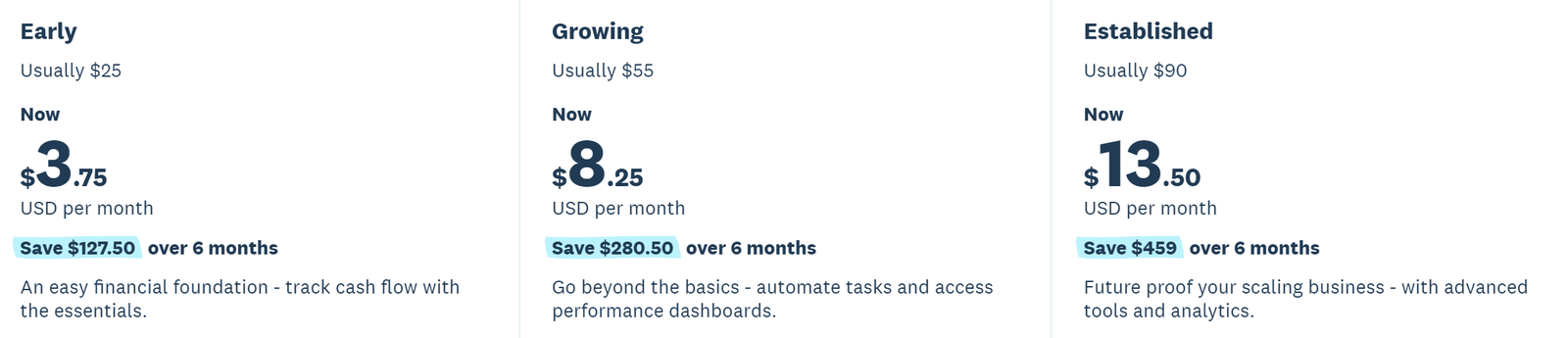
Xero US pricing screenshot from the EcomBuilderInsider Media Library. Pricing and promotions can change, so check the official pricing page before you buy.
The Real Pricing Question: What Are You Paying For?
If you compare $0 against $27, Wave wins the first round. But the subscription price is only part of the sum.
Say your business sends invoices, and customers usually pay by check or bank transfer. Wave’s free Starter plan can be genuinely cheap, because you aren’t paying a monthly subscription for the core software.
Now change the situation. You process a lot of card payments, need better bank automation, run an ecommerce store, or need several systems to share financial data. At that point the value calculation shifts.
That’s why I wouldn’t use a fixed rule like “Wave is cheaper” or “Xero pays for itself.” Your transaction volume, workflow, and software needs decide the answer.
Invoicing: Wave Keeps It Simple
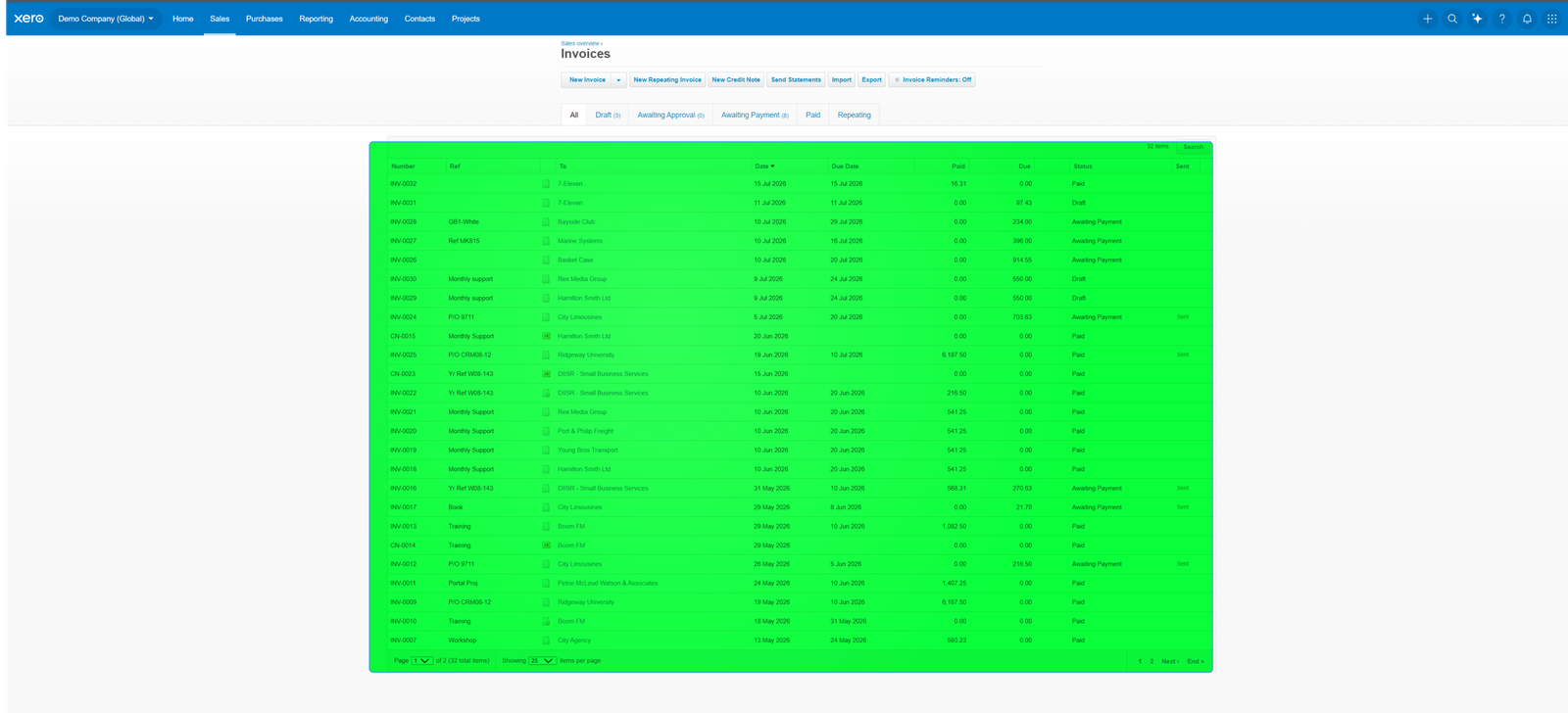
Wave is especially appealing if your accounting starts with invoices. Its current Starter plan includes unlimited estimates and invoices, so a freelancer who sends a handful of invoices each week doesn’t need to worry about a small monthly limit.
Wave also lets you accept online payments through invoices. The trade-off is payment processing fees, which you should treat as a separate business expense rather than part of the accounting subscription.
Xero takes a more connected approach. Its invoicing sits alongside bills, bank reconciliation, reporting, and other accounting workflows. The Early plan has a 20-invoice limit, while Growing and Established remove that limit.
My pick: Wave for simple invoicing on a tight budget. Xero if invoicing is one part of a larger bookkeeping system.
Bank Reconciliation Is Where the Difference Becomes More Important
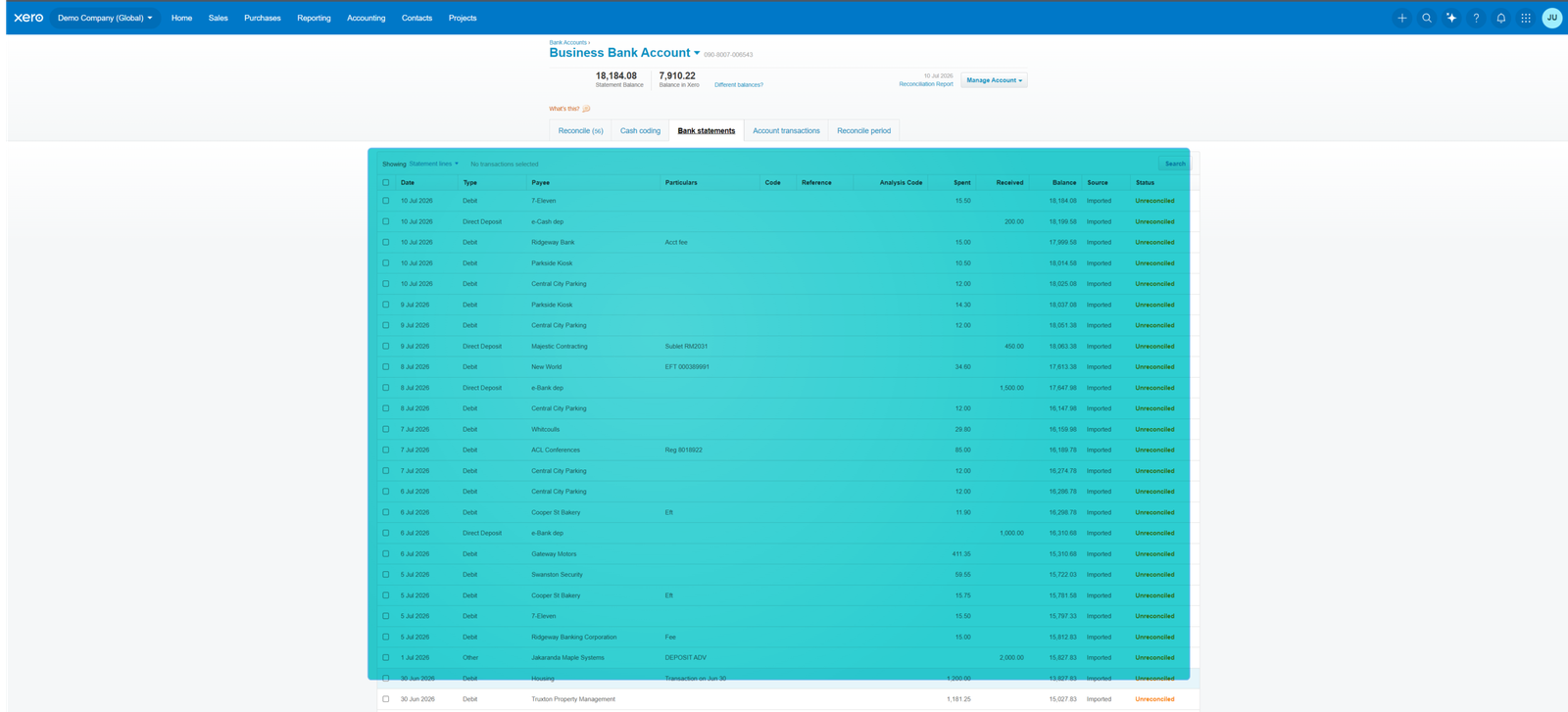
For a real bookkeeping workflow, importing transactions is only the start. You need to match them correctly, categorize them, deal with duplicates, handle transfers, and keep the books reconciled.
Wave’s current Pro plan adds automatic bank transaction imports and automatic merging and categorization. That’s a meaningful step up from an invoicing-only workflow.
Xero puts bank reconciliation much closer to the centre of the experience. Its US plans include bank reconciliation, and the higher plans add more automation around bills and reporting.
If you’re the person maintaining the books every week, this matters more than a flashy dashboard. Saving a few minutes on every reconciliation session adds up.
I don’t have a Wave screenshot for this section yet. Treat screenshots as evidence of the workflow, not a substitute for checking the current product interface.
Reporting: Xero Has the Stronger Long-Term Case
Wave handles the basic financial reports a small business needs. For a very simple operation, that’s often enough.
The picture changes when you want more detailed management information. Xero’s higher US plans add visual performance reporting, cash-flow forecasting, KPI analysis, and other tools that become more useful as the business gets more complicated.
If you only check whether revenue beats expenses, Wave may be enough. If you use reports to manage cash flow, profitability, and performance, I’d lean toward Xero.
Ecommerce Is a Major Divider
This is one area where I wouldn’t choose on price alone.
An ecommerce business can have orders, refunds, discounts, shipping charges, payment processing fees, sales tax, and inventory movements all happening at once. The accounting system needs clean financial information from your selling channels and payment systems.
Xero is built to sit inside a wider app ecosystem. Its current US documentation points businesses toward Inventory Plus or third-party apps when they need inventory across multiple locations and channels.
Wave is much easier to justify for a service business with no meaningful inventory. For a growing Shopify, Amazon, or multi-channel operation, I’d look at Xero first, then check the exact connector and inventory setup before deciding.
Inventory: Don’t Assume the Cheapest Plan Covers Everything
The old version of this comparison treated Xero’s inventory as if every use case were included in every plan. That’s too broad.
Xero supports tracked inventory items. But if you need inventory across several locations and sales channels, you may need Inventory Plus or a third-party integration.
Wave doesn’t offer an equivalent built-in inventory workflow for businesses that need proper stock management. If inventory is central to your business, that alone can push the decision toward Xero or another platform.
Integrations and the Bigger Software Stack
Wave is deliberately simpler. That can be an advantage when you don’t want a dozen apps plugged into your books.
Xero takes the opposite approach. It’s built to connect with a wide ecosystem of ecommerce, payments, payroll, inventory, expense, and business apps.
Here’s the practical question: do you need those integrations? If not, a huge app ecosystem isn’t a reason to pay more. If you do, it can save you from moving data between systems by hand.
Which One Is Easier to Learn?
Wave has the edge here because it does less. Fewer options make the first few accounting tasks feel less intimidating.
Xero has more accounting depth, so there’s more to understand. That isn’t necessarily a weakness. It means you can build a more detailed workflow without moving to another platform later.
For a brand-new freelancer, I’d rather see you use Wave properly than buy Xero and never reconcile the books. Good bookkeeping habits matter more than the longest feature list.
Where Wave Makes the Most Sense
I’d seriously consider Wave when the business looks like this:
- You’re a freelancer, consultant, or very small service business.
- You mainly send invoices and track expenses.
- Your customers don’t generate large volumes of online card payments.
- You want to keep recurring software costs close to zero.
- You don’t need sophisticated inventory or project accounting.
- You operate in a market where Wave’s available features meet your needs.
For that kind of business, paying for more software just because it has more features doesn’t automatically make sense.
Where I’d Choose Xero Instead
I’d move toward Xero when accounting becomes a real operational system rather than just a place to create invoices.
- You need more structured bank reconciliation.
- You have a growing team or an accountant who needs access.
- You need ecommerce or other business-system integrations.
- You need more detailed reporting and cash-flow visibility.
- You need tracked inventory and may eventually need a dedicated inventory integration.
- You operate across currencies or markets where Xero has a suitable local product.
- You expect the business to get more complicated over time.
Xero vs Wave for Freelancers
For a solo freelancer, this is probably the closest call.
If you send invoices, track expenses, and have a fairly small number of transactions, Wave’s free Starter plan is hard to ignore. You can put the money you save toward things that actually grow the business.
Xero becomes more attractive when the bookkeeping gets more complicated, you need stronger reporting, you work with an accountant regularly, or the business is growing into a team.
Xero vs Wave for Ecommerce Sellers
For ecommerce, I’d choose Xero more often.
The reason isn’t simply that Xero has more features. Ecommerce accounting gets messy with multiple sales channels, payment processors, refunds, fees, and inventory. A broader accounting ecosystem gives you more ways to build a workflow around those transactions.
Don’t buy Xero and assume the accounting will sort itself out, though. The connector between your store and your accounting system matters just as much as the platform.
Xero vs Wave for Accountants and Bookkeepers
If you hand your books to an accountant or bookkeeper, collaboration matters more. Xero is generally the stronger choice when the business needs a deeper workflow and ongoing professional involvement.
Wave can still work for a small client with straightforward books. The question is whether the bookkeeping is simple enough that Wave’s smaller feature set isn’t a problem.
What I Wouldn’t Do
I wouldn’t choose Xero just because it’s more powerful. More software doesn’t automatically mean better bookkeeping.
I also wouldn’t choose Wave just because it says “$0.” If you need inventory, integrations, detailed reporting, or more advanced workflows, the free subscription can turn into a false economy if it pushes you into spreadsheets and extra services.
And I wouldn’t compare the products using one country’s pricing and assume the same plans and features apply everywhere. Accounting software is heavily regional, especially around tax, payroll, payments, and bank connections.
So, Which One Should You Choose?
Choose Wave if your priority is simple bookkeeping and invoicing with minimal subscription cost. Its Starter plan is genuinely useful for a narrow but important group of small businesses.
Choose Xero if you need a more complete accounting system that can support a growing operation, connect with other software, and give you more room for detailed bookkeeping and reporting.
If you want the simplest rule, it’s this: Wave is the better starting point for simplicity, and Xero is the better long-term choice when your accounting workflow gets more complex.
Frequently Asked Questions
Is Wave really free?
Wave’s current Starter plan is $0/month and includes core invoicing and bookkeeping features. Online payment processing and some additional services carry separate fees. See Wave’s current pricing.
Is Xero free?
No. Xero is subscription-based. In the US, its current regular prices are $27, $59 and $97 per month for Early, Growing and Established, respectively, after the applicable introductory period.
Which is better for ecommerce?
I’d generally choose Xero for a growing ecommerce business because of its broader integration ecosystem and inventory options. You still need the right ecommerce connector and inventory setup.
Which is better for a freelancer?
Wave is often the better starting point when a freelancer has simple needs and wants to keep software costs down. Xero makes more sense once the bookkeeping gets more involved.
Can I move from Wave to Xero later?
Yes. Businesses can migrate between accounting systems, but the process needs planning. Before you switch, export the records you need, decide how historical transactions will be handled, and make sure opening balances and tax information are correct.
Does Xero have inventory?
Yes, Xero supports tracked inventory items. For more advanced multi-location and multi-channel inventory, Xero says businesses may need Inventory Plus or a third-party application.
My Recommendation
For a very small service business that mainly needs invoices and basic bookkeeping, Wave deserves a serious look. The free Starter plan removes a common barrier for people who are just getting organised.
For a business already dealing with more transactions, ecommerce, multiple systems, detailed reporting, or a more involved bookkeeping workflow, I’d choose Xero.
Neither product is automatically right for everyone. The better choice is the one that makes it easier to keep accurate books without creating a pile of manual work somewhere else.
Video Guide
Related Accounting Software Guides
- Accounting Software Comparisons
- Xero vs QuickBooks
- Xero vs FreshBooks
- Xero vs Zoho Books
- Xero vs Sage
- Xero for Ecommerce Sellers
Official resources: Xero · Wave
Related guides: Wave Accounting Resource Center · Xero Resource Center



