Xero vs FreshBooks 2026: Which Is Better for Your Business?
Xero vs FreshBooks 2026 comparison for freelancers, service businesses and ecommerce sellers. Compare pricing, invoicing, bookkeeping, reporting and fit.

Xero vs FreshBooks isn’t really about finding a universal winner. It’s about choosing the accounting workflow that fits your business. Xero is the broader accounting platform, while FreshBooks puts more emphasis on invoicing, clients, projects, and billable work.
I’m Janak Uparkoti, an accountant and the founder/editor of eComBuilderInsider. When I compare accounting software, I look at the jobs the software has to handle once the sales pitch is over: recording transactions, reconciling the bank, sending invoices, tracking expenses, producing reports, and handing clean records to an accountant.
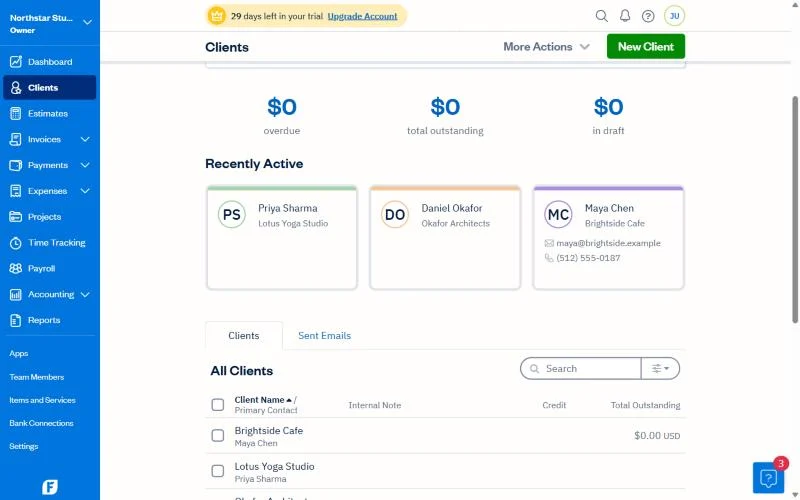
How this was tested: These screenshots are from my own Xero and FreshBooks trial accounts. Screenshots below are from those accounts, captured in August 2026.
Xero partner offer · checked 1 Nov 2026
80% off Xero for 6 months
For organisations new to Xero, on any plan, until 31 March 2027. No code needed: the discount applies when you sign up through the link.
Get 80% off XeroXero vs FreshBooks: the short answer
Choose FreshBooks if your business mainly sells your time or expertise and revolves around clients, projects, and invoices. Choose Xero if you want a broader accounting system that can support more complex bookkeeping, reporting, ecommerce, inventory workflows, and a wider range of business needs.
That distinction matters. A freelancer and an ecommerce seller can both be called “small businesses,” but their accounting problems are completely different.

What makes Xero and FreshBooks different?
FreshBooks grew up around invoicing and time-based work. That makes it especially interesting for consultants, designers, writers, developers, agencies, coaches, and other service businesses that need to turn tracked work and expenses into client bills.
Xero takes a wider accounting approach. Its US plans cover core tasks such as invoicing, bank reconciliation, bills, reporting, sales tax tools, and cash-flow information, with higher plans adding more advanced reporting, multicurrency, and other capabilities.
So I wouldn’t start this comparison by counting feature checkmarks. I’d start by asking: what kind of transactions does your business create every week?
FreshBooks is the better fit for client-focused work
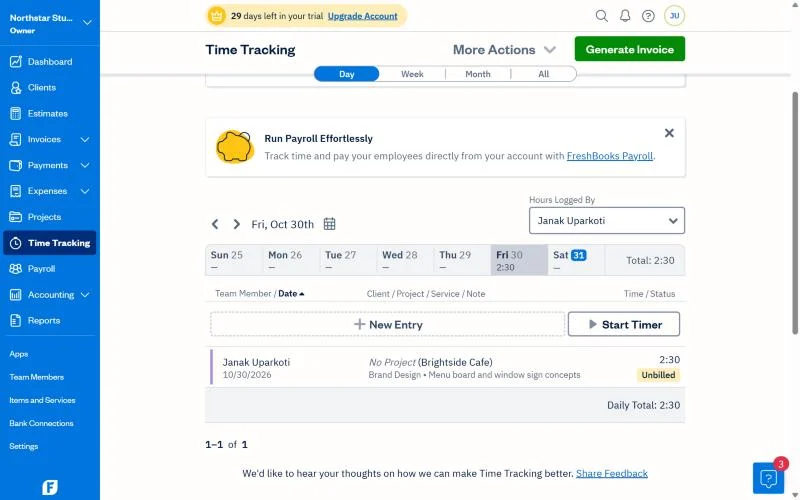
FreshBooks makes a lot of sense when your business is built around clients rather than products. Its plans are structured partly around the number of clients you can invoice. On the current US pricing page, Lite supports five clients, Plus supports 50, and Premium supports unlimited clients.
That limit is easy to overlook when you see a low introductory price. If you regularly add clients, the plan you need may change sooner than you expect.
For a consultant who tracks time, prepares estimates, sends invoices, follows up on payments, and wants project information close to the billing workflow, FreshBooks deserves a serious look.
Xero is the broader accounting choice
Xero is built around the accounting system rather than just the client-billing side of the business. Its current US plans include bank reconciliation, invoicing, bills, reporting, and other financial-management tools, while the higher tiers add capabilities such as multiple currencies and more advanced performance analysis.
That broader structure becomes more useful once the business has more to manage than simple income and expenses.
For example, an online retailer may need to deal with sales, refunds, payment-processing fees, inventory, cost of goods sold, marketplace settlements, and tax. Xero can also connect with inventory and other third-party apps, which can make it a stronger accounting hub for a growing ecommerce operation.
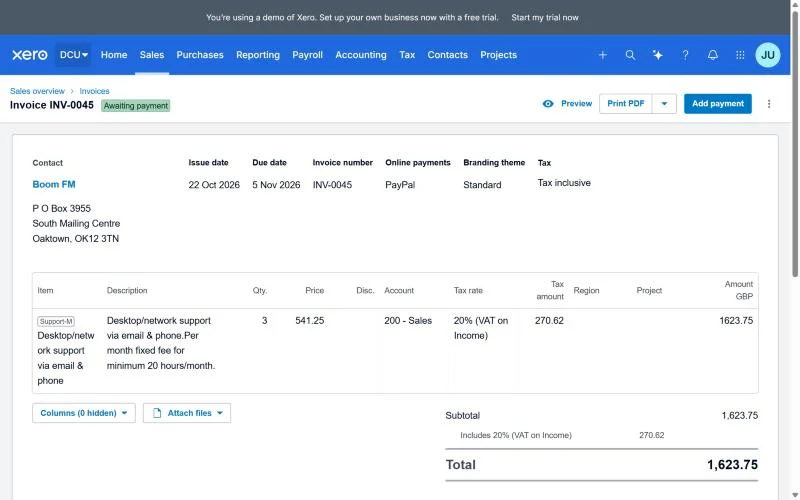
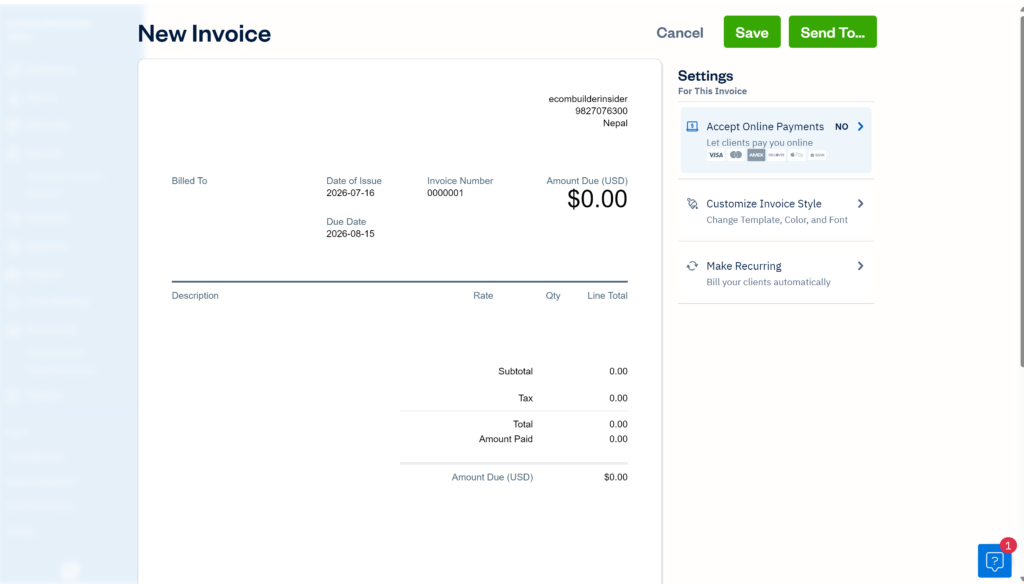
Invoicing and getting paid
FreshBooks gets the edge for service businesses.
If your main job is turning client work into invoices, FreshBooks’ focus is attractive. The software keeps invoicing, estimates, expenses, and client-related work close together.
Xero also handles invoices and online payments, so this isn’t a case where Xero can’t invoice customers. The difference is that invoicing is one part of a much broader accounting system.
My practical rule: if most of your revenue comes from projects and billable client work, look closely at FreshBooks first. If invoices are just one piece of a larger bookkeeping workflow, Xero becomes more compelling.
Bank reconciliation and bookkeeping
Xero gets the edge for a broader bookkeeping workflow.
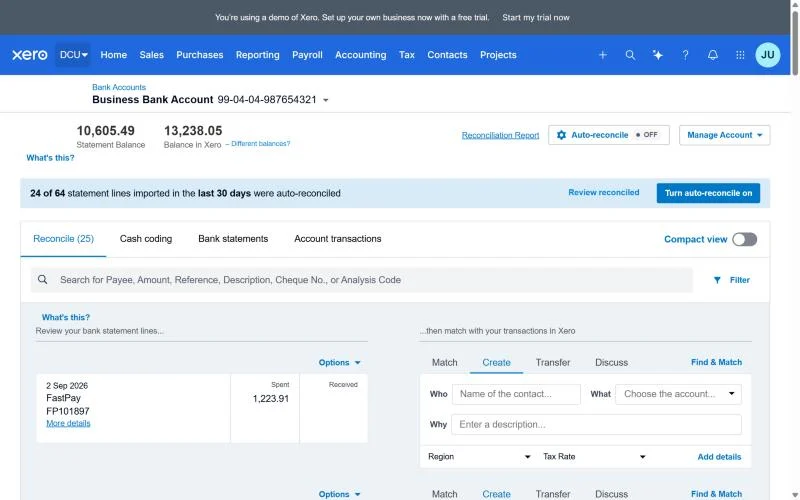
Bank reconciliation sounds boring until your books get messy. You want bank transactions to flow into the accounting system, then you want a clear process for matching them to the right income, expenses, bills, transfers, and other transactions.
Xero places reconciliation at the centre of its accounting workflow. Its current US plans include bank reconciliation, with automated reconciliation features available on the relevant plans.
FreshBooks also offers accounting and bank-related functionality, so don’t read this as “FreshBooks isn’t accounting software.” The difference is emphasis. FreshBooks is particularly appealing when the business starts with client work and billing; Xero feels more natural when bookkeeping itself is a major part of the workflow.
Reporting: which one gives you the better financial picture?
Both platforms p
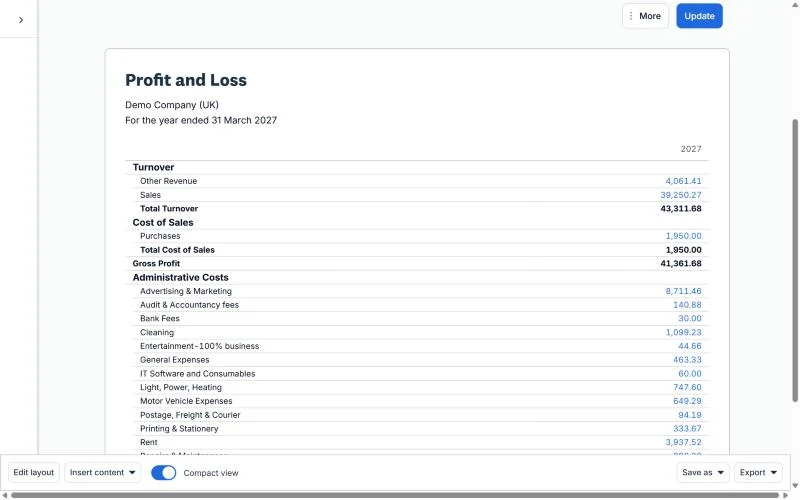
Xero’s current US plans include real-time reporting, while higher tiers add performance dashboards, KPIs, ratios, cash-flow forecasting, and other analysis tools.
FreshBooks also provides financial and accounting reports, with some reporting capabilities tied to plan level. Its Premium plan, for example, includes financial and accounting reports plus project profitability tools.
The important question isn’t which product has the longer report list. Ask whether the reports answer the questions you actually have: How much cash do we have? Which customers owe us money? Are projects profitable? What are our biggest expenses? What does the business look like after the month closes?
Xero vs FreshBooks pricing: don’t compare the trial price
This is where I’d be careful.
Both companies use introductory offers, and those prices can make a software comparison look much cheaper than the long-term subscription really is.
For the US market, Xero currently lists regular prices of $27/month for Early, $59/month for Growing, and $97/month for Established. New customers can get 80% off for the first 6 months through our Xero partner link (until 31 March 2027). Until 2 November 2026, Xero’s own US code DC90626310US gives 90% off for 6 months instead. Xero changes this offer often, so check before you buy. After the offer, the regular price applies.
FreshBooks currently lists regular US prices of $23/month for Lite, $43/month for Plus, and $70/month for Premium, although its current page is showing a limited-time 80% discount for four months. FreshBooks also offers a 30-day trial.
FreshBooks has another cost detail worth watching: team members, Advanced Payments, and payroll can add to the subscription. The current pricing page lists team members at $11 per user per month, and FreshBooks Payroll at $40/month plus $6/month per user.
For Xero, check add-ons as well. Inventory Plus is currently shown as an optional add-on on the US pricing page.
So don’t ask only, “Which has the cheaper first three months?” Ask what the software will cost once your business reaches the size and workflow you actually expect.
For freelancers and consultants
FreshBooks would be my first shortlist.
If you’re a solo consultant, writer, designer, developer, coach, or similar professional, your accounting may revolve around a relatively small number of clients, invoices, expenses, and projects.
FreshBooks’ client-focused structure fits that model well. The five-client limit on Lite is still something to watch, especially if your client list changes often.
Xero can absolutely work for a freelancer, particularly if you want a more accounting-centric system or expect the business to become more complex. But you may be paying for breadth you don’t need yet.
For agencies and service businesses
This one is closer.
FreshBooks is attractive when project billing, client communication, time, and expenses are central to the business. That’s especially relevant when the agency needs to understand project profitability rather than simply send invoices.
Xero becomes more interesting when the agency has a larger finance function, more complicated bills and expenses, multiple currencies, stronger reporting needs, or a broader accounting workflow.
I’d also ask your accountant which platform fits their review and month-end process. A small software advantage can disappear quickly if the bookkeeping handoff becomes awkward.
For ecommerce businesses
Xero is the stronger starting point for most ecommerce accounting use cases.
Ecommerce creates accounting problems that don’t show up in a simple service business. You may need to reconcile payment processors, marketplaces, and bank deposits while also dealing with refunds, discounts, shipping, sales tax, inventory, and cost of goods sold.
Xero’s broader accounting structure and app ecosystem make it a more natural fit for this kind of setup. Xero’s own documentation also points ecommerce businesses toward Inventory Plus or third-party inventory applications when they need deeper inventory and multi-channel capabilities.
That doesn’t mean Xero automatically solves ecommerce accounting. Your integrations still need to map sales and fees correctly into the books. That’s where a good setup matters more than the logo on the dashboard.
For businesses that need multiple currencies
Xero gets the advantage.
Xero’s current US Established plan includes multiple currencies.
If you invoice customers or pay suppliers in different currencies, don’t judge software only by whether it says “multicurrency.” Check how it handles exchange rates, foreign-currency invoices, payments, bank accounts, and reporting in your specific country.
Regional availability and plan rules can differ, so verify the local pricing and feature page before subscribing.
For a business that is growing
This is another situation where I’d lean towards Xero.
Growth tends to create accounting complexity. You may add employees, inventory, suppliers, payment channels, currencies, projects, or a second sales channel. A broader accounting platform gives you more room before you have to reconsider the software itself.
But don’t buy complexity just because you expect growth. If you’re still a one-person service business with a handful of clients, FreshBooks may be the simpler and more sensible choice today.
What I would be careful about with FreshBooks
The biggest thing I’d watch is the relationship between your client count and your plan.
A low introductory price looks great until you realise your workflow needs more clients, more team members, payroll, or payment functionality. FreshBooks publishes those limits and add-on costs, so calculate the real subscription before deciding.
I’d also make sure the reporting and accounting features you need are available on the plan you’re considering. Don’t assume every feature shown in a product comparison belongs to the cheapest plan.
What I would be careful about with Xero
Xero’s broader feature set can be an advantage, but it can also be more software than a very small service business needs.
I’d also check the exact plan limits and add-ons for your country. In the US, for example, Inventory Plus is optional rather than included with every plan.
And if you’re moving from another accounting system, don’t choose based on the migration checklist alone. Think about your chart of accounts, opening balances, bank feeds, historical transactions, tax setup, and the reports your accountant will need after the migration.
So, which one should you choose?
FreshBooks is my pick for client-focused service businesses. If your day revolves around clients, projects, billable work, and invoices, its focus makes a lot of sense.
Xero is my overall pick when the business needs broader accounting. I’d look at it first for ecommerce sellers, businesses with more involved bookkeeping, growing teams, multicurrency needs, and owners who want a wider accounting ecosystem.
The simple answer is that neither product wins every category. The better choice is the one that matches the transactions and workflow your business actually has.
Before you subscribe, check these five things
- Count your clients, and check whether the plan’s limits fit where you’re going, not just where you are today.
- Calculate the regular monthly cost after the promotional period.
- Check whether payroll, extra users, payment processing, or inventory require an add-on.
- Ask your accountant which system fits their bookkeeping and review workflow.
- Make sure your key integrations support the country, payment providers, sales channels, and tax setup you actually use.
Watch my accounting software comparisons
I publish accounting software comparisons and tutorials on YouTube, including Xero guides and comparisons with other accounting platforms.
Watch Janak Uparkoti on YouTube →
About the author
Janak Uparkoti is an accountant and the founder/editor of eComBuilderInsider. He writes practical guides about accounting software, bookkeeping, ecommerce accounting, and business software.
Related reading: Xero Review 2026 · FreshBooks Review 2026 · How We Test Accounting Software · Accounting Software Comparisons
Official resources: Xero · FreshBooks
Keep exploring: Xero Resource Center · FreshBooks Resource Center