Chart of Accounts for Small Business (with Sample Templates)
What a chart of accounts is, the five account types, and sample charts for a service business and an online store, plus how to set yours up in an hour.

Open your accounting software for the first time and you’ll find a list of 60 or so accounts you didn’t ask for. “Accrued liabilities.” “Retained earnings.” “Suspense.” It’s tempting to close the tab.
That list is your chart of accounts, and it’s just the set of categories your money gets sorted into. You need far fewer than the software gives you.
I’m an accountant, and below you’ll find what each section means, a ready-made sample chart for a service business and an online store, and the steps I’d follow to set yours up in an hour.
General information, not tax advice
I’m an accountant, but I don’t know your situation. Check anything tax-related with your own accountant or your tax authority (the IRS in the US, HMRC in the UK, the ATO in Australia).
What a chart of accounts is
It’s the full list of accounts in your books. Every transaction is recorded into at least two of them, and every report you run is built from them.
Get it right and your profit and loss reads like a story. Get it wrong and every report needs explaining.
The five types of account
| Type | What it holds | Shows on | Examples |
|---|---|---|---|
| Assets | What the business owns | Balance sheet | Bank account, accounts receivable, equipment, inventory |
| Liabilities | What the business owes | Balance sheet | Credit card, accounts payable, loans, sales tax owed |
| Equity | The owner’s stake | Balance sheet | Owner’s investment, drawings, retained earnings |
| Income | Money earned | Profit and loss | Sales, services, interest |
| Expenses | Costs of running the business | Profit and loss | Rent, software, advertising, wages, bank fees |
Many businesses split out cost of goods sold (the direct cost of what you sell) from other expenses, so you can see your gross profit. If you sell products, you’ll want this.
How accounts are numbered
Most charts use number ranges so accounts sort in a sensible order. A common convention:
| Range | Type |
|---|---|
| 1000–1999 | Assets |
| 2000–2999 | Liabilities |
| 3000–3999 | Equity |
| 4000–4999 | Income |
| 5000–5999 | Cost of goods sold |
| 6000–6999 | Operating expenses |
Your software may use different numbers, or none at all. That’s fine. Consistency matters more than the exact numbers.
Sample chart of accounts: service business
Here’s a lean chart for a consultancy, agency or freelancer. It covers most of what you’ll need:
| Code | Account | Type |
|---|---|---|
| 1000 | Business bank account | Asset |
| 1010 | Tax savings account | Asset |
| 1100 | Accounts receivable | Asset |
| 1500 | Computer equipment | Asset |
| 2000 | Business credit card | Liability |
| 2100 | Accounts payable | Liability |
| 2200 | Sales tax / VAT / GST payable | Liability |
| 3000 | Owner’s investment | Equity |
| 3100 | Owner’s drawings | Equity |
| 3900 | Retained earnings | Equity |
| 4000 | Service income | Income |
| 6000 | Advertising and marketing | Expense |
| 6100 | Bank and payment fees | Expense |
| 6200 | Contractors | Expense |
| 6300 | Insurance | Expense |
| 6400 | Office and home office | Expense |
| 6500 | Professional fees (accountant, legal) | Expense |
| 6600 | Software and subscriptions | Expense |
| 6700 | Phone and internet | Expense |
| 6800 | Travel | Expense |
| 6900 | Meals (check what is deductible where you are) | Expense |
Extra accounts for an online store
If you sell products online, add these to the list above:
| Code | Account | Type | Why you need it |
|---|---|---|---|
| 1200 | Inventory | Asset | Stock you hold but have not sold yet |
| 1300 | Payouts in transit (Shopify, Stripe, PayPal…) | Asset | Sales collected by the platform but not yet in your bank |
| 4100 | Product sales | Income | Kept separate from shipping income |
| 4200 | Shipping income | Income | What customers pay you for delivery |
| 4900 | Refunds and returns | Income (negative) | So refunds do not hide inside sales |
| 5000 | Cost of goods sold | Cost of goods sold | What the products you sold cost you |
| 5100 | Shipping and fulfilment costs | Cost of goods sold | Postage, packaging, 3PL fees |
| 5200 | Marketplace and platform fees | Cost of goods sold | Amazon, Etsy, Shopify transaction fees |
For the software side of running an online store’s books, see the best accounting software for ecommerce and Xero for ecommerce.
Step 1: Start from your software’s default
Don’t build from a blank page. Xero, QuickBooks and the others give you a sensible starting list for your type of business.
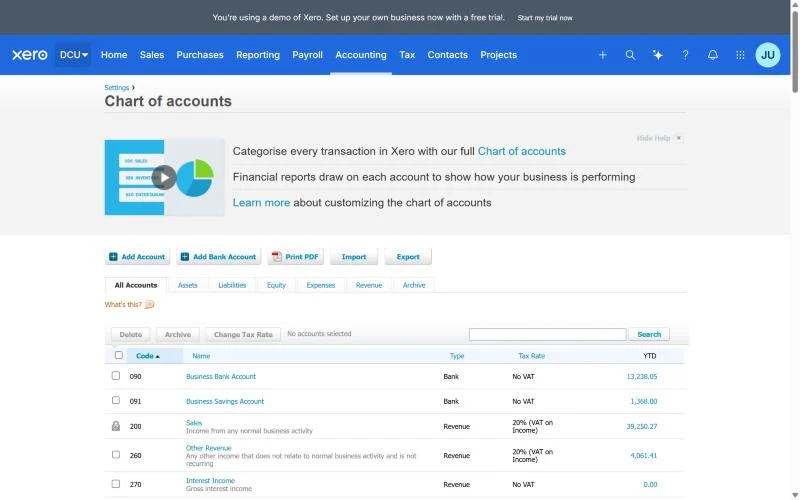
Pick the closest business type when you sign up. You’ll trim it next.
Step 2: Hide what you will never use
Go through the expense list and archive or make inactive anything you’ll never touch, like “Vehicle fuel” if you don’t have a vehicle.
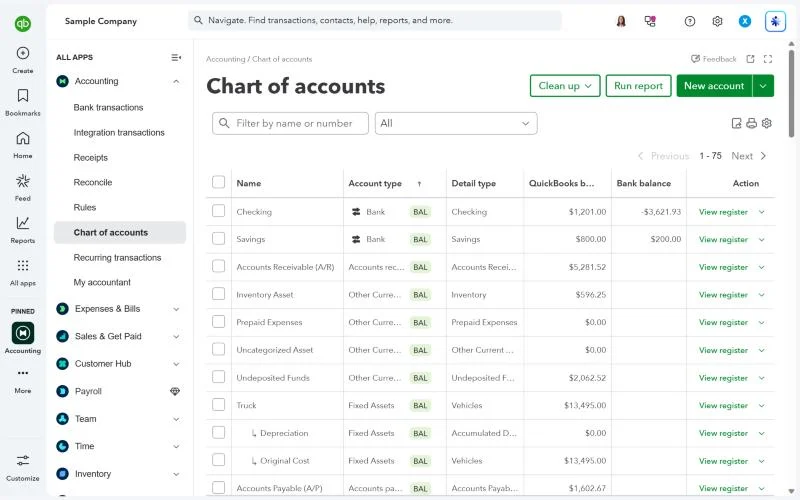
Leave the system accounts alone (retained earnings, sales tax, receivables). Your software needs them.
Step 3: Match your expense accounts to your tax return
Look at the expense categories on your tax return: Schedule C in the US, the self-employment pages of your Self Assessment in the UK, or your business schedule in Australia. Try to have one account per line you’ll need to fill in.
This one step makes tax time dramatically faster. Your accountant can lift the totals straight across.
Step 4: Add only the accounts you will want on a report
Before adding an account, ask: will I ever want to see this number on its own? If not, use a broader account and add a note in the description.
If you want to slice numbers by client, project or location, use your software’s tracking categories, classes or tags instead of creating dozens of accounts.
How tracking categories save you dozens of accounts
Say you run a design studio and want to see profit by service: branding, websites and retainers. You could create “Branding income”, “Website income” and “Retainer income”, then the same three for every cost. That’s how charts grow to 100 accounts.
Instead, keep one “Service income” account and tag each transaction with a tracking category (Xero), a class (QuickBooks) or a reporting tag (Zoho Books). Your P&L can then be filtered or split by tag, and the chart stays short.
Use tags for things that change (clients, projects, locations), and accounts for things that stay the same (types of income and cost).
Step 5: Ask your accountant to check it once
Send your chart to your accountant before you start coding transactions. Ten minutes of their time now saves hours of reclassifying later.
Common mistakes
Too many accounts
Separate accounts for “Coffee” and “Snacks” make reports noisy and coding slower. Group them.
Using “Miscellaneous” or “Suspense” as a home
They’re for things you’ll sort out shortly, not permanent storage. Clear them every month.
Deleting accounts that already have transactions
Archive them instead. Deleting can break history, and most software won’t let you anyway.
Putting owner withdrawals in expenses
Money you take out for yourself (drawings) isn’t a business expense for a sole trader. It goes to equity.
Frequently asked questions
How many accounts should a small business have?
Often 30 to 60 in total, including the system accounts your software needs. Fewer expense accounts is usually better than more.
Can I change my chart of accounts later?
Yes. You can add, rename and archive accounts any time. Big changes are easiest at the start of a financial year.
Is the chart of accounts the same in every country?
The structure is the same everywhere. The tax accounts (sales tax, VAT, GST) and the expense categories that match your tax return differ.
What is the difference between the chart of accounts and the general ledger?
The chart of accounts is the list of accounts. The general ledger is every transaction recorded in them.
What to do next
With your accounts set up, the habit that keeps them accurate is a monthly reconciliation: how to do a bank reconciliation. Or go back to the full small business bookkeeping guide.