Small Business Bookkeeping: The Complete Beginner’s Guide (2026)
An accountant explains small business bookkeeping step by step: separate accounts, cash vs accrual, chart of accounts, reconciling, reports and a routine.

Somewhere between your first sale and your first tax deadline you’ve realised someone has to keep the books. That someone is probably you.
Then the words start: debits, credits, accruals, reconciliation, chart of accounts. It can feel like you’ve signed up for an accounting degree by accident.
Bookkeeping for a small business comes down to a handful of habits you repeat every week and every month.
I’m an accountant, and I’ll walk you through exactly what to set up, in the order I’d do it if I were starting today. If you can keep a shopping list, you can keep the books.
General information, not tax advice
I’m an accountant, but I don’t know your situation. Use this guide to understand how bookkeeping works, and check anything tax-related with your own accountant or your tax authority (the IRS in the US, HMRC in the UK, the ATO in Australia).
Why bookkeeping is worth your time
Good books do three jobs for you, and only one of them is about tax.
- Tax without panic. Your tax return is built from your books. Tidy books mean a faster, cheaper return and fewer missed deductions.
- Knowing where the money is. You can see who owes you, what you owe, and whether you can afford that new hire, before your bank balance tells you the hard way.
- Proof when you need it. Banks, investors and landlords ask for financial statements. So does a tax authority if it ever has questions.
What bookkeeping actually is
Bookkeeping is recording every money event in your business, putting each one in the right category, and checking the records against your bank. That’s it.
Accounting is what happens next: turning those records into reports, tax returns and advice. You’ll often do the bookkeeping yourself and pay an accountant for the accounting. This guide is about the bookkeeping part.
The bookkeeping words you will hear, translated
You’ll meet these words in every accounting tool. Here’s what they mean in plain English:
| Word | What it means |
|---|---|
| Transaction | Any money event: a sale, a payment, a refund, a transfer |
| Categorise (or code) | Choosing which account a transaction belongs in, like “Software” or “Sales” |
| Chart of accounts | Your full list of those accounts |
| Reconcile | Checking your books agree with your bank statement |
| Accounts receivable | Money customers owe you |
| Accounts payable | Money you owe suppliers |
| Profit and loss (P&L) | Income minus expenses for a period |
| Balance sheet | What the business owns and owes on one date |
| Drawings | Money a sole trader takes out of the business for themselves |
Step 1: Separate your business and personal money
Open a business bank account, and a business card if you use one, and run every business payment through them.
This one move fixes half of all small-business bookkeeping problems. When your coffee and your supplier invoices share an account, every line needs a decision, and tax time turns into an archaeology dig.
Already mixed them? You’re not alone. Start separating from today, and sort out the past with your accountant.
Step 2: Choose cash or accrual accounting
This decides when you record income and expenses: when money moves (cash), or when you earn it or owe it (accrual).
Most very small businesses start on cash basis because it’s simpler. Accrual gives a truer picture once you invoice customers and have bills to pay later. The rules on who can use which depend on your country and business type.
I’ve explained both, with a worked example and the US, UK and Australian rules, in cash vs accrual accounting.
Step 3: Decide where you will keep the books
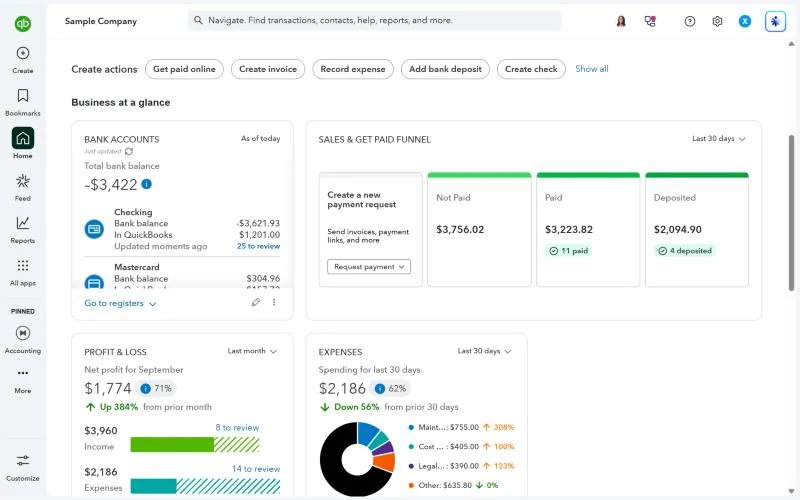
You have three realistic options:
| Option | Good for | Watch out for |
|---|---|---|
| Spreadsheet | A side hustle with a handful of transactions a month | No bank feed, easy to break a formula, hard to hand to an accountant |
| Free software (Wave Starter, Zoho Books Free) | Solo owners starting out | Limits on features, users or revenue |
| Paid software (Xero, QuickBooks Online, FreshBooks, Zoho Books) | Anyone with regular sales, bills or staff | Price after the intro offer ends |
Software does the double-entry for you, pulls in your bank transactions, and produces reports in one click. For most businesses with regular sales, it pays for itself in saved hours.
Not sure which? Start with how to choose accounting software, then see my shortlist for small businesses or the best free options.
Step 4: Set up your chart of accounts
Your chart of accounts is the list of categories every transaction goes into: sales, rent, software, bank fees, and so on.
Your software will give you a default list. Keep it short, match it to the categories on your tax return, and only add an account when you’ll actually want to see that number on a report.
I’ve included a sample chart for a service business and an online store in chart of accounts for small business.
Step 5: Record every transaction
Every sale, every expense, every transfer gets recorded and categorised. In software, most of this arrives through your bank feed and you just confirm the category.
- Money in: sales, customer payments, refunds received, loans, money you put in.
- Money out: supplier bills, expenses, wages, tax payments, loan repayments, money you take out.
- Transfers: moving money between your own accounts. These aren’t income or expenses, so don’t categorise them as either.
Behind the scenes, every transaction is recorded twice, once as a debit and once as a credit. That’s double-entry bookkeeping, and it’s what keeps the books in balance.
You don’t need to do it by hand, but understanding it makes everything else click. Here’s double-entry bookkeeping explained simply.
Keep the receipts
Save a receipt or invoice for every expense. Snap a photo, or forward the email to your software’s document capture.
How long to keep records depends on where you are. As a general guide: at least 3 years in the US (longer in some situations, such as employment records), 5 years in Australia, and in the UK at least 5 years after the 31 January filing deadline for sole traders, or 6 years for limited companies. Check with your tax authority for your exact case.
Step 6: Reconcile your bank accounts every month
Reconciling means checking that your books and your bank statement agree, line by line, and explaining any difference.
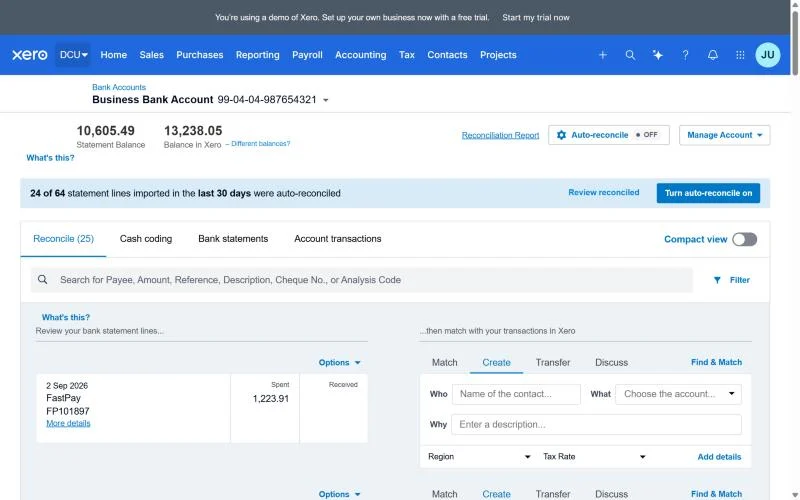
It’s the step that catches missing income, double-counted expenses and bank fees nobody recorded. If you only do one thing on this list every month, make it this.
Here’s a step-by-step walk-through with a worked example: how to do a bank reconciliation.
Step 7: Keep track of who owes you, and who you owe
Money customers owe you is accounts receivable. Money you owe suppliers is accounts payable. Both are easy to lose track of, and both affect your cash.
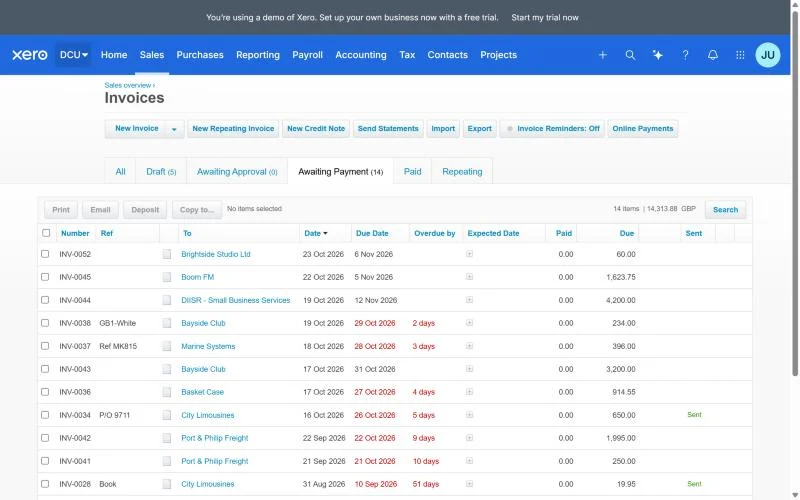
- Send invoices as soon as the work is done, with clear payment terms.
- Turn on automatic reminders in your software.
- Once a week, look at the “aged receivables” report: who’s overdue, and by how much?
- Enter supplier bills when they arrive, not when you pay them, so you can see what’s coming.
Step 8: Read three reports every month
You don’t need dozens of reports. These three tell you almost everything:
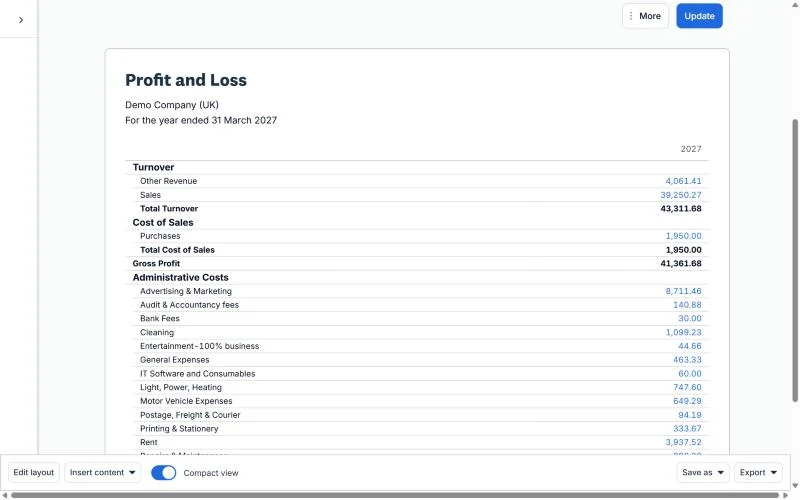
| Report | The question it answers |
|---|---|
| Profit and loss (P&L) | Did I make money this month, and where did it go? |
| Balance sheet | What does the business own and owe on a given day? |
| Cash flow statement or forecast | Where did my cash actually go, and will I have enough next month? |
Read them in that order, with a cup of tea, once a month. Compare with last month. That habit alone puts you ahead of most small businesses.
Step 9: Set money aside for tax, and know your deadlines
The most stressful moment in small business is a tax bill you didn’t plan for. Two habits prevent it:
- Move a percentage of every payment you receive into a separate savings account for tax. Your accountant can suggest the right percentage for you.
- Put your deadlines in your calendar now. In the US that usually means quarterly estimated tax payments (around mid-April, June, September and January) plus any state sales tax returns. In the UK it’s your Self Assessment deadline and, if you’re VAT-registered, your VAT returns. In Australia it’s your BAS, usually quarterly.
Step 10: Build a simple routine
Bookkeeping is easy when it’s small and regular, and miserable when it’s a once-a-year pile. Here’s the routine I’d suggest:
| How often | What to do | Time it takes |
|---|---|---|
| Weekly | Categorise new bank transactions, send invoices, chase anything overdue, save receipts | 15–30 minutes |
| Monthly | Reconcile every bank and card account, enter all bills, read the P&L and balance sheet | 1–2 hours |
| Quarterly | Review tax set-aside, file sales tax, VAT or BAS if you have to, check your estimated tax | 1–2 hours |
| Yearly | Tidy up, send everything to your accountant, archive records, review your chart of accounts | Half a day |
Bookkeeping for your kind of business
The steps above apply to everyone, but each type of business has its own pressure point.
Freelancers and sole traders
Your biggest risks are mixing personal and business money and forgetting to set tax aside. Keep it simple: one business account, invoicing with reminders, and a tax savings account.
See the best accounting software for freelancers.
Online stores
Your bank deposits aren’t your sales. Platforms like Shopify, Stripe and PayPal take fees and refunds out before paying you, so you need to record the full sale, the fees and the refunds separately. You also need to track stock and the cost of what you sold.
This is the area where good software, and often a connector app, saves the most time. See the best accounting software for ecommerce.
Businesses with employees
Payroll adds wages, payroll taxes and retirement or super contributions, each with its own deadlines. Use payroll software rather than spreadsheets, and reconcile the payroll liability accounts every month.
Most accounting tools offer payroll as an add-on; the small business shortlist compares the costs.
Your first month: a checklist
- Open a business bank account (and card, if you use one).
- Choose cash or accrual with your accountant.
- Sign up for accounting software and connect the bank feed.
- Trim the chart of accounts to match your tax return.
- Create an invoice template and turn on reminders.
- Set up a tax savings account and an automatic transfer.
- Put your tax deadlines in your calendar.
- At month-end, reconcile and read your P&L for the first time.
Tick those off and you’re ahead of most small businesses. Really.
Common bookkeeping mistakes
Mixing business and personal spending
It makes every transaction a judgement call and invites trouble at tax time. A separate account fixes it.
Leaving it all until tax time
Twelve months of receipts in a shoebox takes days to sort, and things go missing. Fifteen minutes a week beats a ruined weekend.
Counting transfers as income or expenses
Moving money between your own accounts, or paying off your business card, isn’t a sale or a cost. Mark it as a transfer, or your profit will be wrong.
Never reconciling
If you don’t reconcile, you don’t really know whether your books are right. Missed income and duplicated expenses hide here.
Too many accounts in the chart of accounts
Forty expense categories make reports unreadable and coding slower. Fewer, clearer categories are better.
Not keeping receipts
Without a receipt, an expense is hard to prove. Snap a photo the day you pay.
Do it yourself, hire a bookkeeper, or hire an accountant?
| You do it | Bookkeeper | Accountant | |
|---|---|---|---|
| What they do | Day-to-day records | Day-to-day records, reconciliations, payroll admin | Tax returns, year-end accounts, advice |
| Best when | You have few transactions and some time | You’re busy, or volume has grown | Always worth it for tax and year-end |
| Typical setup | You plus software | Monthly fee or hourly | Annual fee, plus advice as needed |
A common, sensible setup: you (or a bookkeeper) keep the books in software, and an accountant does the year-end and tax. Give your accountant free access to your software, and you’ll pay for less of their time.
Frequently asked questions
How much time does bookkeeping take for a small business?
For a simple business with software and a bank feed, about 15–30 minutes a week plus an hour or two at month-end. More transactions, staff or stock mean more time.
Can I do my own bookkeeping without any accounting knowledge?
Yes. Software handles the debits and credits for you. You need to understand the categories, keep receipts and reconcile monthly, and this guide covers all three.
Is a spreadsheet good enough?
For a side hustle with a few transactions, yes. Once you have regular sales, bills or staff, software saves time and mistakes, and your accountant will thank you.
What’s the difference between bookkeeping and accounting?
Bookkeeping is recording and organising transactions. Accounting is turning them into reports, tax returns and advice.
Which accounting software is best for a beginner?
It depends on your business. For most small businesses I’d look at Xero or QuickBooks Online; for freelancers, FreshBooks; for free, Wave or Zoho Books. See the best accounting software for small business and for freelancers.
What to do next
If you’ve read this far, do one thing today: open a separate business bank account if you don’t have one. Then read cash vs accrual accounting, because it decides how everything else gets recorded.
Selling online? Bookkeeping for a store has a few extra wrinkles (payouts, fees, stock), which I cover in the best accounting software for ecommerce.