FreshBooks Pricing 2026: Plans, Hidden Costs and What You’ll Really Pay
FreshBooks pricing for 2026 explained by an accountant: Lite, Plus, Premium and Select, the 80% offer, team member and payment fees, and worked examples of what you'll really pay.

So, how much does FreshBooks really cost? The headline prices are simple: $23, $43 or $70 a month. What you end up paying depends on three things the headline doesn’t show: how many clients you bill, how many people need access, and how your clients pay you.
I’m an accountant, and I’ve worked through FreshBooks’ 2026 US pricing line by line. Below are the plans, the current offer, every extra that adds to the bill, and worked examples for a freelancer and a small agency.
Quick answer
- Lite: $23 a month, up to 5 billable clients. No bank reconciliation or accountant access.
- Plus: $43 a month, up to 50 clients. The plan most freelancers need.
- Premium: $70 a month, unlimited clients, project profitability and bills.
- Current offer: 80% off for 4 months on monthly plans, or a 30-day free trial with no card.
- Extras: $11 a month per team member, 2.9% + 30¢ per card payment, and payroll from $40 a month plus $6 per person.
FreshBooks offer · checked 2 Nov 2026
80% off FreshBooks for 4 months
Plus is $8.60 a month for your first 4 months, then $43. Or try it free for 30 days with no credit card.
FreshBooks Plans and Prices in 2026
| Plan | First 4 months | Regular monthly | Billable clients | Team members |
|---|---|---|---|---|
| Lite | $4.60/mo | $23 | 5 | $11/mo each |
| Plus | $8.60/mo | $43 | 50 | $11/mo each |
| Premium | $14/mo | $70 | Unlimited | $11/mo each |
| Select | Custom | Custom | Unlimited | 2 included, then $11/mo each |
Drawn from the table above. Lowest price highlighted.
What Each Plan Includes
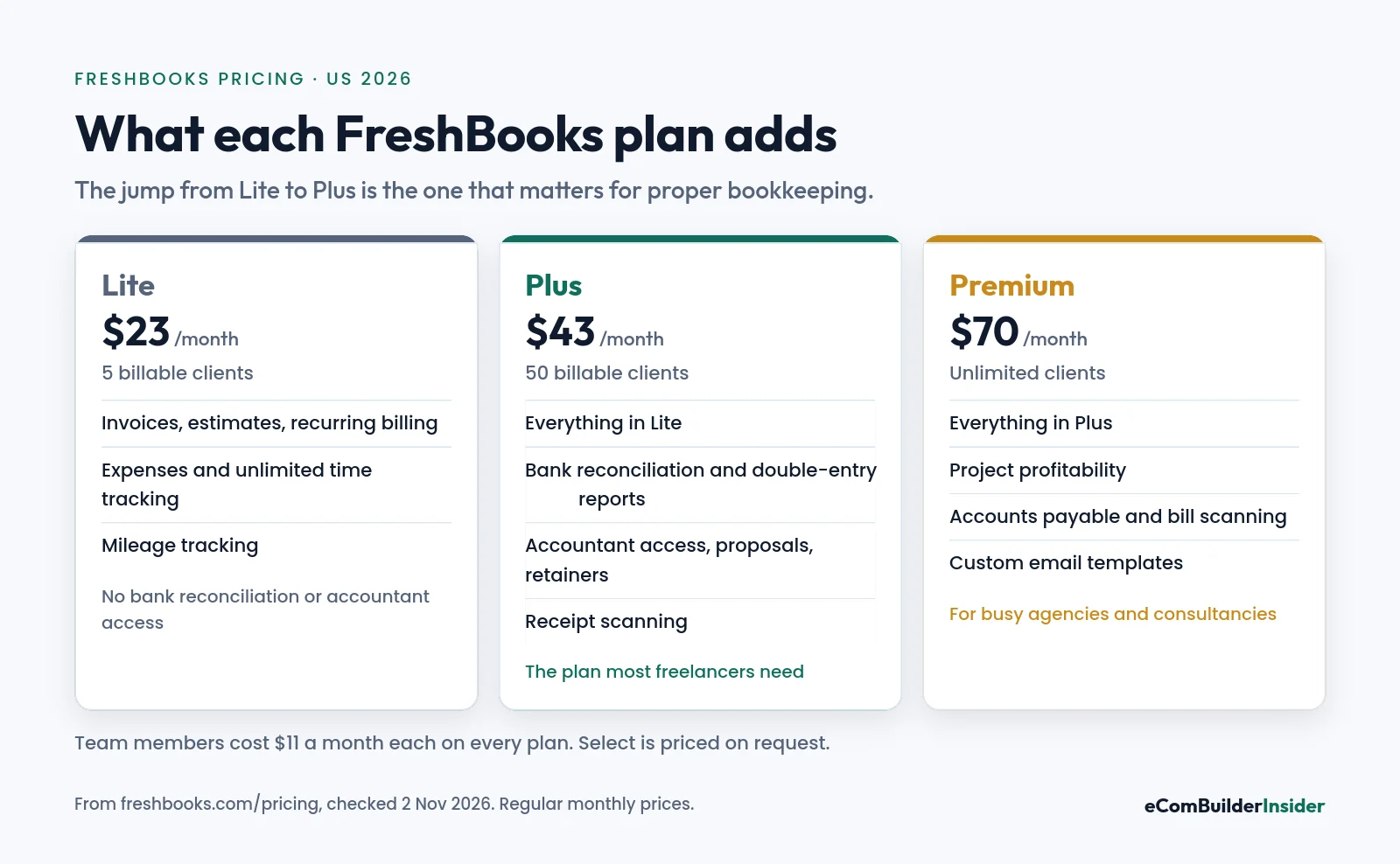
Lite: $23 a month
Invoices, estimates, recurring invoices, late fees and reminders, expense tracking, unlimited time tracking, mileage tracking in the app, and basic tax-time reports. What’s missing matters: no bank reconciliation, no double-entry reports and no accountant access.
Plus: $43 a month
Everything in Lite, plus bank reconciliation, double-entry reports such as the balance sheet, accountant access, proposals, e-signatures, client retainers and receipt scanning. This is the plan I recommend for most freelancers.
Premium: $70 a month
Everything in Plus, plus project profitability, accounts payable with bill scanning, custom email templates and automated client emails. Worth it for agencies and consultancies running several projects at once.
Select: custom pricing
For larger service businesses: lower card fees, capped bank transfer fees, taking cards in person or by phone, phone support, help moving your data, and 2 team members included.
Billable Clients: The Limit That Catches People Out
FreshBooks limits how many clients you can bill: 5 on Lite and 50 on Plus. If you have 6 regular clients, Lite is already too small, however cheap it looks.
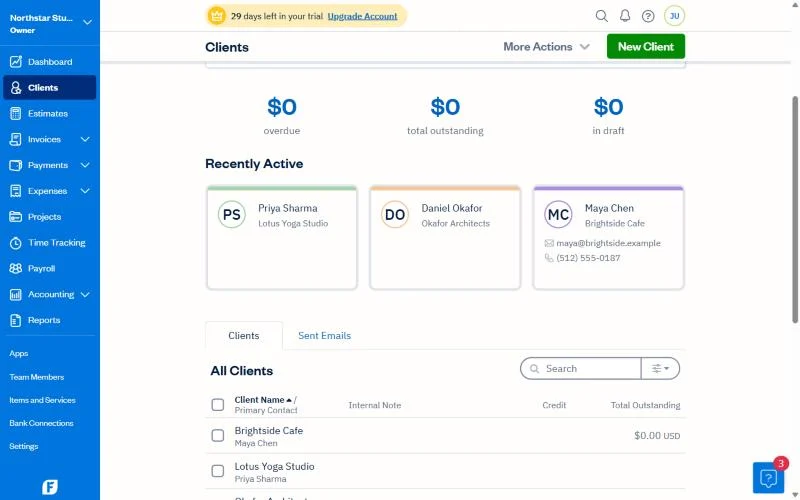
Count the clients you bill in a typical month, then add a margin for growth before you pick a plan.
The Extras That Add to Your Bill
| Extra | Cost | Who needs it |
|---|---|---|
| Team members | $11 a month each | Anyone with staff or contractors in the account |
| Card payments | 2.9% + 30¢ per transaction | Clients who pay invoices by card |
| Bank transfers (ACH) | 1% per transaction | Clients who pay by bank |
| Advanced Payments | $20 a month (included in Select) | Taking cards in person or by phone |
| Payroll | $40 a month + $6 per person | Businesses with employees |
Team members
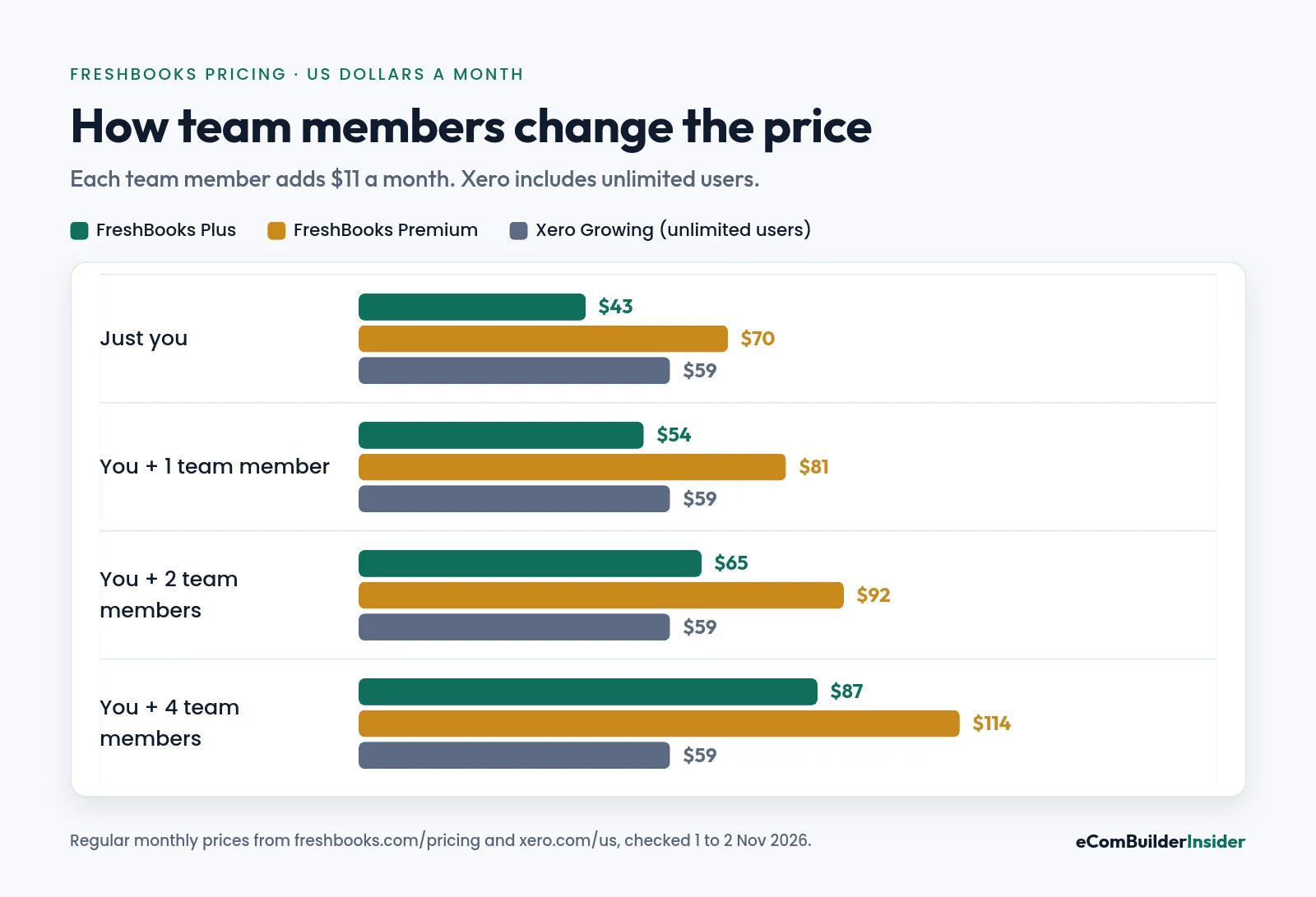
With two team members, Plus costs $65 a month. That’s more than Xero Growing at $59, which includes unlimited users. Once you have a team, it’s worth comparing.
Payment fees
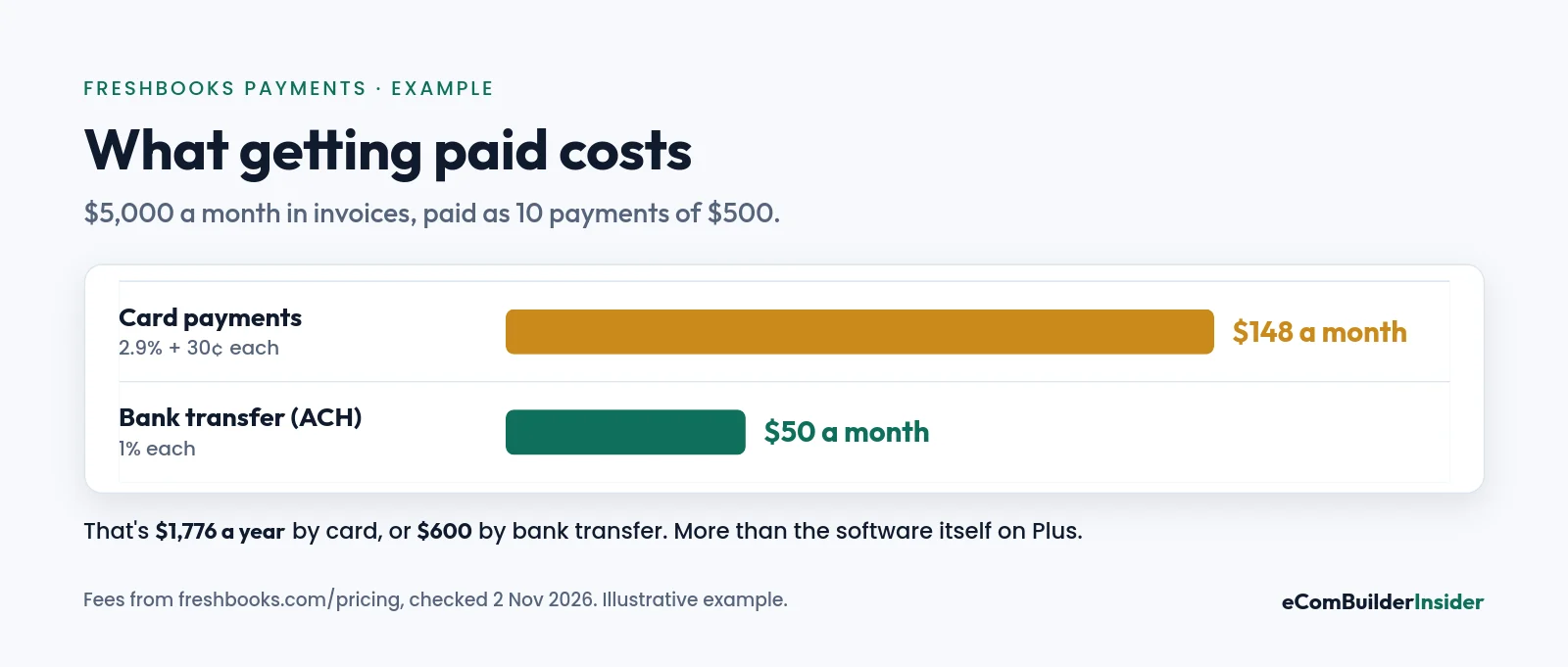
Payment fees often cost more than the software. On $5,000 a month in card payments, fees are about $148 a month. Asking regular clients to pay by bank transfer cuts that to $50.
Accountant’s tip
Card and bank fees are a business expense, so make sure they’re recorded, not netted off your sales. FreshBooks records them for you when clients pay through FreshBooks Payments.
What You’ll Really Pay: Two Examples
Example 1: solo freelancer on Plus
| Year one | Year two | |
|---|---|---|
| Plus subscription | $378.40 (4 × $8.60 + 8 × $43) | $516 |
| Team members | $0 | $0 |
| Total software | $378.40 | $516 |
Example 2: small agency on Premium with 2 team members
| Year one | Year two | |
|---|---|---|
| Premium subscription | $616 (4 × $14 + 8 × $70) | $840 |
| 2 team members | $264 | $264 |
| Total software | $880 | $1,104 |
For comparison, Xero Growing with its partner offer is $424.80 in year one and $708 after that, for any number of users.
Is the 80% Offer Worth Taking?
- It lasts 4 months on monthly plans, then the regular price applies.
- It’s for monthly billing. Yearly billing has its own extra 10% off instead.
- Take it if you’re still testing whether FreshBooks fits. Four cheap months is a long trial.
- Choose yearly once you’re sure, for the extra 10% off.
- There’s also a 30-day money-back guarantee on purchases.
FreshBooks vs Xero vs QuickBooks on Price
| FreshBooks Plus | Xero Growing | QuickBooks Essentials | |
|---|---|---|---|
| Monthly | $43 | $59 | $85 |
| Users included | Owner only | Unlimited | 3 |
| Extra users | $11 each | Free | Higher plan |
| Bank reconciliation | Yes | Yes | Yes |
Working alone? FreshBooks Plus is the cheapest of the three. With 2 or more team members, Xero usually wins on price. My Xero vs FreshBooks comparison goes deeper.
Xero partner offer · ends 31 March 2027
Got a team? Xero includes unlimited users
80% off for 6 months for new customers, with bank reconciliation and 1,000+ apps on every plan.
Which FreshBooks Plan Should You Choose?
| If you… | Choose |
|---|---|
| Bill 5 or fewer clients and do your own books | Lite |
| Bill up to 50 clients or have an accountant | Plus |
| Run several projects and pay supplier bills | Premium |
| Have a larger team or take cards in person | Select |
| Have 2+ people who need access | Compare Xero first |
Free tool · 4 quick steps
Not sure which software fits?
Answer four quick questions and get a shortlist that fits your size, budget and the apps you use.
My Verdict
FreshBooks is fairly priced for freelancers. Plus at $43 a month, or $8.60 for the first 4 months, gives you invoicing, time tracking, bank reconciliation and accountant access. The costs to watch are team members, card fees and the 5-client limit on Lite.
FreshBooks offer · checked 2 Nov 2026
Try FreshBooks: 80% off for 4 months
Or a 30-day free trial with no credit card.

Frequently Asked Questions
How much does FreshBooks cost in 2026?
In the US, Lite is $23, Plus $43 and Premium $70 a month. Select is priced on request. Team members cost $11 a month each.
Is the FreshBooks 80% discount permanent?
No. It applies for your first 4 months on monthly plans, then the regular price starts.
Does FreshBooks have a free trial?
Yes. 30 days with no credit card, plus a 30-day money-back guarantee on purchases.
How much do extra users cost on FreshBooks?
$11 a month per team member on every plan. Select includes 2 team members.
What are FreshBooks payment fees?
2.9% + 30¢ per card payment and 1% per bank transfer (ACH). Select has lower card fees and capped bank transfer fees.
Which FreshBooks plan is best for a freelancer?
Plus, for most. It adds bank reconciliation, accountant access and room for 50 clients.
Can I pay for FreshBooks yearly?
Yes. FreshBooks shows an extra 10% off for yearly billing. The 80% offer applies to monthly plans.
Next steps: FreshBooks review · FreshBooks for freelancers · Xero vs FreshBooks · best accounting software for freelancers.
How this site makes money
Some links on this page are affiliate links. If you sign up through one, I may earn a commission at no extra cost to you. Read the full disclosure.