Xero for Ecommerce 2026: An Accountant’s Setup Guide
How to set up Xero for an online store in 2026: which plan to choose, connecting Shopify and marketplaces, the chart of accounts you need, COGS, sales tax and a month-end routine.

So, you sell online and you’re thinking about Xero, or you’ve signed up and want to set it up properly. Good news: Xero works very well for ecommerce. The catch is that the software is only half of it. The other half is how your sales, fees and payouts get into it.
I’m an accountant and I use Xero every day. This is the setup I’d use for a small online store: which plan to pick, how to connect Shopify and marketplaces, the accounts you need, and a month-end routine that keeps your books right.
Quick answer
- Is Xero good for ecommerce? Yes. Unlimited users on every plan, a free Shopify integration built by Xero and 1,000+ connected apps.
- Which plan: Growing at $59 a month for most stores. Early’s 20-invoice limit is tight once you’re selling.
- Shopify only: use Xero’s free Shopify integration.
- Amazon, Etsy, eBay or Walmart: add A2X, from $29 a month for Shopify plans.
- The golden rule: never record a payout as sales. Split it into sales, fees, refunds and tax.
Xero partner offer · ends 31 March 2027
80% off Xero for 6 months
For organisations new to Xero, on any plan. No code needed: the discount applies when you sign up through the link.

Is Xero Good for Ecommerce?
For most small and growing online stores, yes. Here’s why I recommend it:
- Unlimited users on every plan, so your bookkeeper, accountant and team can all log in.
- A free Shopify integration built by Xero, plus settlement apps such as A2X for marketplaces.
- Strong bank reconciliation, which is how you prove each payout landed.
- Multi-currency on Established, for sellers who buy or sell abroad.
Where it’s weaker: inventory is basic, so stores with lots of stock or several warehouses usually add an inventory app. And Xero relies on connectors for marketplace data, so you need to set those up properly. If you’re still choosing software, see my best accounting software for ecommerce comparison.
Which Xero Plan Do You Need?
| Plan | Monthly | Fits an online store that… |
|---|---|---|
| Early | $27 | Sells a little, with fewer than 20 sales invoices and 5 bills a month |
| Growing | $59 | Sells regularly. No invoice or bill limits |
| Established | $97 | Buys or sells in other currencies, or needs projects and expense claims |
Drawn from the table above. Lowest price highlighted.
With the 80% partner offer, Growing costs $11.80 a month for 6 months, so year one is $424.80 before any connector fees.
How Your Sales Get Into Xero
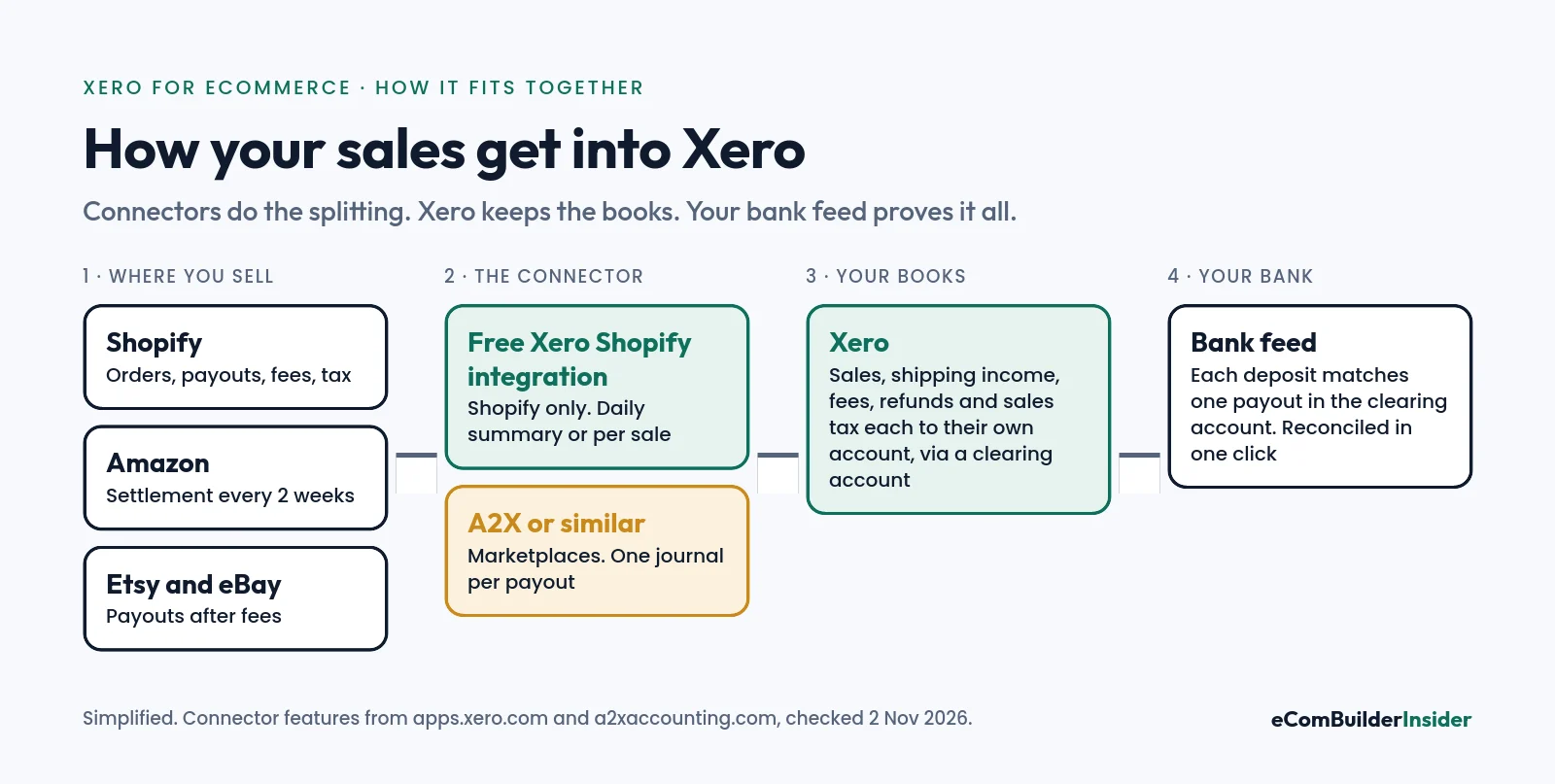
The mistake I see most often is recording each bank deposit as sales. A payout is your sales, minus fees and refunds, plus sales tax you owe. Record it as one number and your revenue, costs and tax are all wrong.
The fix is a connector that splits each payout into its parts and posts them to a clearing account in Xero. When the money lands in your bank, it matches that payout exactly, and you reconcile it in one click.
Step 1: Set Up Your Chart of Accounts
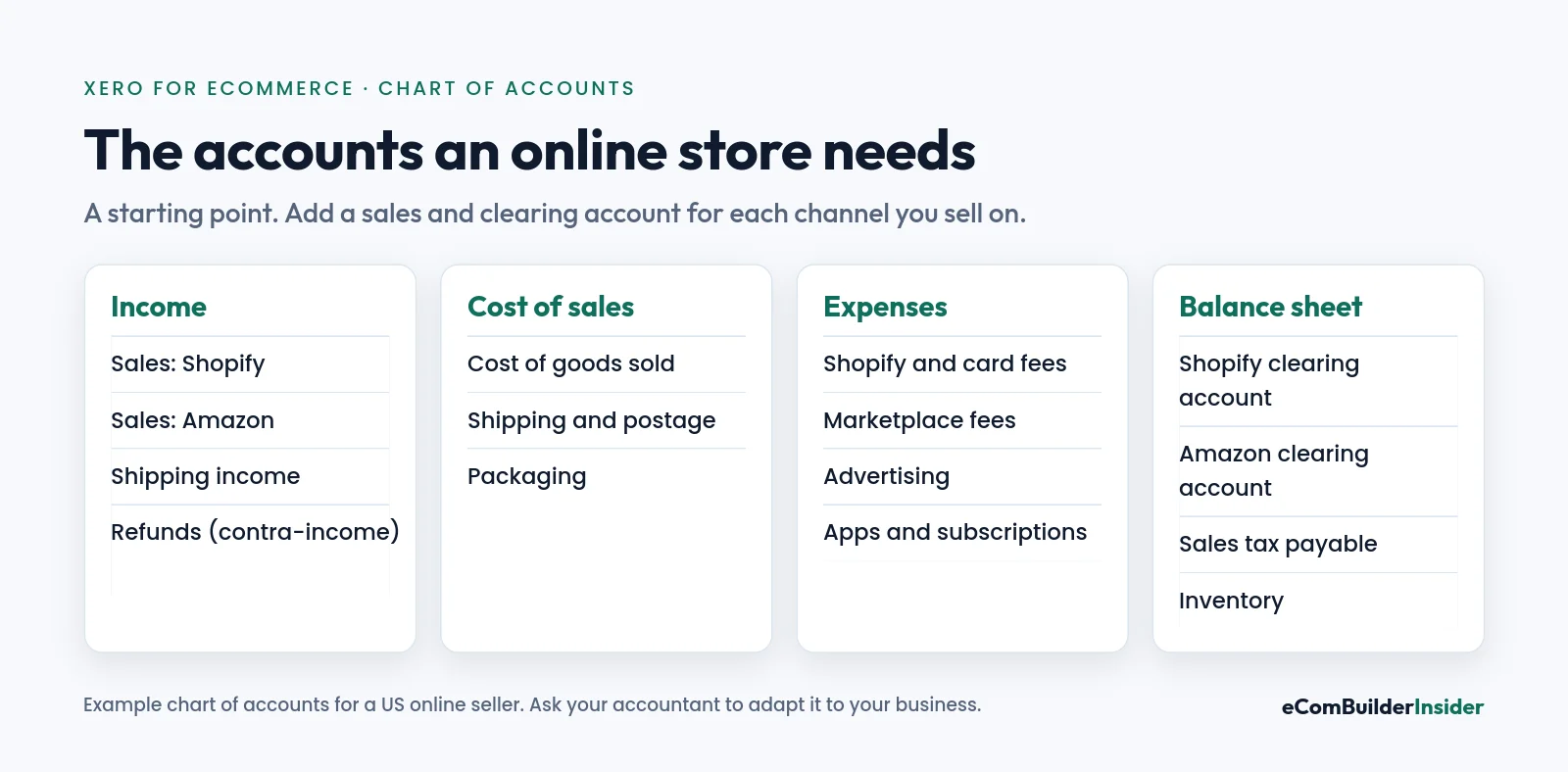
Do this before you connect anything, because your connectors will ask which account each item goes to. Separate sales accounts for each channel let you see which one really makes money. My chart of accounts guide explains each type.
Step 2: Connect Shopify
The Shopify integration by Xero is free on all Xero plans and covers both your online store and Shopify POS. It brings in sales, payouts, fees and taxes, and matches Shopify Payments payouts to your bank.
- In Xero, open the App Store and search for Shopify.
- Connect your store and choose a daily summary or per-sale transactions. For busy stores I recommend the daily summary: it keeps Xero lighter.
- Map sales, shipping, fees, refunds and taxes to the accounts you set up in step 1.
- Bring in history if you need it. The integration can sync up to 90 days back.
- Reconcile your first few payouts carefully against your bank feed.
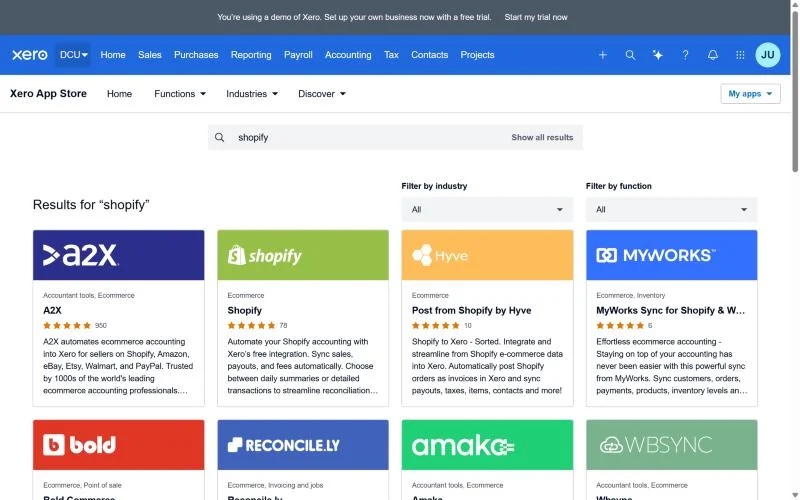
Step 3: Connect Amazon, Etsy, eBay and Walmart
Marketplace payouts are messier: Amazon settlements mix sales, referral fees, fulfilment fees, ads, refunds and reserves. This is where a settlement connector such as A2X earns its fee.
- What it does: turns each settlement into one journal in Xero, split by type, and matches the deposit in your bank.
- Channels: Amazon, Shopify, eBay, Etsy and Walmart.
- Price: for Shopify, Mini is $29 a month for up to 200 orders, Basic $45 for up to 500 and Professional $79 for up to 2,000 (A2X pricing). A2X says prices above Mini rise from 14 November 2026.
- Free trial: no card needed, and you can post 3 settlements to test it.
Accountant’s tip
Shopify only? Start with Xero’s free integration. Add A2X when you add a marketplace, or when Shopify payouts stop matching. Don’t run both for the same Shopify store, or you’ll record your sales twice.
Step 4: Handle Inventory and Cost of Goods Sold
Your profit isn’t sales minus fees. It’s sales minus what the products cost you. Without cost of goods sold (COGS), your margins look far better than they are.
- Simple stores: Xero’s tracked inventory items record COGS as you sell.
- Many products, kits or warehouses: use an inventory app such as Cin7 that posts COGS to Xero.
- Amazon FBA: make sure your stock at Amazon is counted in your inventory, not lost from view.
- Either way: count your stock at year end and adjust Xero to match.
Step 5: Get Sales Tax Right
In most US states, marketplaces such as Amazon, Etsy and eBay collect and pay sales tax for you under marketplace facilitator laws. On your own Shopify store, collecting and filing is usually your job.
- Map collected sales tax to a Sales tax payable account, never to income.
- Keep marketplace-collected tax separate so you don’t pay it twice.
- Use Shopify’s tax reports, or a tool such as Avalara or TaxJar, to file by state.
- Ask your accountant where you have sales tax nexus. It changes as you grow.
Selling in the UK, Australia or New Zealand? The same setup works, with VAT or GST in place of sales tax, and Xero’s local tax features handle the returns.
Your Month-End Routine
A good setup makes month-end boring. Here’s my checklist:
- Reconcile every bank and payment account in Xero, including PayPal and Stripe.
- Check each clearing account is at zero, or that what’s left matches payouts still in transit.
- Review fees, refunds and chargebacks by channel. Look for anything unusual.
- Record COGS or check your inventory app has posted it.
- Check sales tax payable against your tax reports.
- Run profit and loss by channel and compare it with last month.
More detail in my bank reconciliation guide.
Free tool · 4 quick steps
Not sure Xero is right for your store?
Answer four quick questions and get a shortlist that fits your size, budget and sales channels.
Common Mistakes to Avoid
- Recording payouts as sales. The most common error, and the most expensive to untangle.
- Running two connectors for one store, which doubles your sales.
- Ignoring COGS, so your profit looks better than it is.
- Putting sales tax in income. It belongs to the state.
- Keeping a spreadsheet as a second set of books. Use spreadsheets for analysis, and Xero as the record.
- Skipping reconciliation for months, then trying to fix it all at year end.
Xero vs QuickBooks for Ecommerce
Both work well with Shopify and A2X. Xero is cheaper for teams because every plan has unlimited users, and its own Shopify integration is free. QuickBooks Online includes Intuit’s Shopify connector and has stronger built-in inventory on Plus ($140 a month). If your accountant works in QuickBooks, that often decides it. Full details in my Xero vs QuickBooks comparison.
My Verdict
Xero is a very good choice for most online stores, as long as it’s set up properly. Start on Growing, set up your chart of accounts, connect Shopify with Xero’s free integration, and add A2X when you sell on marketplaces. Reconcile every month, and your numbers will tell you the truth.
Xero partner offer · ends 31 March 2027
Set up Xero with 80% off for 6 months
Unlimited users, a free Shopify integration and 1,000+ apps. No code needed through the partner link.
Frequently Asked Questions
Is Xero good for Shopify?
Yes. Xero’s own Shopify integration is free on all plans. It brings in sales, payouts, fees and taxes as a daily summary or per sale, and matches Shopify Payments payouts to your bank.
Can Xero connect to Amazon?
Yes, through a settlement connector such as A2X, which turns each Amazon settlement into a journal in Xero and matches the deposit in your bank.
Do I need A2X with Xero?
Not for a Shopify-only store, where Xero’s free integration is usually enough. For Amazon, eBay, Etsy or Walmart, a connector like A2X saves a lot of manual work.
Which Xero plan is best for ecommerce?
Growing, at $59 a month, for most stores. Early limits you to 20 invoices and 5 bills a month. Choose Established ($97) if you need multi-currency.
Can Xero handle ecommerce inventory?
For simple stores, yes, with tracked inventory items. For many products, kits or several warehouses, add an inventory app such as Cin7.
Should I record Shopify or Amazon deposits as sales?
No. A deposit is sales minus fees and refunds, plus sales tax. Use a connector and a clearing account so each part goes to the right account.
How much does Xero for ecommerce cost?
Xero Growing is $59 a month, or $11.80 a month for 6 months with the partner offer. Add A2X from $29 a month if you sell on marketplaces.
Next steps: best accounting software for ecommerce · Xero pricing plans · Xero review · Shopify pricing plans.
How this site makes money
Some links on this page are affiliate links. If you sign up through one, I may earn a commission at no extra cost to you. Read the full disclosure.