Best Accounting Software for Startups in 2026: What Should You Choose?
Compare the best accounting software for startups in 2026, including Xero, QuickBooks, FreshBooks, Zoho Books, and Sage.

When you’re choosing accounting software for a startup, the real question isn’t which platform has the most features. It’s which one won’t turn into a headache as the company grows.
Early on, you need clean books, reliable reports, easy invoicing, bank reconciliation, expense tracking, and a system your investors, accountant, and founders can all work with.
Good news: you don’t need an enterprise finance stack on day one. Just pick software with enough room to grow, without paying for complexity you don’t need yet.
What should startup accounting software actually do?
At minimum, your platform should help you keep business and personal money apart, record income and expenses, reconcile bank accounts, manage bills and invoices, and produce useful financial statements.
As you grow, you might also need payroll, inventory, subscriptions, project tracking, multiple users, budgets, cash-flow forecasting, and integrations with your payment, ecommerce, CRM, and payroll tools.
That’s why I wouldn’t pick software based only on what you need this month.

The best accounting software for startups: my shortlist
| Software | Best for | Why consider it |
|---|---|---|
| Xero | Startups wanting flexible cloud accounting | Strong collaboration and broad app ecosystem |
| QuickBooks Online | Startups wanting a familiar small-business platform | Broad accounting, payroll, payments, and integration ecosystem |
| FreshBooks | Service-based startups | Client billing, projects, and time tracking |
| Zoho Books | Cost-conscious startups and businesses using Zoho | Broad accounting features and wider Zoho ecosystem |
| Sage | Startups expecting more structured finance needs | Range of products from small-business accounting to advanced financial management |
1. Xero: my overall pick for many startups
If I were starting a typical cloud-based startup today, Xero would be one of the first platforms I’d look at.
It’s not because Xero has every feature. It’s because it gives you a solid accounting base while letting you connect other business systems as you grow.
You can handle invoices, expenses, bills, bank reconciliation, financial reports, and connected apps from the same place.
For a startup, that flexibility matters, because the software stack tends to change fast.
Why Xero works for startups
Startups often have founders, bookkeepers, accountants, managers, and outside advisors all touching the numbers. Cloud access makes that teamwork much easier.
Xero also has a big ecosystem of connected apps. That helps when you need to hook up ecommerce, payroll, expenses, CRM, inventory, or other tools.
You don’t need dozens of apps. You need one central accounting system that talks to the few tools you actually use.
Where I’d be careful with Xero
Don’t pick a plan just because the promotional price looks good. Check the regular price, your user needs, transaction limits, included features, and any add-ons you’ll actually use.
Also make sure your accountant is comfortable with Xero. A good workflow matters more than the brand.
2. QuickBooks Online: the familiar startup choice
QuickBooks Online is another strong option, especially if you want a platform most people already know.
Its ecosystem covers accounting, payroll, payments, reporting, and many third-party apps. That makes it easier to build a connected workflow as you grow.
It’s also a practical pick if your accountant or bookkeeper already works in it every day.
Why startups choose QuickBooks
The biggest advantage is familiarity. Plenty of accountants and bookkeepers already know the platform, which cuts the learning curve when you bring in financial help.
It also gives you a path from basic bookkeeping into more advanced small-business accounting.
Where I’d be careful
QuickBooks has a lot of products, plans, and add-on services. That flexibility can make the final bill harder to predict than the advertised starting price.
Work out the total cost of the workflow you actually need.
3. FreshBooks: excellent for service startups
If your startup sells consulting, design, development, marketing, coaching, or another professional service, FreshBooks is worth a look.
It puts client billing, time tracking, projects, expenses, and payments close together.
That’s handy when the main thing your business sells is people doing work for clients.
I wouldn’t put FreshBooks at the top for an inventory-heavy startup. Product businesses need to plan for purchasing, stock, COGS, returns, and sales-channel reconciliation.
4. Zoho Books: worth considering if budget matters
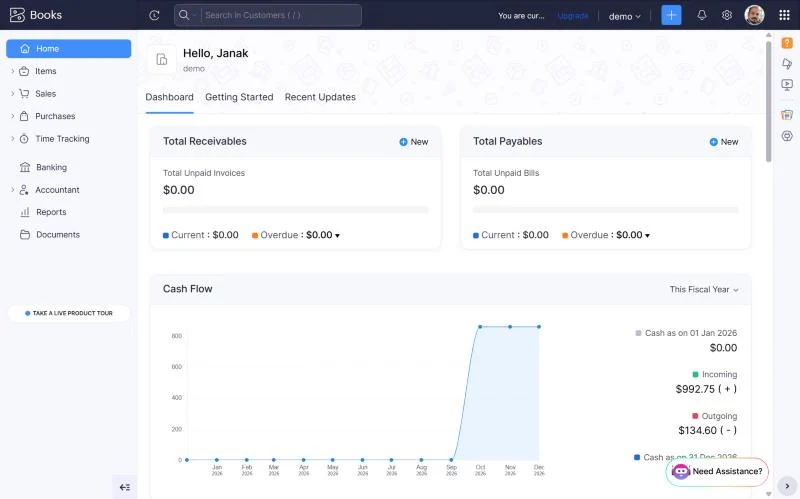
Zoho Books can be a good pick if you want a broad accounting platform without jumping straight into a high-cost finance stack.
It gets more interesting if you already use other Zoho products. The wider ecosystem can cut down on the number of disconnected systems you need.
As with any accounting platform, check plan limits and regional pricing before you decide.
5. Sage: for startups with more structured finance needs
Sage is worth considering when you expect the finance side of the business to get more structured.
The Sage product family covers different levels of complexity, so pin down the exact product you’re comparing. A small-business Sage product is a very different proposition from Sage Intacct.
If you expect multiple entities, more complex reporting, or advanced financial management, Sage’s higher-end products can become relevant.
How much should a startup spend on accounting software?
Early founders naturally want to keep costs down.
That’s sensible. But accounting is one place where saving the wrong $20 can cost you hours of clean-up later.
Look at the total monthly cost, including payroll, payment processing, extra users, integrations, inventory tools, and other add-ons.
Then compare that with the time it saves you.
Don’t build your startup around an introductory discount
Promotions can make a subscription look incredibly cheap for the first few months.
That’s useful, but it shouldn’t decide your long-term choice.
Write down the regular price and budget for it. If you can’t comfortably afford the normal price, the discount hasn’t solved the real problem.
Cloud accounting is usually the right starting point
For most modern startups, I’d start with cloud accounting.
Your accountant can get into the books remotely. Founders can check reports from anywhere. Bank feeds and integrations cut down on manual entry.
You also avoid tying your accounting to one office computer.
There are exceptions, but cloud is the sensible default for most new companies.
What reports should a startup watch?
You don’t need to stare at every report every day.
Start with a small group of numbers:
- Profit and loss
- Balance sheet
- Cash position
- Accounts receivable
- Accounts payable
- Monthly revenue
- Major operating expenses
- Budget versus actual results
If you’re funded, cash runway is also a critical number to track. Your accountant or finance team can help you define the right calculation for your situation.
Accounting software and investors
Investors care less about which logo sits on your dashboard than about whether the numbers are reliable.
Clean books make financial due diligence much easier. Inconsistent categories, missing reconciliations, unexplained transfers, and messy paperwork invite questions you don’t need.
Pick software that helps your team keep records clean, every month.
Separate bookkeeping from financial planning
Accounting software records what happened. It doesn’t automatically tell you what to do next.
Startups also need forecasting, budgeting, cash-flow planning, and scenario analysis. You might use spreadsheets, a planning tool, or a finance platform alongside your accounting system.
That’s completely normal.
Just keep your accounting system as the source of truth for historical financial data.
What about payroll?
Payroll can become one of your biggest recurring costs as you hire.
Before choosing accounting software, check how payroll works in your country, whether the payroll product is included or sold separately, and how payroll entries flow into the general ledger.
Don’t assume a US payroll feature works the same way in Canada, the UK, Australia, Nepal, or anywhere else.
What about ecommerce startups?
Ecommerce startups have to think beyond invoices.
Sales data, payment processor fees, refunds, chargebacks, inventory, COGS, taxes, and marketplace settlements all need to reach your accounting records correctly.
Xero and QuickBooks both have large ecosystems of ecommerce integrations. Zoho Books can also make sense, depending on your sales channels and connectors.
Before you subscribe, test one full settlement from your store to your bank account. That single exercise can expose problems a feature comparison never will.
What about SaaS startups?
SaaS businesses have their own accounting challenges.
Recurring billing, annual contracts, deferred revenue, processor fees, refunds, and customer metrics can make bookkeeping more complicated than a simple service business.
Your accounting software may need to connect to the billing and payment systems that run the subscription side of the business.
If you’re dealing with significant deferred revenue or complex revenue recognition, bring your accountant in early. Don’t try to solve it all with software settings.
When should a startup hire a bookkeeper?
There’s no magic revenue number.
A better signal is complexity. If bank reconciliation, bills, payroll, sales tax, inventory, or monthly reporting are pulling founders away from building the company, it’s probably time for help.
You don’t necessarily need a full-time hire. A reliable part-time bookkeeper or accounting service can be enough at an early stage.
Do startups need an accountant?
For tax and financial decisions, professional advice can pay off from the start.
Even if you handle day-to-day bookkeeping yourself, bring an accountant in before big decisions: hiring employees, raising investment, issuing shares, entering another country, acquiring another company, or changing the business structure.
How to choose the right startup accounting software
- Define the business model. Service, ecommerce, SaaS, agency, marketplace, and product businesses all have different needs.
- List your required integrations. Include banks, payment processors, ecommerce platforms, payroll, CRM, inventory, and expense tools.
- Estimate your next two years of growth. Think about users, revenue, transactions, employees, and entities.
- Calculate the normal price. Ignore the promotion for this calculation.
- Ask your accountant. Their familiarity can save you time and money.
- Test the monthly close. Make sure you can reconcile the bank and produce your key reports without unnecessary manual work.
So, what is the best accounting software for startups?
For many startups, I’d put Xero and QuickBooks at the top of the shortlist.
Xero is especially appealing if you want flexible cloud accounting and a broad connected-app ecosystem. QuickBooks makes sense when accountant familiarity, a wide small-business ecosystem, and an established workflow matter most.
FreshBooks is the specialist I’d consider for service startups. Zoho Books is worth a look when cost and the wider Zoho ecosystem matter. Sage deserves a closer look when the startup expects structured or advanced financial requirements.
The best choice is the one that keeps your books clean today without forcing an unnecessary migration tomorrow.
Frequently asked questions
What is the best accounting software for startups?
Xero and QuickBooks are strong general choices for many startups. FreshBooks can suit service businesses better, Zoho Books can appeal to cost-conscious companies, and Sage fits more structured financial requirements.
Should a startup use Xero or QuickBooks?
Both are strong options. Compare integrations, pricing, accountant support, reporting, payroll, and the workflow your startup actually needs, rather than picking by brand popularity.
Is free accounting software good for startups?
It can be useful at the very beginning, but check the limits carefully. Free software can get restrictive once you add employees, inventory, integrations, or more advanced reporting.
Should startups use cloud accounting?
For most startups, yes. Cloud accounting makes collaboration easier and works naturally with online banking, payments, payroll, ecommerce, and other connected services.
When should a startup hire a bookkeeper?
Consider hiring help once bookkeeping gets complex enough to distract founders, or when the business needs reliable monthly reporting, payroll, tax support, or inventory reconciliation.
Related reading: Best Free Accounting Software 2026: What Is Actually Free?
Related guides: Accounting Software Resource Center · Accounting Software Resource Center