Wave Accounting Review 2026: Free Isn’t What It Was
An accountant tests Wave in 2026: what the free Starter plan does, what Pro adds for $19 a month, card and payroll fees, pros and cons, and who should use it.

So, is Wave still free in 2026? Yes. The Starter plan costs nothing and you can send as many invoices as you like. But “free” now comes with a few catches that the old reviews don’t mention.
I’m an accountant, and I set up a Wave Starter account to see exactly where the free plan stops and where you start paying. Below is what you get for $0, what Pro adds for $19 a month, and the fees that sit outside both.
Verdict
Still the best free option for a one-person business
Wave’s free Starter plan handles invoicing and basic bookkeeping well. You’ll type in or upload bank transactions yourself, though, and every card payment carries a 60¢ fee on top of 2.9%. Pro fixes the bank feed for $19 a month.
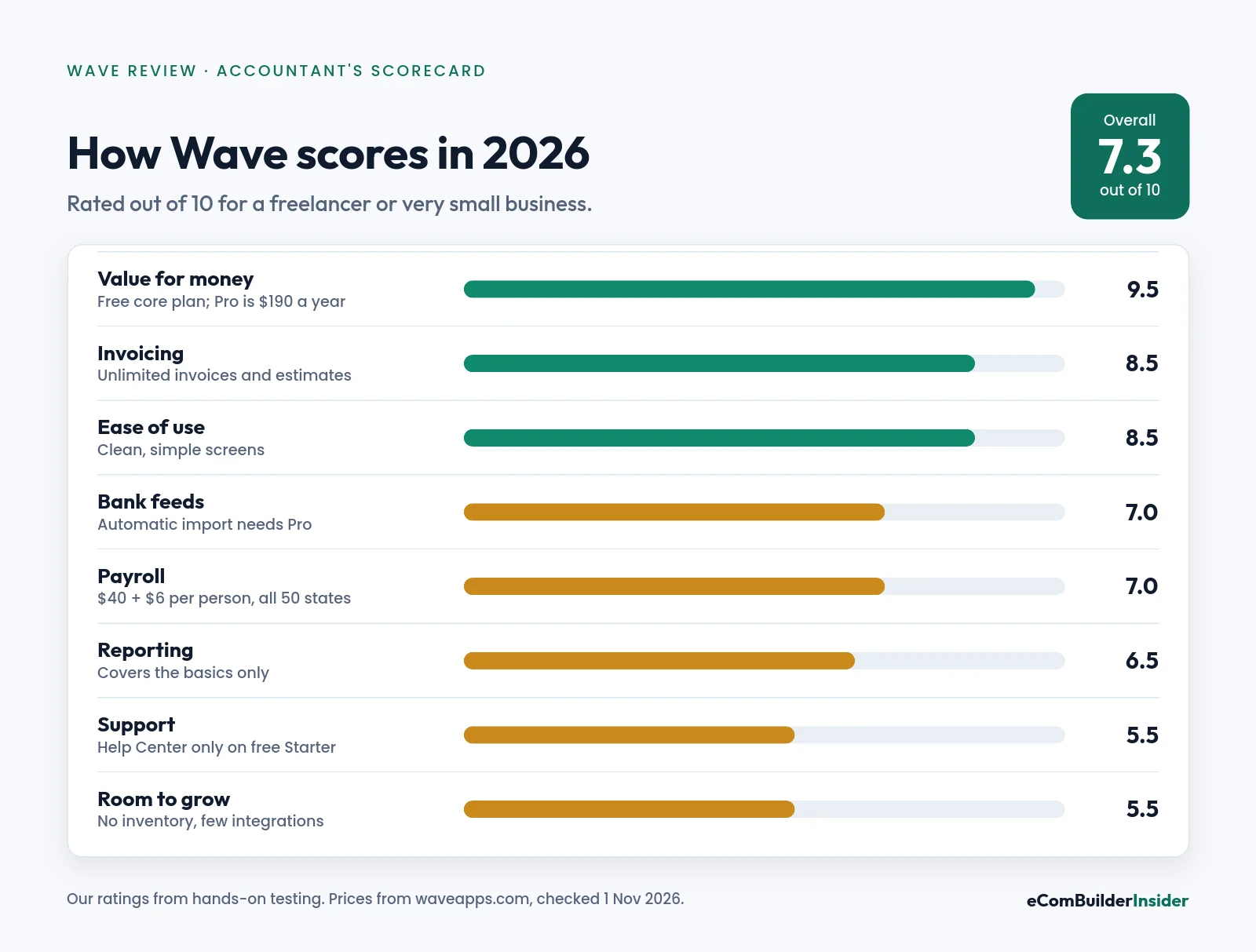
7.3/10
Our overall score
$0
Starter, unlimited invoices
$190
Pro, per year
Quick answer
- Starter ($0) is great for freelancers and sole traders who send invoices and don’t mind uploading a bank statement each month.
- Pro ($19/mo or $190/yr) is worth it once typing in bank transactions starts eating more than an hour a month.
- Watch the card fees: 2.9% + 60¢ per card payment on Starter. Bank (ACH) payments cost 1%, with a $1 minimum.
- Skip Wave if you hold stock, need several people in the books, or expect to grow fast. Look at Zoho Books or Xero instead.
Wave at a Glance
| Area | My take |
|---|---|
| Best for | Freelancers, contractors and very small service businesses in the US or Canada |
| Price | Starter $0; Pro $19/mo or $190/yr |
| Invoices | Unlimited on both plans |
| Bank feeds | Automatic import on Pro only; Starter uses CSV upload or manual entry |
| Card payments | 2.9% + 60¢ on Starter; Pro waives the 60¢ on your first 10 a month |
| Payroll | Add-on: $40/mo + $6 per employee or contractor |
| Inventory | Not supported |
| Support | Help Center on Starter; chat and email with a paid add-on |

How I Tested Wave
I opened a Wave Starter account and worked through the dashboard, invoicing, the chart of accounts and bank transactions. The screenshots below come from that account (October 2026). Prices and plan features were checked on Wave’s pricing page on 1 November 2026. Here’s how I test accounting software.
Wave Pricing in 2026: Starter vs Pro
There are just two plans. Both include unlimited invoices, estimates, bills and bookkeeping records. The difference is automation.
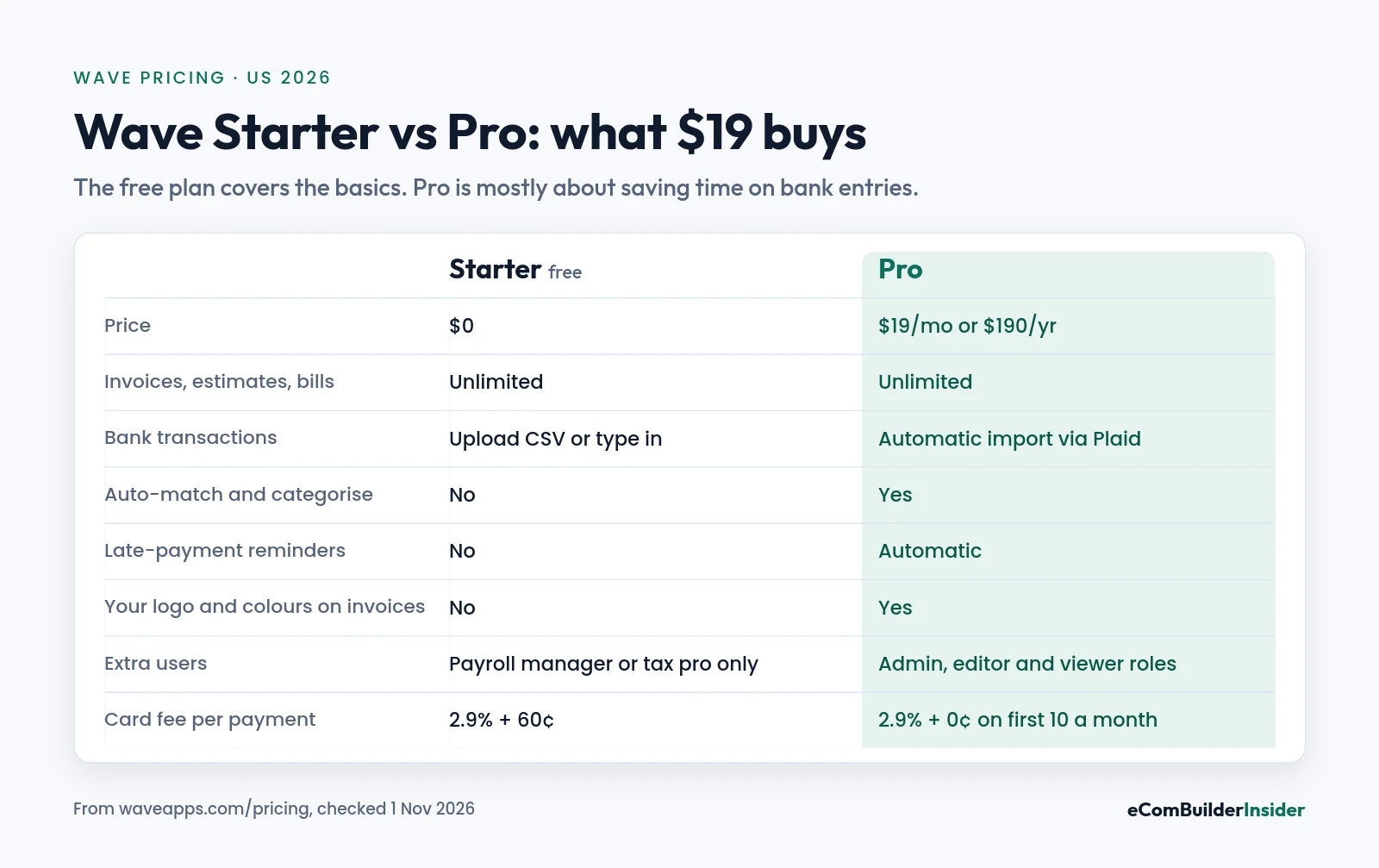
| Starter | Pro | |
|---|---|---|
| Price | $0 | $19/mo or $190/yr (save $38) |
| Invoices, estimates, bills | Unlimited | Unlimited |
| Bank transactions | CSV upload or manual entry | Automatic import via Plaid, auto-merge and categorisation |
| Late-payment reminders | Manual | Automatic |
| Branding | Wave branding on invoices | Your logo and colours, no Wave footer |
| Users | Payroll manager or tax pro roles only | Admin, editor and viewer roles |
| Card fee | 2.9% + 60¢ | 2.9% + 0¢ on your first 10 a month, then 2.9% + 60¢ |
What You Get With the Free Starter Plan
Starter isn’t a trial with a countdown. It’s a real accounting plan, and for a one-person service business it covers most of the weekly work.
Invoicing and estimates
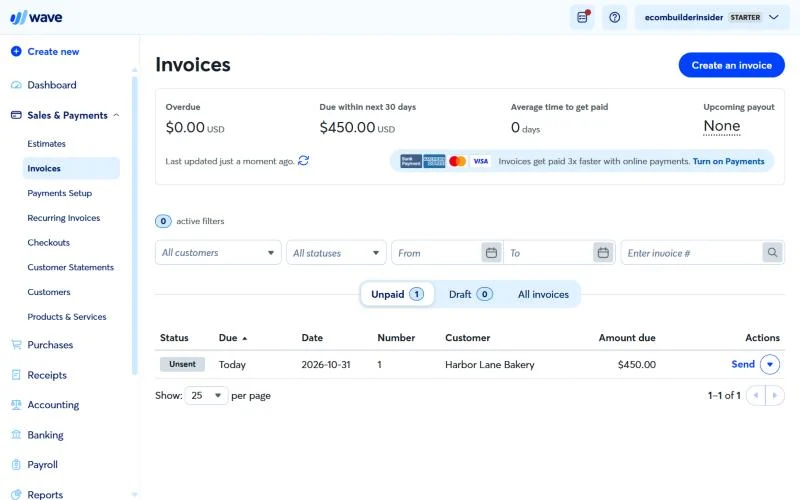
Create unlimited invoices and estimates, send them by link or PDF, and track what’s due. You can invoice from the mobile app too.
Bookkeeping and reports
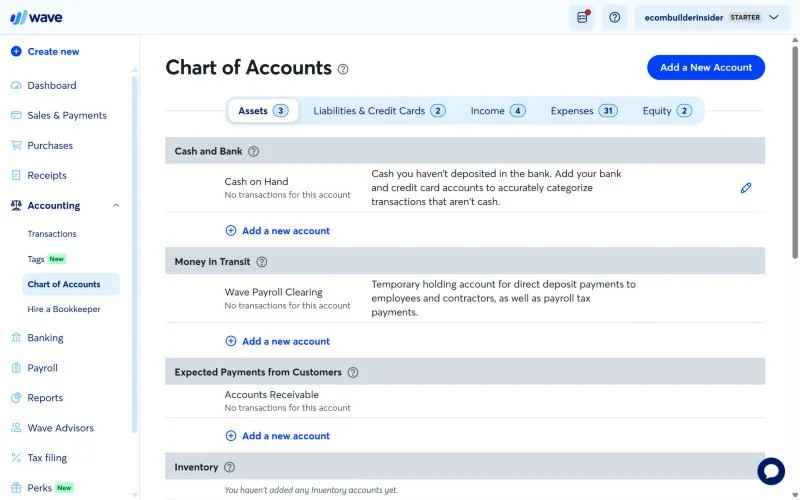
Record income, expenses and bills against a proper double-entry chart of accounts, then run a profit and loss and balance sheet. That makes Wave more than an invoicing app: your accountant can work from it at tax time.
Dashboard
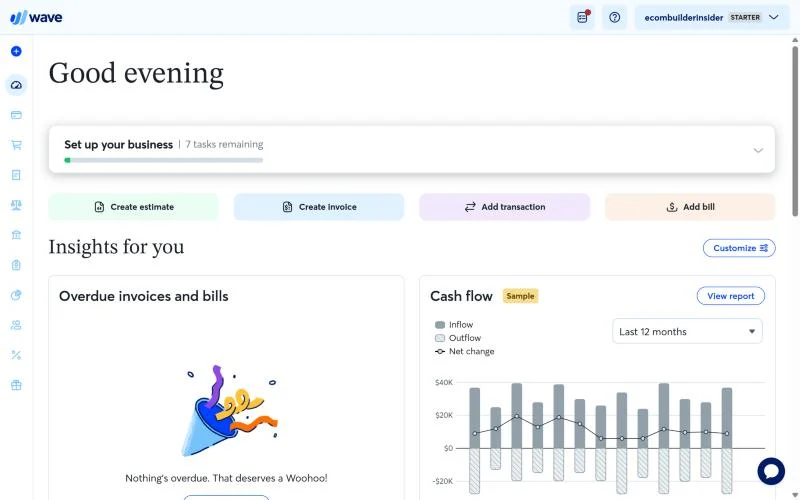
The dashboard shows cash flow, what customers owe you and a setup checklist. It’s simple, which is exactly what a new business owner needs.
Where the Free Plan Falls Short
This is where the “free accounting software” reputation needs an update.
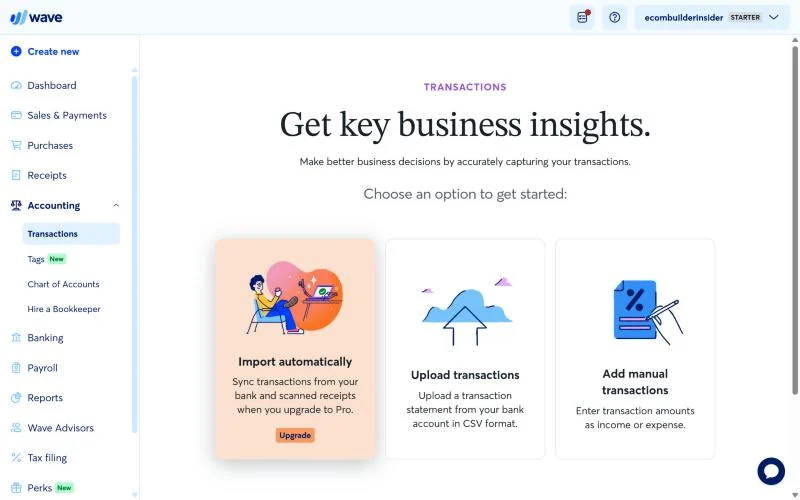
No automatic bank feed
On Starter, Wave asks you to upgrade for automatic bank imports. You can still upload a CSV file from your bank or type transactions in. For 30 transactions a month, that’s fine. For 300, it’s a chore, and the most likely place for errors to creep in.
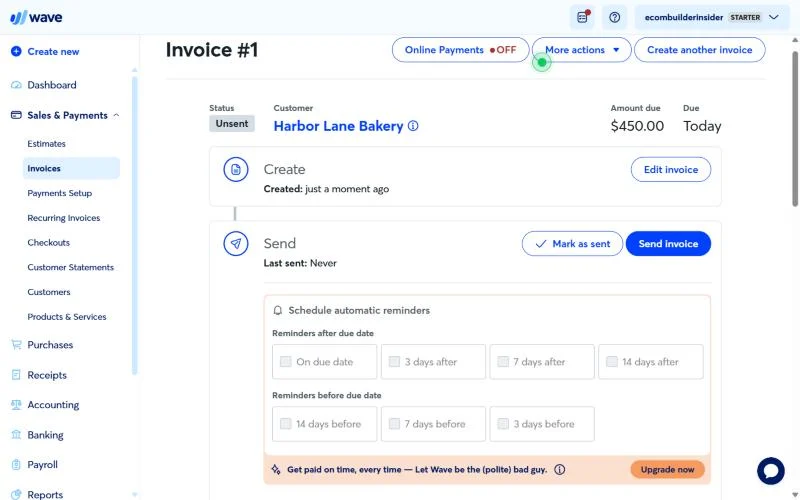
No automatic payment reminders
Chasing late invoices is manual on Starter. Pro sends reminders for you.
Basic support and growth limits
Starter gets the Help Center only. Live chat and email come with a paid add-on, Monday to Friday, 9am to 4:45pm Eastern. There’s no inventory tracking and few integrations, so product sellers and growing teams will outgrow it.
Is Wave Pro Worth $19 a Month?
Here’s how I’d think about it as an accountant. Don’t upgrade for the card-fee discount. Upgrade for the bank feed.
- The card-fee saving is small. Pro waives the 60¢ on your first 10 card payments a month. That’s $6 a month at most, so it covers about a third of the price.
- The bank feed is the real value. If importing, matching and categorising transactions by hand takes you more than an hour a month, $19 is cheap for the time back, and auto-import cuts typing mistakes.
- Pay yearly if you’re sure. $190 a year saves $38 against monthly billing.
My rule of thumb: under about 40 bank transactions a month, stay on Starter. Above that, Pro pays for itself in time.
The Costs Outside the Plan
Starting at $0 doesn’t mean you’ll pay nothing. These are the extras to budget for.
| Extra | Cost (US) | Notes |
|---|---|---|
| Card payments | 2.9% + 60¢ (Amex 3.4% + 60¢) | Pro waives the 60¢ on the first 10 a month |
| Bank (ACH) payments | 1%, $1 minimum | Much cheaper than cards on larger invoices |
| Payroll | $40/mo + $6 per employee or contractor | Tax filing in all 50 states |
| Receipt scanning | Paid add-on on Starter | Check current price in your account |
| Wave Advisors bookkeeping | From $149/mo | A bookkeeper does the books for you |
A quick example: a client pays a $1,000 invoice. By card, Wave keeps $29.60. By bank transfer, it keeps $10. If your clients will pay by ACH, ask them to.
Wave Payroll
Wave Payroll costs $40 a month plus $6 per active employee and $6 per contractor paid, and Wave now handles payroll tax filing in all 50 states. For five employees, that’s $70 a month, the same as FreshBooks and a little more than Xero’s Gusto add-on ($66).
In Canada, it’s $25 CAD a month plus $6 per person, everywhere except Quebec.
Wave Pros and Cons
Pros
- Genuinely free plan with unlimited invoices and estimates
- Proper double-entry bookkeeping your accountant can use
- Clean, simple interface that’s quick to learn
- Pro is one of the cheapest paid plans around at $190 a year
- Payroll priced the same in every state
Cons
- Automatic bank import needs Pro
- Card payments carry a 60¢ fee on top of 2.9%
- Help Center only on the free plan
- No inventory and few integrations
- Only available in the US and Canada
Who Should Use Wave, and Who Should Skip It
Wave is a great fit if you:
- work alone as a freelancer, consultant or contractor
- send invoices and want your software bill at $0
- have a modest number of bank transactions each month
- are in the US or Canada
Look elsewhere if you:
- sell physical products and need inventory (try Zoho Books or QuickBooks)
- have several people working in the books (try Xero, with unlimited users)
- bill clients by the hour and want time tracking (try FreshBooks)
- rely on lots of app integrations
Wave vs the Alternatives
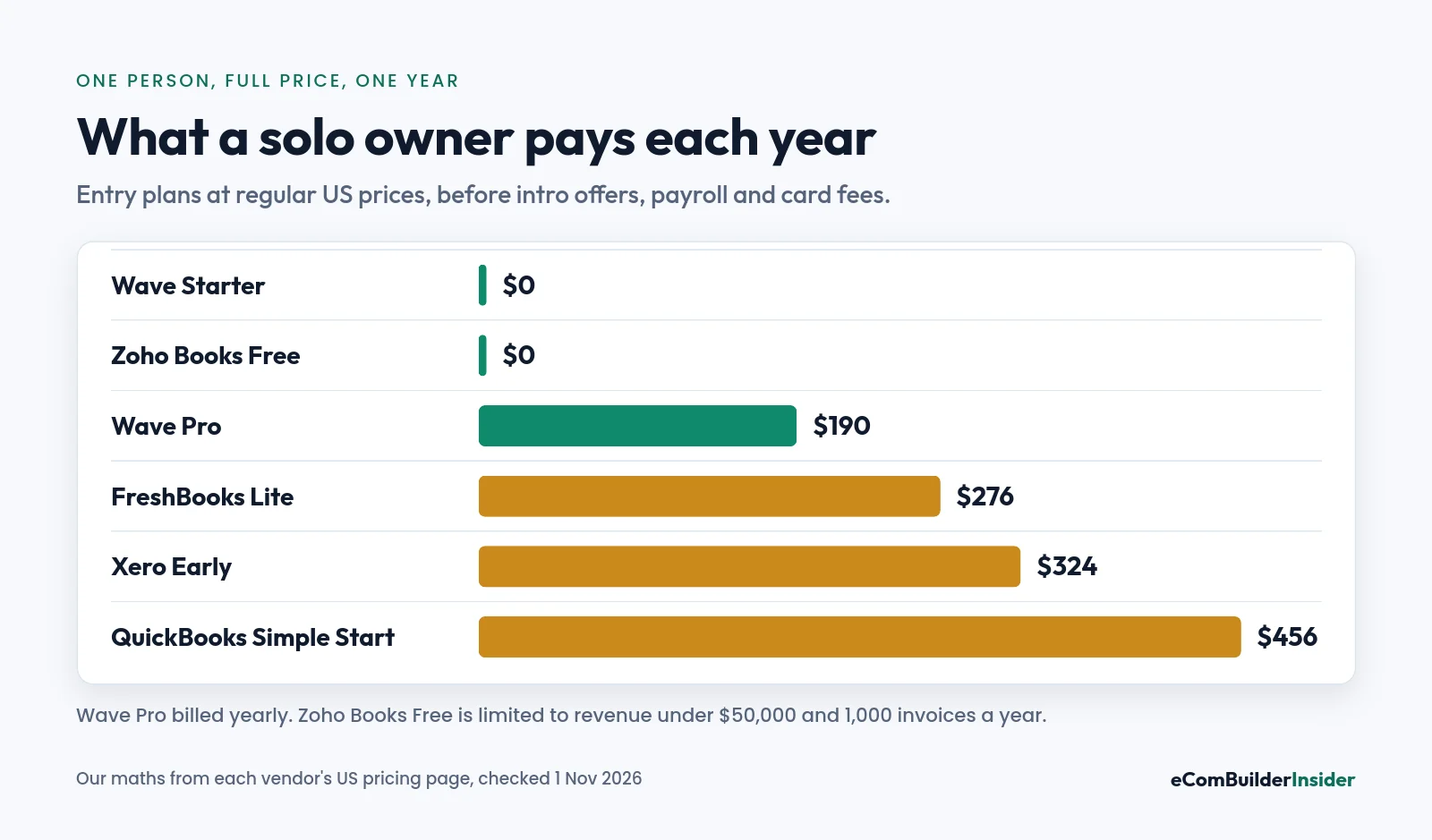
| Software | Cheapest plan | Free plan? | Best for |
|---|---|---|---|
| Wave | $0 or $19/mo | Yes, unlimited invoices | Solo service businesses |
| Zoho Books | $0 or $15/mo yearly | Yes, under $50,000 revenue | Budget-conscious small teams |
| FreshBooks | $23/mo | No | Freelancers who bill by the hour |
| Xero | $27/mo | No | Teams that need unlimited users |
| QuickBooks Online | $38/mo | Yes, very limited | Growing, accountant-led businesses |
More head-to-heads: Wave vs QuickBooks · Xero vs Wave · best free accounting software.
Free tool · 4 quick steps
Not sure Wave is enough for you?
Answer four quick questions about your business and get a shortlist that fits your size, budget and the apps you use.
My Verdict on Wave in 2026
Wave is still the best free accounting software for a one-person service business in the US or Canada. It just isn’t “everything free” any more.
Start on Starter. Upload your bank statement once a month and ask clients to pay by bank transfer where you can. When the monthly upload starts to feel like a chore, move to Pro at $190 a year. And when you hire, hold stock or need your accountant in the books every week, that’s your cue to move to Xero, QuickBooks or Zoho Books.
Prices and features change, so check Wave’s pricing page before you sign up.
Frequently Asked Questions
Is Wave accounting really free?
Yes. The Starter plan is $0 with unlimited invoices, estimates, bills and bookkeeping records. You pay for card and bank payments, payroll, receipt scanning and bookkeeping help if you use them.
How much is Wave Pro?
$19 a month or $190 a year in the US ($25 or $250 CAD in Canada). It adds automatic bank imports, automatic payment reminders, your branding on invoices and extra user roles.
What are Wave’s payment processing fees?
2.9% + 60¢ per card payment (3.4% + 60¢ for Amex), and 1% for bank (ACH) payments with a $1 minimum. On Pro, the 60¢ is waived on your first 10 card payments each month.
Does Wave connect to my bank?
On Pro, yes: transactions import automatically through Plaid if your bank is supported. On the free Starter plan, you upload a CSV file or enter transactions yourself.
Does Wave do payroll?
Yes, as an add-on. It costs $40 a month plus $6 per employee or contractor in the US, with tax filing in all 50 states.
Is Wave good for ecommerce or inventory?
Not really. Wave doesn’t track inventory, so product sellers are better served by Zoho Books Professional or QuickBooks Plus.
Is Wave available outside the US and Canada?
Wave prices its plans in US and Canadian dollars only, so it’s built for businesses in those two countries.
More on Wave in the Wave Accounting Resource Center, or browse every guide in the Accounting Software Resource Center.
About the author: Janak Uparkoti is an accountant and the founder of eComBuilderInsider. He writes practical guides on accounting software, bookkeeping and ecommerce accounting.