Thinking about a Xero free trial? Don’t spend the whole trial clicking around the dashboard. Use the time to test the parts of Xero that will matter once you start paying: bank feeds, reconciliation, invoicing, bills, reporting, and the workflow your accountant will use.
I’m Janak Uparkoti, an accountant and the founder/editor of eComBuilderInsider. I write accounting-software guides because choosing a bookkeeping platform is easier when you test real business tasks instead of just reading a feature list.
Xero partner offer · checked 1 Nov 2026
80% off Xero for 6 months
For organisations new to Xero, on any plan, until 31 March 2027. No code needed: the discount applies when you sign up through the link.
Xero currently promotes a 30-day free trial on its US site. It also advertises a one-month-free offer on eligible purchases, so check the signup page carefully. A trial and a promotional offer aren’t necessarily the same thing.
Regional offers can differ, so don’t assume the US terms apply in your country.
Watch: Xero Tutorial for Beginners 2026 – Full Course (Step by Step)Subscribe
What should you test during the trial?
The best Xero tri
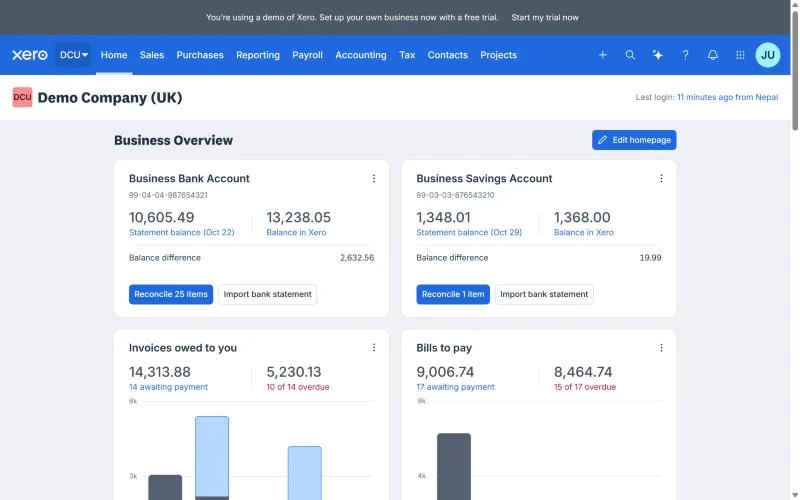
Xero Business Overview dashboard (Demo Company UK). Screenshot from the Xero demo company, October 2026.
al isn’t a tour of every menu. It’s a small simulation of your real bookkeeping.
1. Connect a bank account
Bank feeds are one of the first things I’d test. You want to know whether your bank connects properly and whether the imported transactions are easy to review and reconcile.
Xero’s accounting tools are built around bank reconciliation, invoicing, bills, expenses, and financial reporting.
2. Create a real invoice
Use an actual client or a test customer, and create the kind of invoice you send regularly. Check the layout, payment options, tax treatment, recurring billing, and how quickly you can find the invoice later.
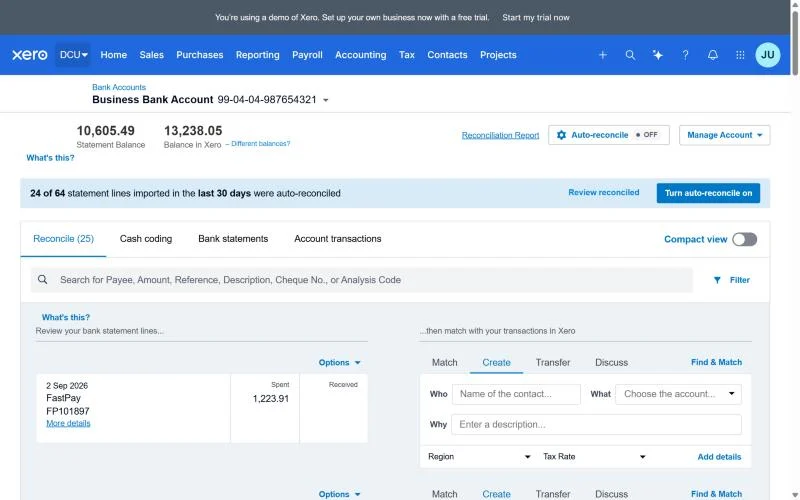
3. Reconcile transactions
This is where accounting software either earns its keep or becomes another chore.
Import a few transactions and see whether the suggested matches make sense. Then deliberately test a transfer, a bank fee, a customer payment, and a transaction that needs a manual category.
4. Run the reports you actually need
Don’t open the Profit and Loss report just because every review tells you to. Check the reports you and your accountant will really use.
Xero provides reports such as profit and loss, balance sheet, and cash-flow information, with options to customise them.
What happens when the trial ends?
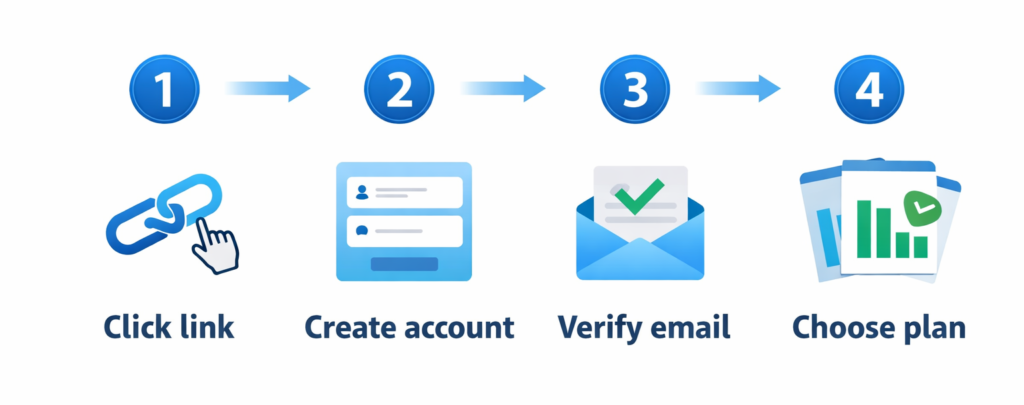
Read the current signup terms here rather than relying on an old blog post. Xero’s trial and promotional offers can change by region and over time.
Before the trial ends, decide whether the software fits your workflow. If it doesn’t, export anything you need and make sure you understand what happens to your account and data.
A common mistake is spending two weeks choosing colours, importing old contacts, and watching tutorials, only to discover that the bank-reconciliation workflow isn’t comfortable.
Start with the accounting tasks that happen every week.
Is Xero worth trying?
Yes, especially if you’re comparing Xero with QuickBooks, FreshBooks, Zoho Books, or spreadsheets. Thirty days gives you enough time to run a realistic monthly bookkeeping cycle.
I’d also invite your accountant or bookkeeper before the trial ends. A platform can look perfect to the business owner and still create unnecessary work for the person who closes the books.
My practical Xero trial checklist
Connect your
Bank reconciliation in Xero: statement lines on the left, matching Xero transactions on the right. Screenshot from the Xero demo company, October 2026.
main business bank account.
Import or create a few realistic customers.
Send a sample invoice.
Enter several bills and expenses.
Reconcile a real-looking bank statement.
Run a Profit and Loss report.
Check your balance sheet.
Test accountant access.
Check the integrations you already rely on.
Write down the regular price before the trial ends.
Xero free trial vs simply staying on spreadsheets
Spreadsheets are cheap, but they put more responsibility on you to maintain formulas, transaction records, version control, and reconciliations.
Cloud accounting becomes more useful once the business has enough transactions that manual bookkeeping starts taking time away from selling, serving customers, or running the company.
Watch my Xero beginner video
If you’d rather see the workflow before trying it yourself, I have a step-by-step Xero beginner tutorial. It covers setup, bank connections, invoices, bills, reconciliation, reports, integrations, and the current Xero interface.
Janak Uparkoti is an accountant and founder/editor of eComBuilderInsider. He publishes practical guides on accounting software, bookkeeping, ecommerce accounting, and business tools, focusing on the questions small-business owners actually face when choosing software.
You don’t need to migrate your whole historical file during a trial. Start with a controlled test. Connect the bank account you use most, create a handful of customers, enter representative expenses, and run the reports you rely on.
That gives you enough information to judge the workflow without turning a free trial into a half-finished migration.
Questions to ask your accountant
Can you work comfortably in Xero?
Which reports do you need from me each month?
Do you recommend importing historical transactions?
Which integrations should I connect?
Which Xero plan actually covers our workflow?
The trial is also a test of your bookkeeping habits
Good software won’t fix incomplete bookkeeping by itself. Use the trial to set a weekly routine for categorising transactions, reconciling the bank, reviewing receivables, and checking reports.
Hello!
Janak Uparkoti
Author & Founder
Janak Uparkoti is an accountant and the founder and editor of eComBuilderInsider. He writes practical guides, reviews, and comparisons about accounting software, bookkeeping, ecommerce accounting, and business software, drawing on his professional accounting background and software research. He also publishes related accounting software tutorials and reviews on YouTube.