Sage vs QuickBooks 2026: Which Accounting Software Is Better?
Sage vs QuickBooks 2026: compare pricing, features, reporting, inventory, payroll and ease of use to see which accounting software fits your business.

Sage vs QuickBooks depends heavily on what kind of business you run. Both have been around for a long time, but they don’t tackle every accounting problem in exactly the same way.
QuickBooks is often the easier pick for a small business that wants a familiar cloud platform with a big ecosystem of accountants, apps, payroll, payments, and business tools. Sage gets more interesting when you want a more structured accounting workflow, stronger operational controls, or you already work inside the Sage ecosystem.
So, which one should you choose in 2026? Let’s look at the practical differences rather than just counting features.
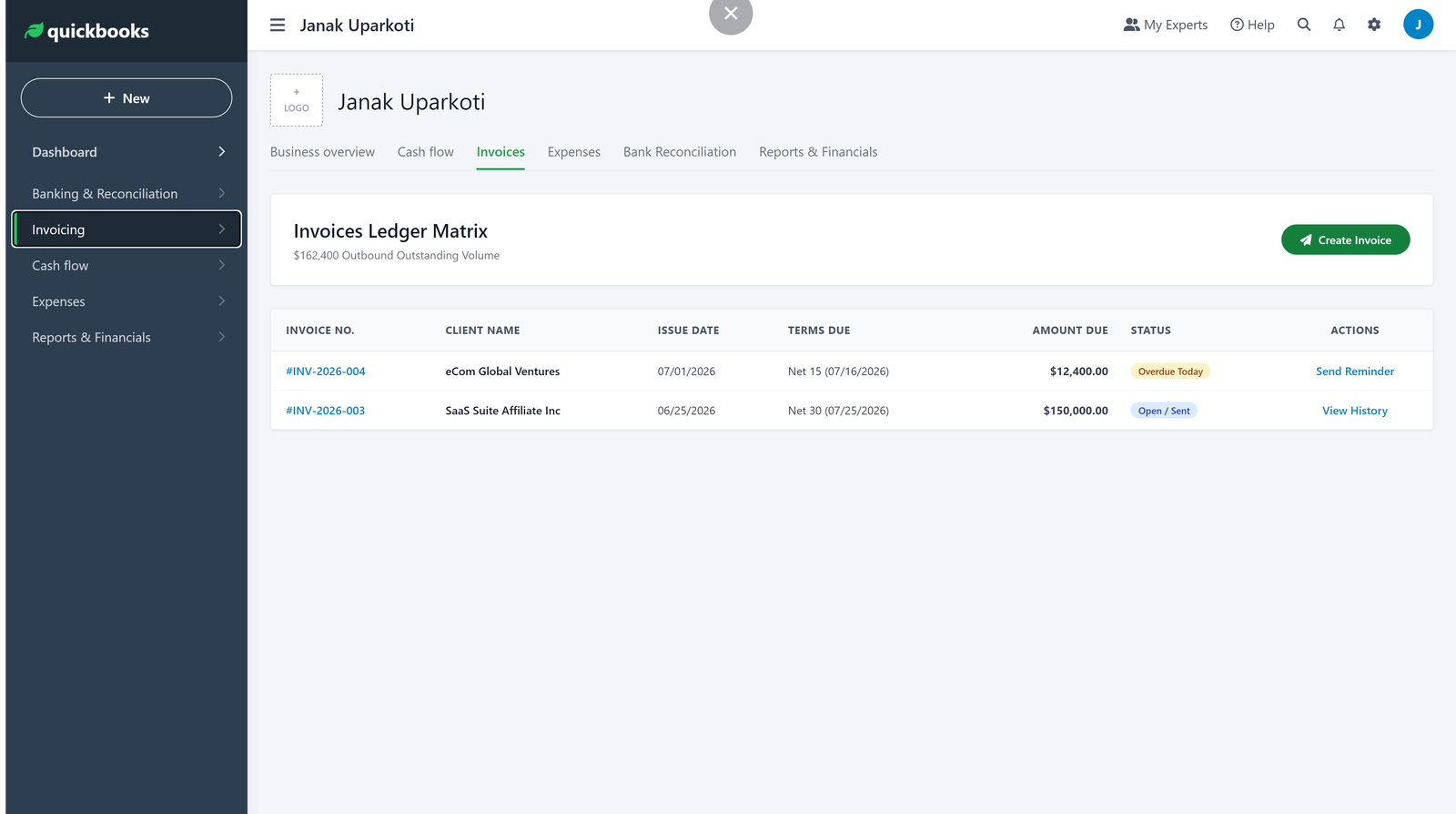
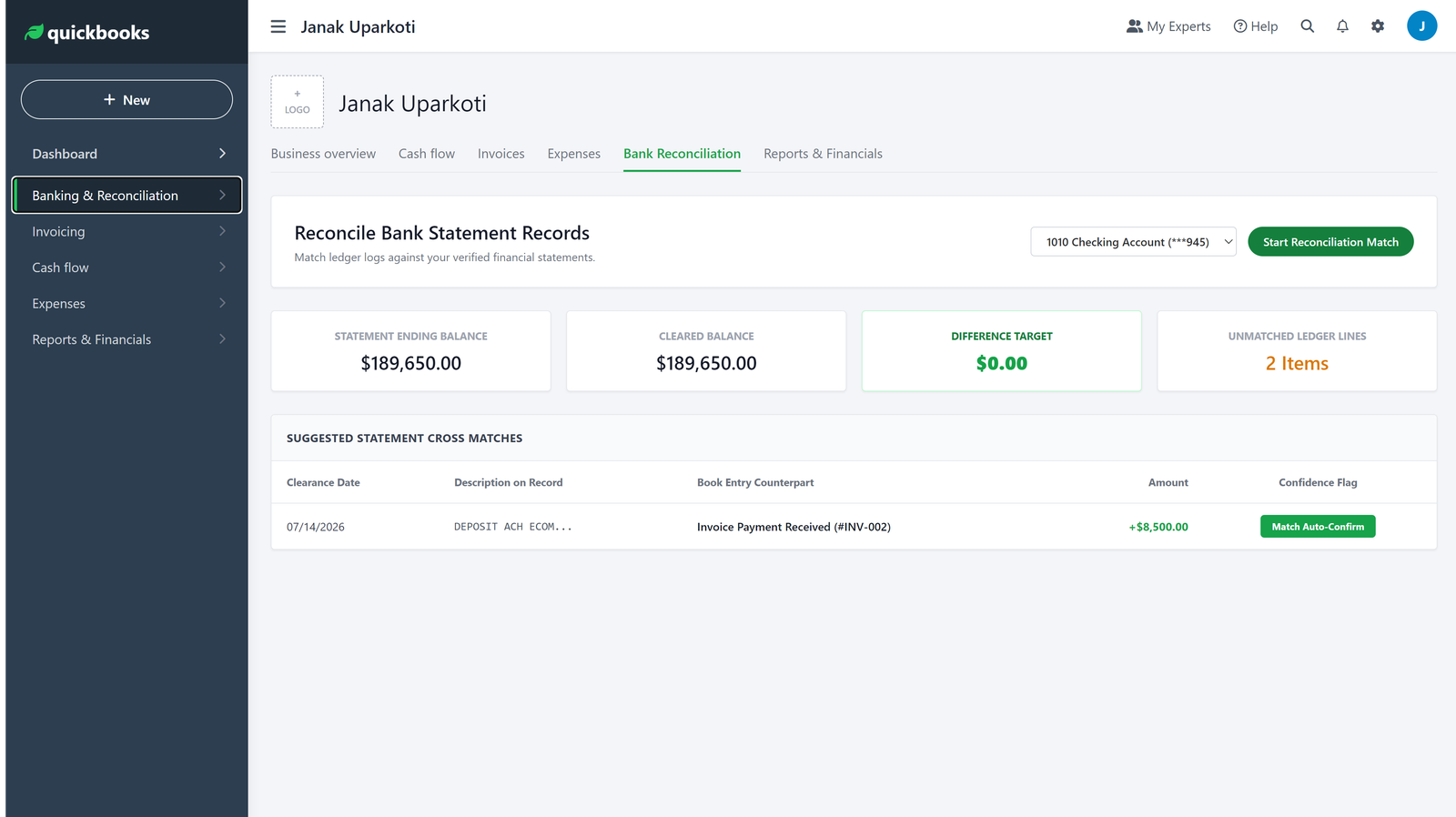
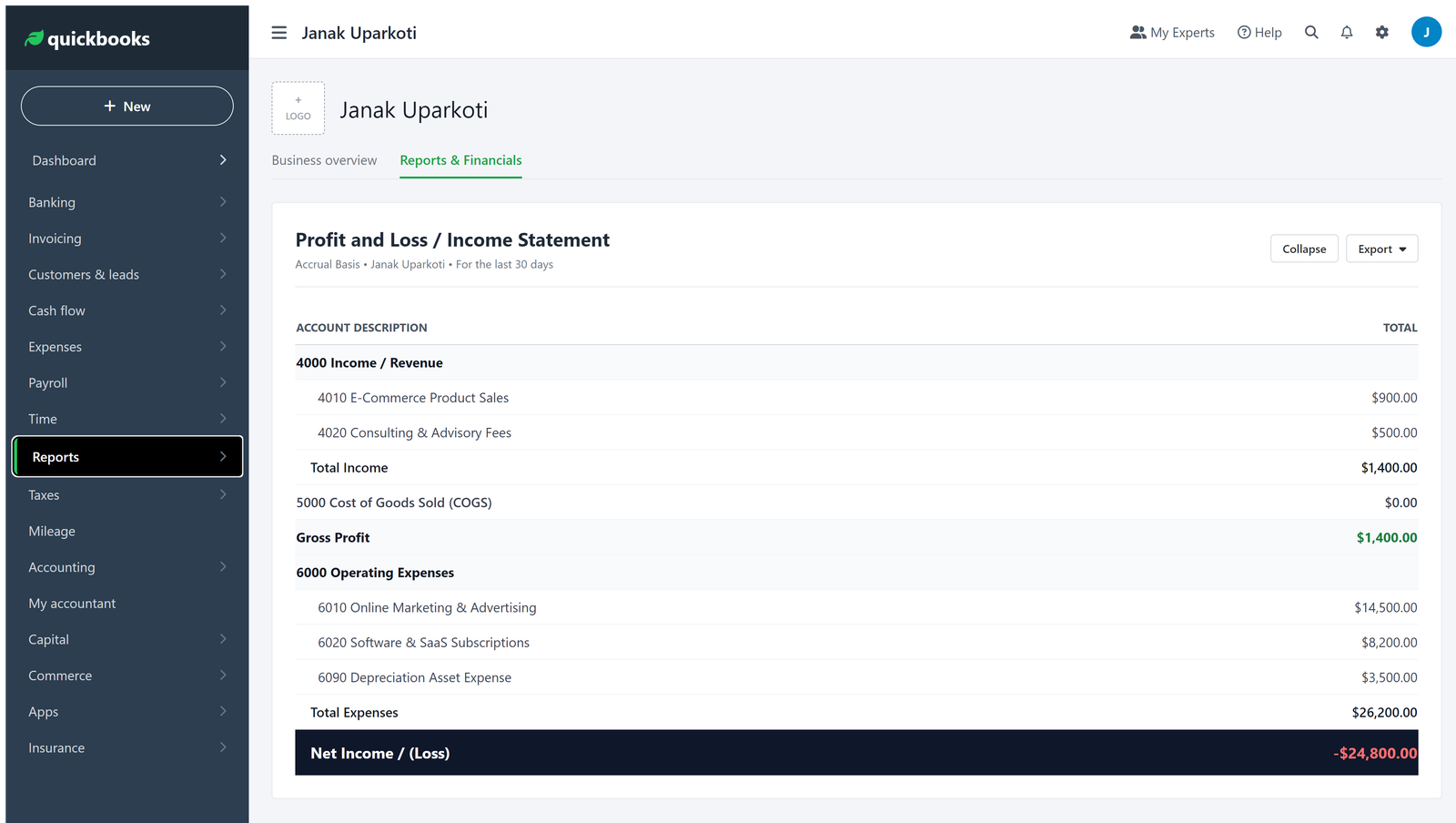
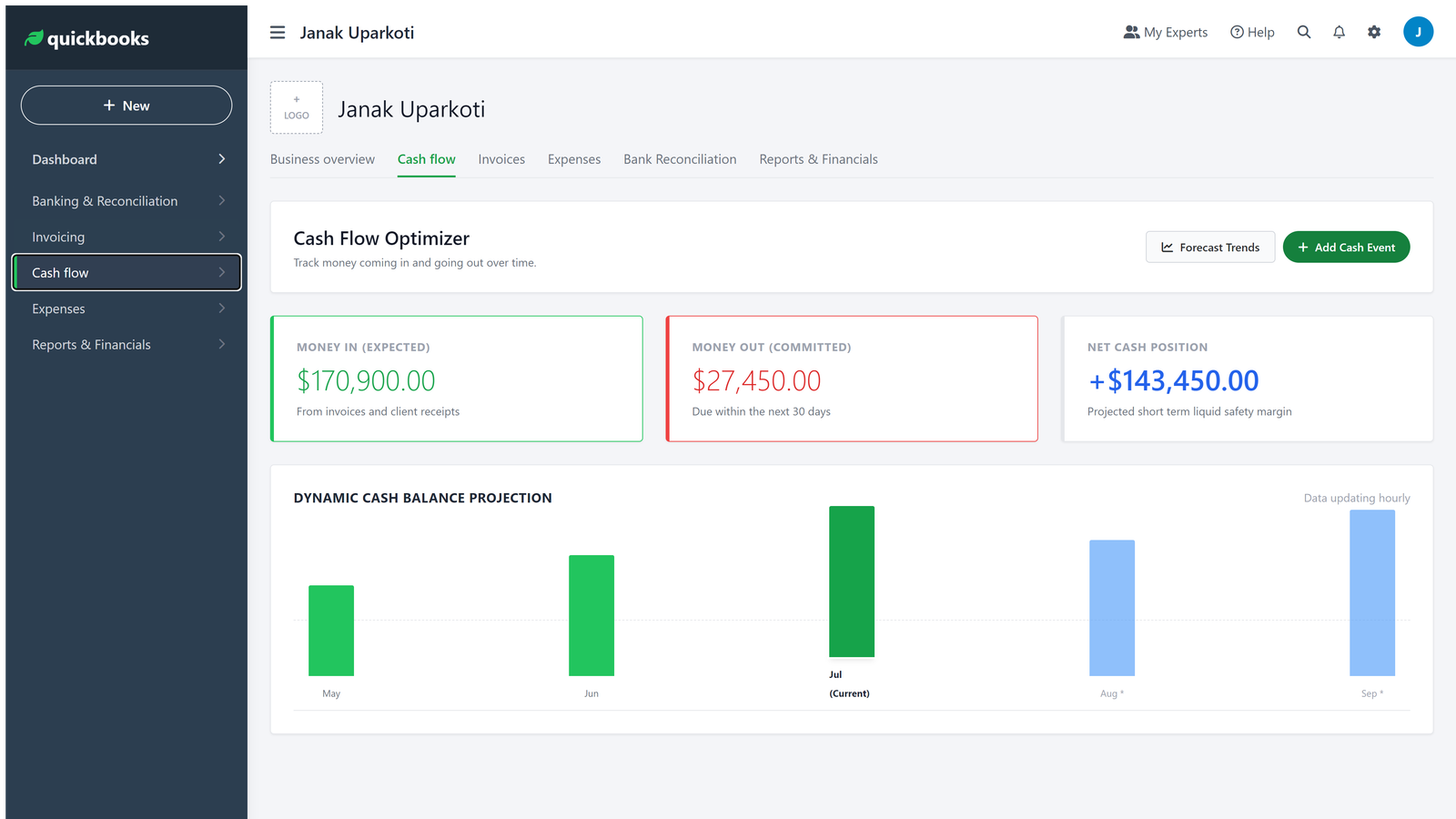
How this was tested: These screenshots come from my own QuickBooks Online trial account, captured in August 2026.
Sage vs QuickBooks at a glance
| Area | Sage | QuickBooks |
|---|---|---|
| Best fit | Businesses wanting structured accounting and Sage ecosystem options | Small businesses wanting familiar cloud accounting and a broad ecosystem |
| Ease of getting started | Depends on the Sage product | Generally straightforward for small-business workflows |
| Cloud accounting | Available through Sage cloud products | QuickBooks Online is cloud-based |
| Reporting | Strong reporting options, varying by product | Strong small-business reporting with deeper options on higher plans |
| Integrations | Broad integrations, especially across Sage products | Very broad third-party ecosystem |
| Inventory | Depends on product and plan | Depends on product and plan |
| Payroll | Available through Sage payroll products | Available through QuickBooks payroll products |
| Price | Varies by Sage product and region | Varies by plan, region, and promotions |

First, there is an important Sage detail
When someone says “Sage,” they could mean several different products.
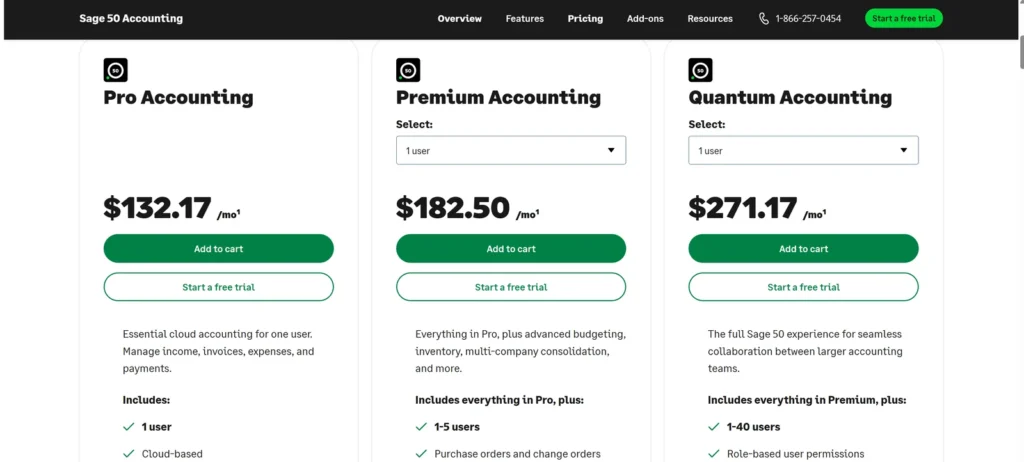
Sage offers small-business accounting products, Sage 50, Sage Accounting in some markets, and Sage Intacct for more advanced financial management. Those products aren’t interchangeable, and their pricing and capabilities can differ a lot.
That’s why I wouldn’t compare “Sage” and “QuickBooks” before deciding which Sage product you’re actually considering.
For a typical small business, the fair comparison is usually a Sage small-business accounting product versus QuickBooks Online. For a larger or more complex organisation, Sage Intacct is a different conversation altogether.
QuickBooks is the simpler starting point for many small businesses
If you’re opening a small business and want your books online quickly, QuickBooks Online is usually the easier place to start.
The workflow is familiar: connect your bank, categorise transactions, send invoices, track bills, reconcile accounts, and run reports. You can add services as the business gets more complicated.
That doesn’t make QuickBooks automatically better. It just means the product matches how many small businesses expect accounting software to work.
Where Sage starts to make more sense
Sage becomes more interesting when accounting is tightly connected to how the business runs.
Depending on the Sage product, you can get tools for invoicing, purchasing, reporting, inventory, payroll, cash flow, and more structured financial processes. Sage’s wider range also means you can move up to more advanced systems when your needs change.
Sage Intacct, for example, is built for organisations that need advanced financial management rather than basic small-business bookkeeping. Sage describes Intacct as a cloud financial management platform with core accounting, accounts payable and receivable, dashboards, reporting, multi-entity capabilities, integrations, and additional modules.
That’s a very different proposition from choosing an entry-level accounting package.
Which one is easier to learn?
For a typical small business, I’d give QuickBooks the edge on simplicity.
There’s a huge amount of educational material, accountant familiarity, and third-party support around QuickBooks. If you get stuck, there’s a good chance someone who helps small businesses already knows the software.
Sage isn’t necessarily difficult, but the learning curve depends on which Sage product you pick and how much of it you use.
And honestly, accounting software only feels simple when your accounting process is simple. Add inventory, multiple entities, complex approvals, projects, or unusual reporting, and every platform gets more complicated.
Sage vs QuickBooks for invoicing
Both ecosystems handle normal invoicing well: creating invoices, tracking what customers owe, and recording payments.
For a freelancer or service business, invoicing probably won’t be the deciding factor. Both can get an invoice to a customer and record the payment when it arrives.
The bigger question is what happens after the invoice goes out.
Do you need recurring invoices? Online payments? Quotes? Customer statements? Project tracking? Automated reminders? Multi-currency billing?
Those details vary by product and plan, so check the exact version you’re buying rather than assuming every Sage or QuickBooks plan includes the same tools.
Bank feeds and reconciliation
This is one area where modern accounting software has made bookkeeping much easier.
Both Sage and QuickBooks can connect banking information to the books, so transactions flow in for review and reconciliation. Sage also highlights bank connections and reconciliation as part of its integrated accounting approach.
The important part is what happens after the transactions arrive.
Don’t assume an imported transaction is automatically correct. Someone still needs to review unusual items, confirm categories, and reconcile the account.
Automation saves time. It doesn’t remove the need for accounting judgement.
Reporting: Sage vs QuickBooks
Both platforms can produce the reports most small businesses expect, such as profit and loss, balance sheet, cash flow information, receivables, payables, and sales reports.
Sage becomes particularly attractive when you need more structured reporting and analysis. Its cloud accounting products promote dashboards, cash-flow reporting, detailed financial reports, and customisable analysis, depending on the plan.
QuickBooks is also strong for small-business reporting, especially when you need to understand income, expenses, profitability, customer balances, and cash.
My rule: don’t buy accounting software because it has 100 reports instead of 50. Look at the five reports you actually use every month.
If those are easy to read and give you what you need, that’s far more useful.
Sage vs QuickBooks for inventory
Inventory is where the comparison gets more complicated.
A business selling a handful of products doesn’t need the same inventory system as a manufacturer, distributor, or multichannel ecommerce company.
Sage has products and plans that support inventory workflows, and QuickBooks also has inventory features, depending on the product and subscription.
If inventory is central to your business, don’t stop at the phrase “inventory management.” Test the real workflow: purchasing, receiving stock, adjustments, cost tracking, sales, returns, and reporting.
That’s where the real differences show up.
QuickBooks for ecommerce
QuickBooks has a large ecosystem around ecommerce and third-party integrations. That’s useful if your business runs on Shopify, Amazon, payment processors, inventory tools, or other online platforms.
The main thing to watch is settlement accounting.
If a marketplace sends $8,000 to your bank after fees and refunds, that deposit isn’t your gross sales. Your accounting workflow needs to explain the difference.
The same warning applies whether you use QuickBooks, Sage, Xero, or another platform.
Sage for ecommerce
Sage can work for ecommerce too, particularly when the business has more structured inventory and financial requirements.
But I wouldn’t choose Sage purely because it has inventory features. First check that the ecommerce platforms and connectors you rely on work well with the exact Sage product you’re considering.
A powerful accounting system isn’t much use if your sales channel means hours of manual clean-up every week.
Sage vs QuickBooks for freelancers
If you’re a freelancer with a few clients, simple expenses, and straightforward invoicing, I’d lean towards QuickBooks or another lightweight cloud platform.
You probably don’t need a complicated accounting setup.
What matters is sending invoices, recording expenses, reconciling your bank, tracking what clients owe, and producing clean reports.
Sage can still work, especially if your accountant already uses it, but I wouldn’t pay for complexity you don’t need.
Sage vs QuickBooks for growing businesses
This is a much closer call.
As the business grows, you’ll care more about controls, reporting, users, integrations, inventory, payroll, approvals, and how well the accounting system fits the rest of the operation.
QuickBooks remains a strong choice for many growing small businesses. Sage becomes more compelling when the organisation needs a more structured finance environment or expects to move towards more advanced Sage products.
What about multiple companies?
Multiple entities change the decision a lot.
If you run several legal entities, you may need consolidated reporting, separate books, intercompany accounting, different currencies, and stronger controls.
This is where Sage’s higher-end financial management products become much more relevant. Sage Intacct specifically offers multi-entity capabilities and global consolidation features.
QuickBooks can support businesses with more advanced needs too, but the exact product and setup matter. If you’re dealing with several entities, compare the actual accounting workflow rather than the entry-level subscription prices.
Payroll is another separate decision
Don’t treat payroll as an automatic extra on your accounting subscription.
Both Sage and QuickBooks offer payroll products, but availability, pricing, tax support, and features vary by country and product.
If payroll matters to your business, check the payroll product separately. Find out how employees get paid, how payroll taxes are handled, how filings work, and how payroll entries reach your general ledger.
The accounting integration is just as important as the payroll screen.
Sage vs QuickBooks pricing
This is the section where I’d avoid giving you one universal price and pretending it applies everywhere.
Sage sells different accounting products in different markets, and QuickBooks also varies pricing by country, plan, billing cycle, and promotion. Sage’s public US pages, for example, separate small-business accounting products from Sage Intacct, which uses request-based pricing rather than a simple public monthly price.
So when you compare pricing, use the price for your country and the exact product you need.
Also compare the regular price, not just the introductory offer.
Then add the costs that are easy to miss: payroll, extra users, payment processing, inventory tools, ecommerce connectors, and other integrations.
Why the cheapest accounting software isn’t always cheapest
Say one platform costs $10 less a month but means you manually reconcile marketplace payouts every week.
If that creates two hours of extra bookkeeping each month, the subscription saving may not be a saving at all.
Accounting software should cut your admin work. If a cheaper platform creates more of it, the lower price is misleading.
Sage vs QuickBooks for accountants and bookkeepers
Your accountant’s preference is worth considering.
Not because accountants should make every technology decision for you, but because accounting software works better when the person maintaining your books knows it well.
Sage has dedicated tools and programmes for accountants and bookkeepers, including practice-management and client-support products.
QuickBooks has a similarly large accountant ecosystem.
If your accountant already works confidently in one platform, ask what they’d gain or lose if you switched.
Which has the better ecosystem?
QuickBooks has a major advantage in ecosystem familiarity.
There are accountants, bookkeepers, consultants, payroll providers, payment tools, ecommerce connectors, and business apps built around the platform.
Sage also has a broad ecosystem, particularly when you look across its accounting, payroll, finance, and business-management products. Sage highlights integrations with banks, POS systems, CRM, payroll, and other systems as part of its connected accounting approach.
So the real question is which ecosystem fits the software you already use.
Where I’d be careful with QuickBooks
QuickBooks is popular, but popularity doesn’t mean everyone will love it.
Subscription costs can rise as you add capabilities. Some features need higher plans or separate services. And a big ecosystem can tempt you to keep adding apps until the bookkeeping stack becomes needlessly complicated.
Keep the setup simple where you can.
Where I’d be careful with Sage
The biggest risk is choosing the wrong Sage product.
Sage is a broad product family. If you compare a small-business Sage accounting product with QuickBooks Online and later discover you need Sage 50 or Sage Intacct, you’re no longer comparing the same category.
Start by defining your accounting needs, then choose the Sage product that matches them.
What I like about QuickBooks
- It’s a familiar starting point for many small businesses.
- The cloud workflow makes remote collaboration practical.
- There’s a large accountant and third-party ecosystem.
- It can grow beyond basic invoicing and expense tracking.
- There are many integrations for connected business workflows.
What I like about Sage
- The product family gives you options as your accounting needs get more sophisticated.
- Sage offers structured accounting and reporting tools across its products.
- Its ecosystem includes accounting, payroll, practice tools, and advanced financial management.
- Higher-end Sage products can support complex organisations and multi-entity accounting.
Which one is better for a new small business?
I’d start with QuickBooks if the business is small, straightforward, and wants cloud accounting without much complexity.
It gives you a familiar path from basic bookkeeping into more advanced small-business accounting.
Sage can still be the better choice if your accountant uses Sage, your business already operates inside the Sage ecosystem, or you know you need the specific controls and workflows of a Sage product.
Which one is better for a growing business?
For a growing small business, I’d compare the two based on the next two years, not today’s bookkeeping.
Ask whether you expect to add employees, inventory, locations, users, ecommerce channels, projects, or additional entities.
If the business is heading towards a more sophisticated finance operation, Sage deserves a closer look. If you’re mainly growing a conventional small business, QuickBooks may stay the simpler choice.
What if you’re already using one?
Don’t migrate just because another comparison says the competitor is better.
Migration takes time. You need to review historical data, opening balances, bank connections, recurring transactions, payroll, inventory, reports, integrations, and user access.
If your current software works and isn’t holding the business back, staying put may be the most sensible decision.
Switch when there’s a real problem to solve.
How I’d make the final decision
Write down the five accounting jobs that eat the most time in your business.
Maybe it’s invoicing. Maybe it’s bank reconciliation. Maybe it’s inventory. Maybe it’s month-end reporting. Maybe it’s keeping several companies organised.
Then test Sage and QuickBooks against those jobs.
Don’t spend your afternoon comparing features you’ll never use.
Sage vs QuickBooks: my practical verdict
QuickBooks is my pick for many small businesses that want a familiar, flexible cloud accounting platform.
Sage is the better option to investigate when you need a more structured accounting environment, already use Sage products, or expect your financial requirements to become more sophisticated.
The key is choosing the right Sage product and the right QuickBooks plan. “Sage vs QuickBooks” is really several comparisons hiding under one question.
If you’re still deciding, compare your actual workflow, not just the monthly subscription.
Frequently asked questions
Is Sage better than QuickBooks?
Not universally. QuickBooks is often easier for small businesses, while Sage can be a stronger fit for businesses that need structured workflows, Sage ecosystem products, or more advanced financial management.
Is Sage cheaper than QuickBooks?
It depends on the specific Sage product, QuickBooks plan, country, billing cycle, and promotion. Compare the regular total cost of the exact products you need rather than relying on a generic price comparison.
Is Sage good for small businesses?
Yes. Sage offers small-business accounting products, while its wider range also serves more complex organisations. Choose the Sage product that matches your size and accounting requirements.
Which is easier to learn, Sage or QuickBooks?
QuickBooks is generally the easier starting point for many small businesses, particularly because of its widespread use and large support ecosystem. Sage’s learning curve depends heavily on which Sage product you choose.
Can Sage and QuickBooks handle inventory?
Both ecosystems offer inventory capabilities, but the exact functionality depends on the product and plan. If inventory is central to your business, test purchasing, stock adjustments, COGS, returns, and inventory reporting before you subscribe.
Should I switch from Sage to QuickBooks?
Only if QuickBooks solves a real problem with your current setup. Migration has a cost, so don’t switch simply because another platform is more popular.
Should I switch from QuickBooks to Sage?
Consider Sage when your current QuickBooks setup no longer fits your reporting, control, operational, or multi-entity requirements. Otherwise, staying with a working system may be the better choice.
Related reading: Wave vs QuickBooks Online 2026: Which One Actually Fits?
Official resource: Quickbooks official website
Related guides: Accounting Software Comparisons · QuickBooks Resource Center