Shopify Free Trial 2026: 3 Days Free, Then $1/Month for 3 Months
How the Shopify free trial works in 2026: 3 days free with no card, then $1 a month for 3 months on most plans. What you can do, what you pay after, and how to make the most of it.

So, you want to try Shopify before you commit. Good idea. The current deal is simple: 3 days free with no credit card, then $1 a month for your first 3 months on most plans.
I’m an accountant, so I’ll show you exactly how the trial works, what you can and can’t do during it, what you’ll pay once the $1 months end, and how to get the most out of those first three months. The old “90-day free trial” and “6-month trial” offers you might read about elsewhere have ended.
Quick answer
- Shopify free trial 2026: 3 days free, no credit card needed.
- Then: $1 a month for your first 3 months on most plans.
- After that: Basic $39, Grow $105 or Advanced $399 a month, or less if you switch to yearly billing.
- You can’t sell during the free days. Checkout switches on when you pick a plan.
- The trial can’t be extended, so do your setup work in the first 3 days.
Shopify offer · checked 2 Nov 2026
3 days free, then $1/month for 3 months
No credit card needed for the 3-day trial. Most plans then cost $1 a month for your first 3 months before the regular price starts.
How the Shopify Free Trial Works in 2026
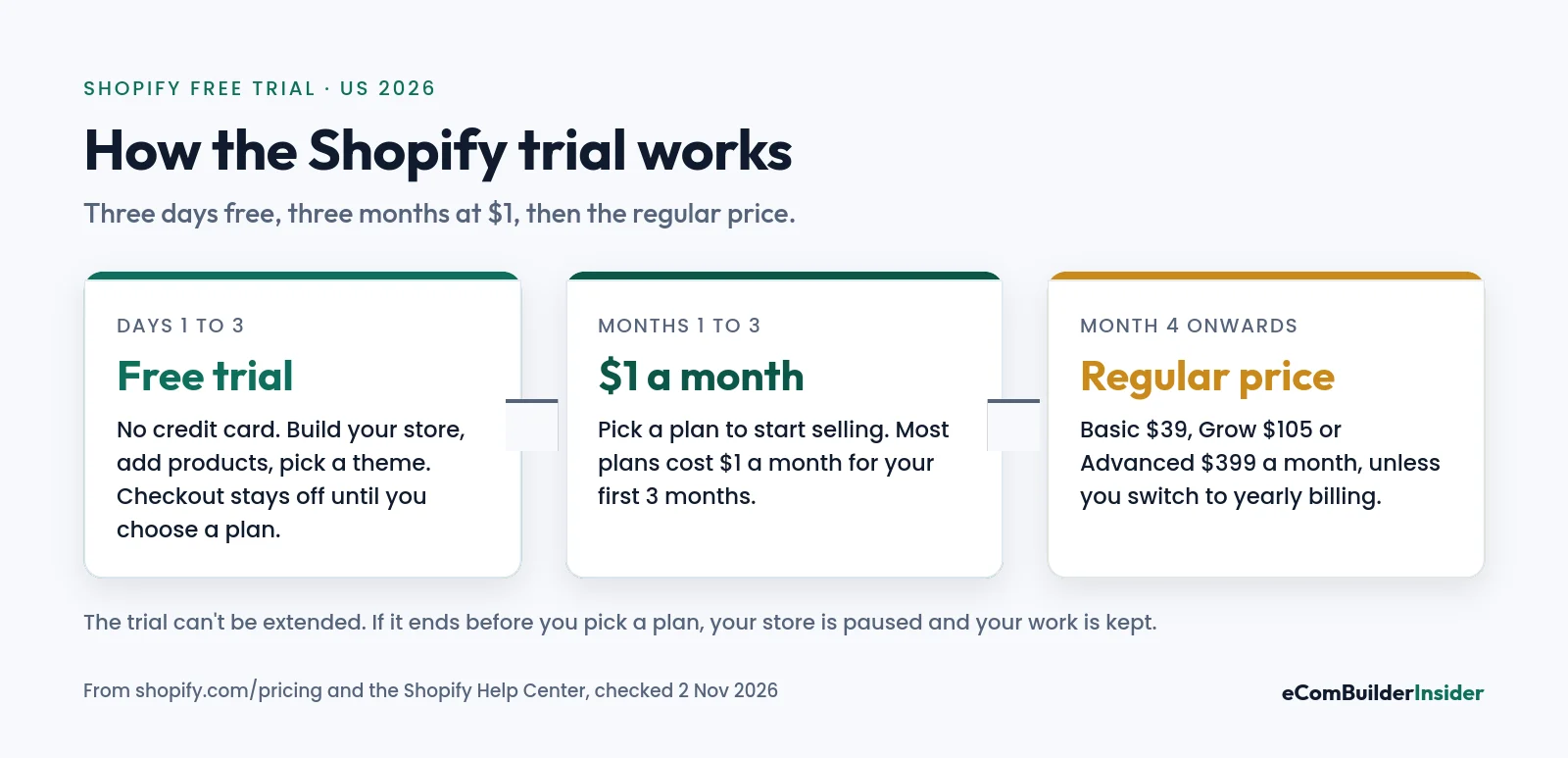
| Stage | How long | What it costs | What you can do |
|---|---|---|---|
| Free trial | 3 days | $0, no card | Build your store, add products, choose a theme, set up payments and shipping |
| $1 offer | First 3 months on a paid plan | $1 a month on most plans | Everything: your checkout is live and you can take orders |
| Regular price | From month 4 | $39, $105 or $399 a month | Same as before, at the standard price |
Two rules from Shopify’s Help Center are worth knowing before you start:
- The trial starts when you sign up, not when you start working on your store.
- It can’t be extended. Shopify Support can’t add extra days or reset promotional pricing.
What You Can and Can’t Do During the Trial
During the free days your store is in private mode, or its checkout is switched off. That’s the main limit.
- You can: add products and collections, choose and edit a theme, set up payments and shipping, browse the app store and configure your settings.
- You can’t: take real orders until you choose a paid plan (or switch off private mode and set up a payment provider).
- Nothing is lost: everything you build during the trial carries over when you pick a plan.
If the trial ends before you choose a plan, your store is paused until you do. Your products and settings are kept.
What You’ll Pay After the Trial
Here’s what each plan costs once the $1 months are over. Card rates are for online payments through Shopify Payments in the US.
| Plan | Monthly | Billed yearly (per month) | Online card rate | Best for |
|---|---|---|---|---|
| Basic | $39 | $29 | 2.9% + 30¢ | New stores and solo sellers |
| Grow | $105 | $79 | 2.7% + 30¢ | Small teams, 5 staff accounts |
| Advanced | $399 | $299 | 2.5% + 30¢ | High-volume stores |
Drawn from the table above. Lowest price highlighted.
The $1 offer vs yearly billing
Here’s an accountant’s quirk worth knowing: over a full first year, the $1 offer and yearly billing cost almost exactly the same.
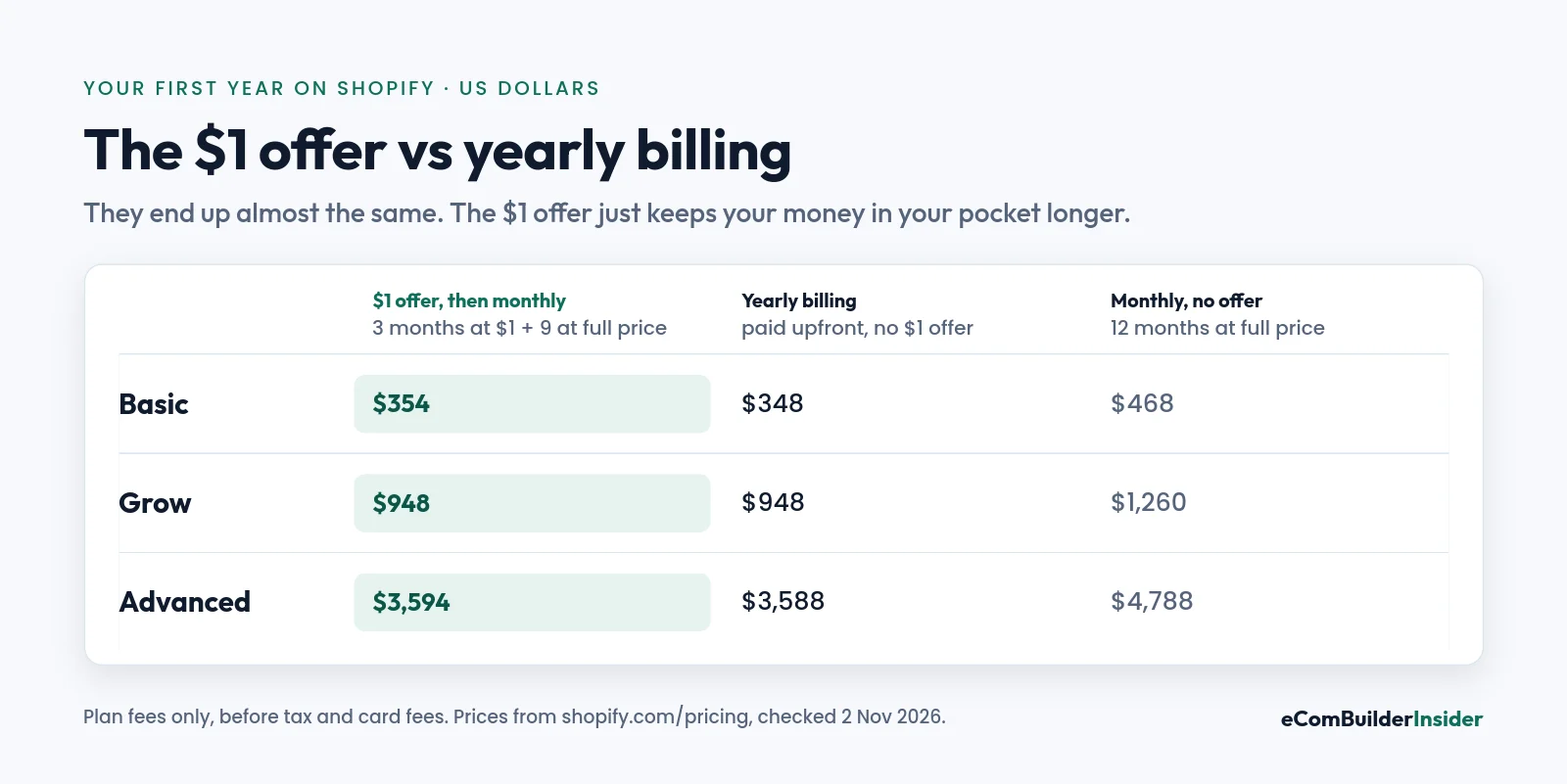
On Basic, 3 months at $1 plus 9 at $39 is $354. Paying yearly is $348, but you hand over the whole year upfront. So take the $1 offer while you’re testing whether your store sells. Think about yearly billing once it’s proved itself.
For the full breakdown of fees and hidden costs, see my Shopify pricing guide.
How to Start Your Shopify Free Trial
- Click my Shopify link and enter your email. No credit card needed.
- Answer the setup questions (you can skip them) and your store is created.
- Use the 3 free days to add products, pick a theme and set up shipping.
- Go to Settings, then Plan, and choose a plan. This is where the $1 a month starts.
- Add your payment details and switch off private mode to start taking orders.
- Set a calendar reminder for the end of month 3, when the regular price begins.
How to Get the Most From the Trial
Three free days isn’t long, so plan them. Here’s the order I’d work in:
- Day 1: pick a free theme and set your brand basics: logo, colours and menu.
- Day 2: add your first 5 to 10 products with real photos and clear descriptions.
- Day 3: set up Shopify Payments, shipping zones and taxes, then place a test order.
- Months 1 to 3: launch, drive your first traffic and add only the apps you really need. Keep an eye on your app bill.
Accountant’s tip
Track your sales, Shopify fees and app costs from day one. Card fees are often your biggest Shopify cost once you’re selling, and they’re a business expense you can claim, but only if they’re recorded properly.
Free tool · 4 quick steps
Find accounting software for your store
Answer four quick questions and get a shortlist that fits your size, budget and the apps you use.
What If You’re Not Ready to Keep Paying?
- Before you pick a plan: do nothing. The store pauses when the trial ends, and you’re not charged.
- After you pick a plan: you need to deactivate the store yourself. Shopify keeps your store information for 2 years in case you reopen.
- Refunds: Shopify subscription charges are non-refundable, so cancel before the next billing date.
- Pause and Build: Shopify’s old low-cost pause plan is no longer available to new subscriptions.
Is the Shopify Trial Worth It?
Yes. Three free days plus three months at $1 means you can build, launch and test a real store for $3 in plan fees. That’s the cheapest way to find out whether Shopify, and your product, will work.
Just go in with a plan: use the free days for setup, launch quickly once you’re on the $1 months, and decide before month 4 whether to stay monthly, switch to yearly or close the store.
Shopify offer · checked 2 Nov 2026
Try Shopify: 3 days free, then $1/month
No credit card for the trial. Most plans then cost $1 a month for your first 3 months.

Frequently Asked Questions
How long is the Shopify free trial in 2026?
3 days, with no credit card needed. After that, most plans cost $1 a month for your first 3 months.
Is there still a 90-day or 6-month Shopify free trial?
No. Those older offers have ended. Shopify’s Help Center says stores created with certain AI tool partners get a longer trial (currently 4 months), but the standard offer is 3 days free plus 3 months at $1.
Do I need a credit card for the Shopify trial?
Not for the 3-day trial. You add payment details when you choose a paid plan.
Can I sell during the free trial?
Not on the free days, because checkout is switched off. Choose a plan to take orders; you’ll pay $1 a month on most plans for the first 3 months.
Can I extend my Shopify trial?
No. Shopify says trials can’t be extended and Support can’t reset promotional pricing.
What happens when the $1 months end?
Your plan moves to the regular price, such as $39 a month for Basic, unless you change plans or deactivate your store.
What happens to my store if I don’t pick a plan?
It’s paused when the trial ends. Your products and settings are kept, and you’re not charged.
Next steps: Shopify pricing plans explained · best places to sell online · how to start dropshipping.
How this site makes money
Some links on this page are affiliate links. If you sign up through one, I may earn a commission at no extra cost to you. Read the full disclosure.