
Xero for Ecommerce Sellers 2026: Honest Setup Guide
13
minute read
31
sections
October 8, 2026
last updated
Janak Uparkoti
reviewed by

So, Xero can be a very good accounting platform for ecommerce. But there’s a catch, and it matters more than the software itself: your setup has to make sense.
Shopify, Amazon, Etsy, eBay, PayPal, Stripe, refunds, marketplace fees, shipping, sales tax, inventory, and cost of goods sold add up to a lot of moving pieces. If those pieces aren’t mapped properly, even good accounting software can give you confusing numbers.
So the goal isn’t to make Xero receive every single order. The goal is to get accurate, explainable financial information into Xero and reconcile it properly.
Is Xero good for ecommerce?
Yes, especially for small and growing sellers who want proper cloud accounting.
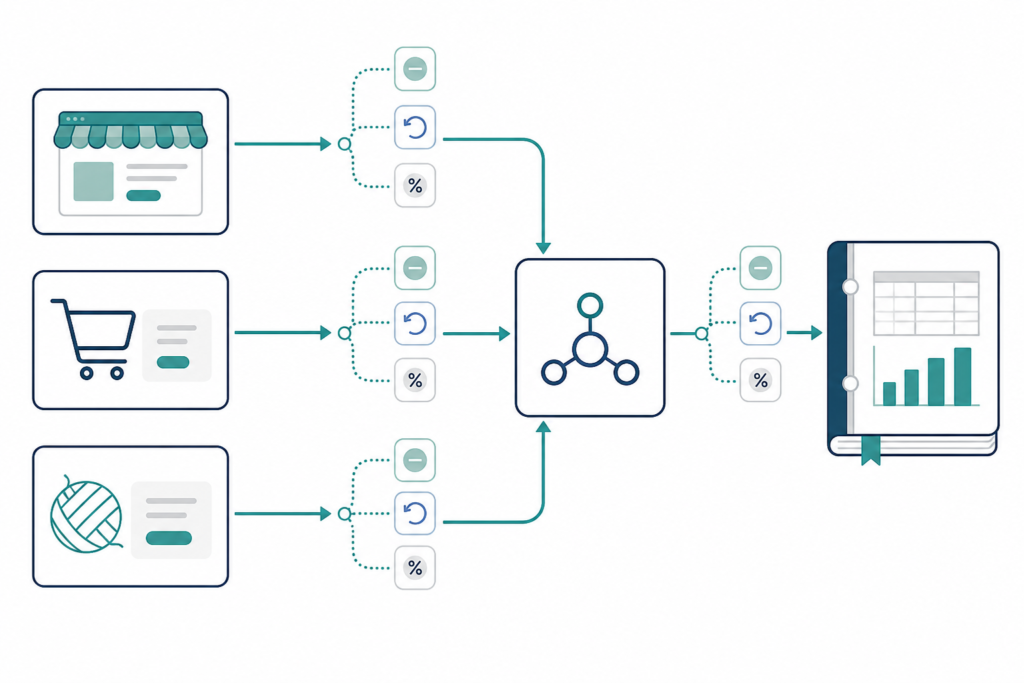
Xero can provide the accounting layer for an ecommerce business while another tool handles the messy marketplace data. That’s usually a more sensible approach than trying to force every individual order into the general ledger.
For example, ecommerce connectors such as A2X or Link My Books can turn marketplace activity into accounting-ready summaries. The exact setup depends on the sales channel and the way you want your books organised.
The important thing is reconciliation.
Xero pricing for ecommerce sellers
The US pricing I was working from lists Xero plans at $25 per month, $55 per month, and $90 per month after the introductory period. The plans differ in features and limits, so the right plan depends on the accounting workflow you need.
And remember that the accounting subscription is only one part of the cost of ecommerce accounting.
You may also need an ecommerce connector, inventory software, sales-tax tools, payroll, payment processing, and professional bookkeeping support.
A cheap accounting plan can turn into an expensive stack if you need five separate add-ons to make it work.
The biggest ecommerce accounting mistake
Don’t record the bank deposit as your sales revenue.
That sounds obvious until you look at a real marketplace payout.
Imagine your store generates $10,000 in sales. The platform may deduct payment processing fees, marketplace commissions, refunds, shipping adjustments, taxes, reserves, or other amounts before sending $9,142 to your bank.
If you simply record the $9,142 deposit as sales, the books won’t show what really happened.
Your revenue is understated. Your fees disappear into a mystery difference. Refunds become harder to track. And your profit report becomes less useful.
That’s why ecommerce accounting needs a proper payout reconciliation process.
What a clean Xero ecommerce setup should explain
At month-end, you should be able to start with your sales activity and explain exactly how it became the money that reached the bank.
That usually means separating the major pieces, such as:
- Gross sales
- Refunds and returns
- Marketplace fees
- Payment processing fees
- Shipping income and adjustments
- Sales tax collected
- Gift cards or other liabilities where applicable
- Inventory purchases
- Cost of goods sold
- Actual marketplace or payment payouts
Your chart of accounts will vary by business. The principle is simple: every major gap between sales and cash should have an explanation.
Where A2X fits into the setup
A2X is commonly used as a bridge between ecommerce marketplaces and accounting software.
Instead of sending thousands of individual orders straight into Xero, a connector can summarise sales, fees, refunds, taxes, and other settlement activity into accounting entries that are easier to manage.
That makes sense because ecommerce systems are built to store huge amounts of order detail. Your ledger usually doesn’t need every individual order as its own journal entry.
It needs a reliable summary that you can reconcile back to the underlying activity.
Don’t assume the connector is automatically correct
This is where I’d be careful.
A connector can automate the data movement, but automation doesn’t remove the need to understand the accounting.
Before you trust the setup, test the awkward transactions. Refunds, partial refunds, chargebacks, marketplace fees, discounts, shipping, gift cards, taxes, and adjustments are exactly where a simple integration can produce surprises.
Run that test before you go live with months of real transactions.
Xero for Shopify sellers
Shopify is fairly straightforward compared with some marketplaces, especially when order volume is low.
A small Shopify store may be able to start with a simpler connection. As orders grow, a connector becomes more useful, because it can summarise transaction data and make payout reconciliation easier.
The question isn’t simply whether Shopify connects to Xero.
It does.
The better question is whether the connection produces accounting information you can reconcile at month-end without rebuilding the numbers in a spreadsheet.
Our best accounting software for ecommerce guide looks at the wider software choices.
Xero for Amazon sellers
Amazon is where ecommerce accounting gets more interesting.
An Amazon settlement can include sales, refunds, marketplace fees, taxes, reimbursements, reserves, and other adjustments. The bank deposit is only the final result.
That’s why Xero plus an ecommerce connector such as A2X is a common approach for sellers who need to turn Amazon settlement information into accounting entries.
Don’t judge the setup by whether the first bank deposit matches.
Judge it by whether you can explain the whole settlement.
Xero for Etsy sellers
Etsy sellers face the same basic problem: a marketplace payout isn’t the same thing as gross sales.
You need to account for fees, refunds, taxes, and other deductions before you can understand the real economics of the store.
Xero can work well as the central accounting system, especially once sales volume grows beyond what’s comfortable to handle by hand.
A connector may or may not be necessary at the start. The right answer depends on transaction volume and how complicated your payouts are.
Xero for eBay sellers
eBay has the same fundamental issue.
The money reaching your bank isn’t necessarily what your customers spent. Fees, refunds, shipping, and adjustments can all sit between the sale and the payout.
A good accounting workflow keeps those items visible instead of burying everything in one net deposit.
Multichannel ecommerce is where the setup really matters
Selling on one channel is manageable. Selling on Shopify, Amazon, Etsy, eBay, and a wholesale channel at the same time is a different problem.
Now you have multiple payout schedules, fee structures, refund processes, and reporting systems to juggle.
Xero can be the central ledger, but you’ll want a consistent process for bringing each channel into the books.
Otherwise, month-end turns into spreadsheet archaeology.
Inventory and COGS are not optional details
A common mistake is focusing so hard on sales reconciliation that inventory gets forgotten.
Ecommerce profitability depends on accurate cost of goods sold. If a product sells for $50 and you don’t have a reliable $20 product cost in your accounting, the revenue figure alone doesn’t tell you whether that sale made money.
Inventory accounting gets complicated quickly when you have several suppliers, shipping costs, returns, stock adjustments, bundles, or a large catalogue.
If inventory is becoming a major operational headache, don’t expect the accounting platform to solve every inventory problem on its own.
You may need a dedicated inventory system that connects to Xero.
Why COGS matters so much
Imagine two ecommerce stores that both report $500,000 in annual revenue.
That number alone tells you almost nothing about which business is healthier.
If one has $200,000 of product costs and the other has $350,000, their gross margins are completely different. Add marketplace fees, advertising, fulfilment, returns, and other costs, and the picture shifts again.
That’s why ecommerce accounting has to connect revenue with the costs that produced it.
Sales tax needs its own process
Sales tax is another area where ecommerce sellers need to slow down.
Your books may need to separate sales revenue, customer payments, sales-tax liabilities, and marketplace-collected tax. The right treatment depends on your sales channels, jurisdictions, registrations, and tax setup.
Accounting software can help organise the information, but it doesn’t replace tax advice.
If you sell across several jurisdictions, design the tax workflow deliberately. Don’t let the bank feed become the source of truth.
Refunds and chargebacks
Refunds are easy to ignore because they often happen after the original sale.
But they directly affect both revenue and cash.
Your accounting should make it clear that a refund reduced the right sales amount, rather than quietly creating a mysterious expense.
Chargebacks need the same attention. If they aren’t mapped properly, bank reconciliation gets confusing fast.
What should your Xero ecommerce reports tell you?
At a minimum, you should be able to answer these questions without opening five spreadsheets:
- How much did we sell?
- How much did customers get refunded?
- How much did each marketplace charge?
- How much payment processing did we pay?
- How much sales tax was collected?
- How much inventory did we sell?
- What is our cost of goods sold?
- How much cash actually reached the bank?
- Which sales channel is producing the best margin?
If you can’t answer those questions, the problem may not be Xero. It may be how the accounting around Xero is designed.
Common ecommerce accounting mistakes
Recording deposits as sales. This is probably the most common mistake. The deposit is the result of the transaction process, not necessarily the gross sale.
Ignoring fees. Marketplace, payment, fulfilment, advertising, and shipping fees can quietly eat into margins.
Using cash balance as profit. A healthy bank balance doesn’t prove the business is profitable. Inventory purchases, taxes, refunds, supplier bills, and ad spending can still be waiting to hit.
Skipping COGS. Revenue without accurate product costs doesn’t show your real gross margin.
Waiting until tax season. Twelve months of messy marketplace deposits are much harder to clean up than monthly reconciliations.
Putting everything into one income account. You lose useful information when every sales channel and adjustment disappears into a generic category.
Xero vs QuickBooks for ecommerce
Xero is a strong option if you want cloud accounting, collaboration, and a broad ecosystem of connected apps.
QuickBooks Online is also a serious alternative. It can make more sense if your accountant already works in QuickBooks, or your business depends on particular Intuit features, integrations, inventory workflows, or payroll tools.
There isn’t a universal winner.
The better platform is the one that produces clean books with the least friction for your particular operation.
Our Xero vs QuickBooks comparison covers the broader decision.
How much does ecommerce accounting really cost?
This is where many sellers make the wrong comparison.
They put the monthly price of Xero next to the monthly price of another platform, and stop there.
But an ecommerce accounting stack can include:
- Accounting software
- Ecommerce connector
- Inventory software
- Sales-tax software
- Payroll
- Payment processing
- Bookkeeping support
- Accounting or tax advice
The accounting subscription may be only one part of the total cost.
A small seller might start with Xero alone. A larger multichannel operation may need Xero plus a connector, inventory software, and tax automation.
When Xero is a good fit
I’d seriously consider Xero if you sell through Shopify, Amazon, Etsy, eBay, or several channels, and you want a proper cloud accounting system at the centre of the business.
It’s also attractive when your accountant or bookkeeper already knows Xero, because the software is easier to manage when the people supporting the business understand the workflow.
Growth is another good reason. You don’t want to rebuild your accounting process every time sales volume goes up.
When I’d look elsewhere
Xero isn’t the right answer for every ecommerce business.
If your inventory setup is extremely complicated, your business has unusual manufacturing requirements, or your accountant has built the whole operation around another platform, compare alternatives first.
QuickBooks may suit some businesses better. Specialised systems can also make more sense once operations get large enough that accounting, purchasing, inventory, and production need to work together closely.
How I’d set up a small ecommerce business
For a small seller, I’d avoid overbuilding the stack on day one.
Start with a clear chart of accounts. Connect your sales channel properly. Make sure payouts can be reconciled. Set up a sensible process for fees, refunds, taxes, and COGS.
Then document the month-end process.
As the store grows, add automation where the manual work becomes painful.
That approach usually beats buying every possible integration before you have the transaction volume to justify it.
How I’d handle a growing multichannel seller
For a larger seller, I’d focus less on the software cost and more on the quality of the monthly close.
Can you reconcile every sales channel? Can you explain the gap between gross sales and cash received? Can you calculate accurate COGS? Can your accountant review the books without asking for a giant spreadsheet every month?
If the answer is no, the stack needs work.
What Xero should and shouldn’t do
Think of Xero as the financial core of your ecommerce system.
It should hold the accounting records, bank activity, reconciliations, reports, liabilities, revenue, expenses, and financial history.
It doesn’t need to store every operational detail of your store.
Your ecommerce platform can manage orders. Your inventory system can manage stock. Your tax tool can handle tax calculations. Your connector can translate marketplace settlements.
Xero is where the financial story comes together.
Why clean reconciliation matters
Good ecommerce bookkeeping isn’t about making the numbers look tidy.
It’s about making them explainable.
If your bank balance doesn’t match the accounting system, you should know why. If marketplace sales don’t match payouts, you should know why. If gross margin shifts sharply, you should be able to find the reason.
That’s what a good accounting setup gives you.
So, is Xero worth using for ecommerce?
For many small and growing ecommerce sellers, yes.
Xero gives you a solid cloud accounting foundation, while ecommerce connectors handle the specialised work of turning marketplace activity into useful accounting data.
But don’t confuse “connected” with “correct.” An integration can work perfectly on a technical level while the accounting treatment is still wrong.
Test the setup, reconcile the payouts, understand your chart of accounts, track COGS, and review the process every month.
That matters far more than picking one accounting brand over another.
A good ecommerce setup should make month-end boring
That may sound like a strange goal, but boring bookkeeping is good bookkeeping. Sales get summarised, payouts reconcile, fees are visible, inventory makes sense, and the reports don’t need a detective story to understand.
If every month ends with several spreadsheets and unexplained differences, the problem is usually the process, not the accounting brand.
Start with one sales channel
If you’re building the setup from scratch, connect your most important channel first. Test sales, refunds, fees, taxes, and payouts before you add another marketplace.
Once the first channel reconciles cleanly, repeat the process for the next one. Troubleshooting is far easier that way than connecting everything at once.
Document the monthly close
Write down the steps you repeat every month: review settlements, reconcile payouts, check refunds and fees, review inventory and COGS, reconcile the bank, and review the profit and loss.
A documented process becomes especially valuable when another bookkeeper eventually takes over.
Use spreadsheets for analysis, not as a second accounting system
Spreadsheets are useful for forecasting and analysis. The trouble starts when the spreadsheet becomes the place where you quietly rebuild the accounting because the accounting system isn’t working.
Your books should stay the source of truth. Use spreadsheets to understand the numbers, not to replace them.
Frequently asked questions
Is Xero good for Shopify?
Yes. Xero can work well for Shopify sellers, especially when the connection produces accounting information that’s easy to reconcile. A connector becomes more useful as transaction volume grows.
Can Xero connect to Amazon?
Yes, typically through an ecommerce connector such as A2X or another supported integration. The key is mapping Amazon settlement activity correctly, rather than simply recording the net deposit.
Do I need A2X with Xero?
Not necessarily. A low-volume seller may manage with a simpler setup, while a larger marketplace seller can benefit a lot from a connector that summarises settlements, fees, refunds, and other adjustments.
Is Xero better than QuickBooks for ecommerce?
It depends on your workflow. Xero is strong for cloud accounting and connected ecommerce workflows, while QuickBooks can be a better fit for businesses already built around Intuit or specific QuickBooks features.
Can Xero handle ecommerce inventory?
Xero can support accounting for inventory, but businesses with complex inventory operations may need a dedicated inventory system that integrates with Xero.
Should I record Shopify or Amazon deposits as sales?
No. The deposit can be net of fees, refunds, taxes, and other adjustments. A proper ecommerce accounting process should reconcile the payout back to the underlying sales activity.
Official resource: Xero official website
Related guides: Xero Resource Center · Accounting Software Resource Center
How we review software: See our accounting software testing methodology to understand how we approach pricing, workflows, comparisons, and first-hand evidence.



