
Zoho Books Review 2026: Is It Worth Using for Your Business?
9
minute read
20
sections
October 8, 2026
last updated
Janak Uparkoti
reviewed by

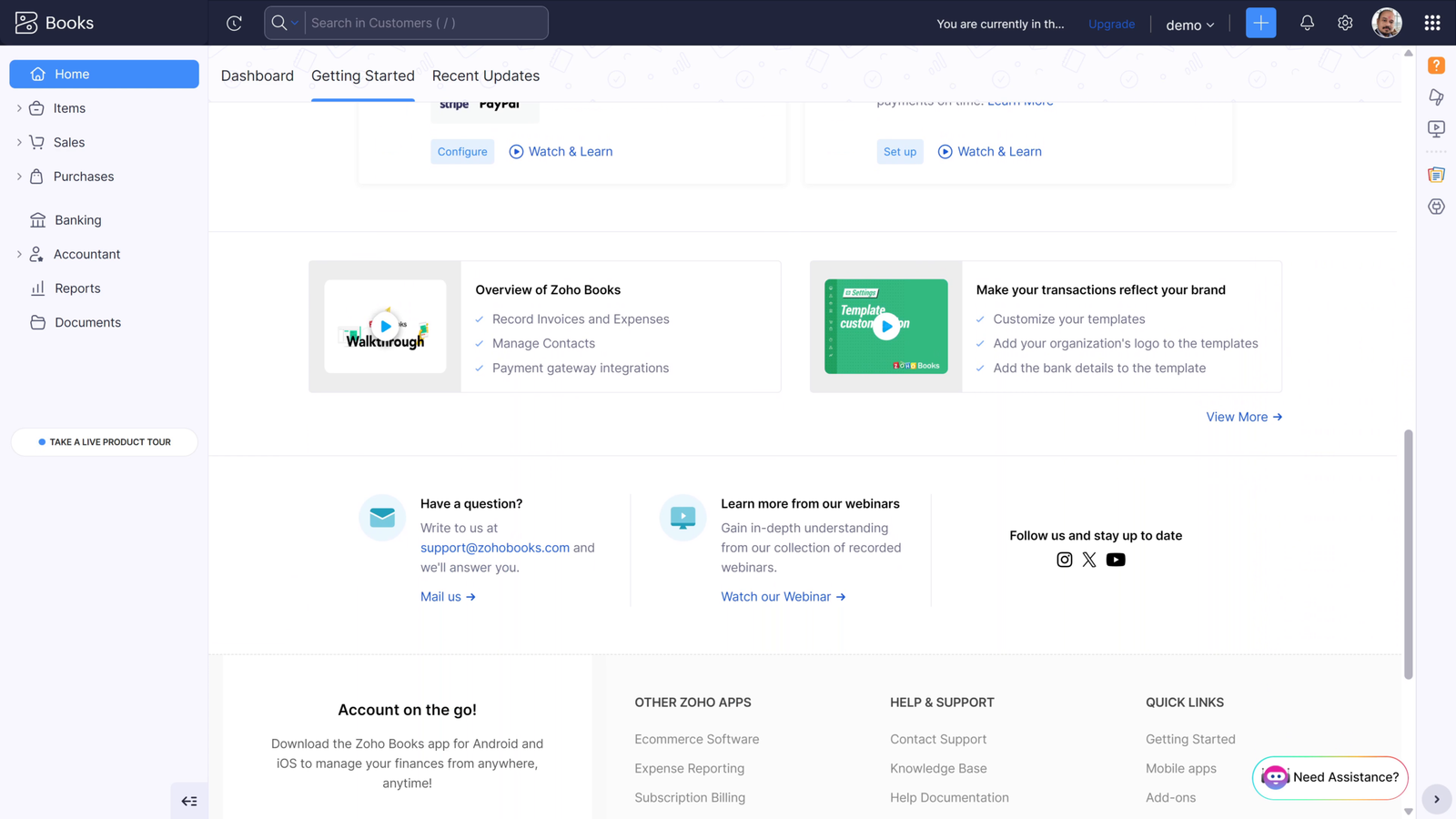
Zoho Books looks simple when you first open it. Then it keeps revealing more as you dig around. That can be a good thing. It can also feel overwhelming if all you really want to do is send invoices and keep your expenses in order.
For 2026, I’d put Zoho Books in the “more capable than it needs to be” category. You get a real accounting system, useful reporting, automation, inventory tools, customization, and a wider Zoho ecosystem to work with.
The question is whether you actually need all of that.
How this was tested: I opened a Zoho Books trial account and reviewed the dashboard and core workflow. Screenshots and screen recordings below are from those accounts, captured in August 2026.
My quick take on Zoho Books
If you run a growing small business and want your accounting software to do more than basic invoicing, Zoho Books deserves a serious look. The free plan also makes it unusually easy to try without committing to another monthly subscription.
But I wouldn’t recommend it automatically to every freelancer or tiny business. If your accounting needs are very basic, all that depth can become extra work rather than extra value.
That distinction matters more than a long list of features.
What makes Zoho Books different?
Zoho Books sits somewhere between a lightweight bookkeeping app and a much more advanced business accounting platform. It covers the basics, and it doesn’t stop there.
You can manage invoices, expenses, bank reconciliation, receivables, payables, reports, projects, inventory, automation, and other accounting workflows. What you get depends on your plan and region.
Here’s the interesting part. Zoho also has a large family of business products. If you already use Zoho CRM, Zoho Inventory, Zoho People, or other Zoho tools, Books becomes more appealing because they can work together.
That can save you from stitching together a pile of unrelated apps.
The free plan is a genuine advantage
One of the easiest reasons to try Zoho Books is the $0 plan in supported markets. Eligible solopreneurs and micro businesses get core accounting features without a monthly bill.
That includes things like invoicing, expense tracking, bank reconciliation, recurring invoices, and financial reports, subject to the free tier’s limits.
But here’s where I’d be careful. Don’t read “free” as “every Zoho Books feature is free forever.” The free plan has eligibility and usage limits, and they vary by market.
Before you build your whole bookkeeping routine around the free tier, check the pricing page for your country.
Check Zoho Books pricing: https://www.zoho.com/us/books/pricing/
Reporting is one of its stronger points
A basic accounting app can tell you how much money came in and went out. That’s useful, but growing businesses usually need more context.
Zoho Books gives you a broader reporting environment. Depending on your plan, you can look at profitability, cash flow, receivables, payables, expenses, and other financial information.
Why should you care? A business can have plenty of sales and still have a cash-flow problem. It can have money in the bank while margins quietly get worse.
Better reports won’t fix those problems, but they make them easier to see.
Customization can be a big deal
Another area where Zoho Books stands out is customization. You can adapt fields, workflows, reports, and other parts of the system to better match how your business runs.
That sounds like a small feature until your business stops fitting the standard template.
A business with specific approval steps or unusual reporting needs may appreciate having more control over the workflow. A very small freelancer may never touch these settings.
More control isn’t automatically better. It only helps if you’ll use it.
Zoho Books pricing in 2026
For the US market, the pricing I was working from lists Free at $0, Standard at $20 per month or $15 when billed annually, Professional at $50 per month or $40 annually, Premium at $70 or $60 annually, Elite at $150 or $120 annually, and Ultimate at $275 or $240 annually.
Regional pricing can differ, and software prices change. Treat these numbers as a starting point, and check Zoho’s current regional pricing before you subscribe.
| Plan | Monthly | Annual billing | Typical fit |
|---|---|---|---|
| Free | $0 | $0 | Micro businesses that fit the limits |
| Standard | $20 | $15 | Core small-business accounting |
| Professional | $50 | $40 | Growing businesses with broader needs |
| Premium | $70 | $60 | More automation and customization |
| Elite | $150 | $120 | Advanced inventory needs |
| Ultimate | $275 | $240 | Advanced analytics |
There’s a big jump between the free plan and the higher tiers. That isn’t necessarily a problem, but it means you should choose based on what your business needs. Don’t buy the priciest plan just because it has the longest feature list.
Who is Zoho Books really for?
I think Zoho Books makes the most sense for a business that has moved beyond basic bookkeeping but isn’t looking for enterprise software.
It’s a good fit if you need stronger reporting, inventory, project tracking, automation, customization, or connections with other Zoho products.
It’s also worth a look if software costs are a major concern and you qualify for the free plan.
On the other hand, a freelancer with a few clients and simple expenses probably doesn’t need this much accounting software.
Zoho Books for freelancers
A freelancer usually wants a few things to work well: invoices, expenses, payments, client details, and reports that don’t need an accounting degree to read.
Zoho Books can handle those jobs. The question is whether its extra depth will help you or distract you.
If your business is simple, I’d compare it with FreshBooks and Wave before you choose. Those platforms can feel more focused on straightforward service-business work.
Zoho Books for growing businesses
This is where Zoho Books becomes more compelling for me.
As a business grows, you need more than invoices. You start dealing with bills, inventory, approvals, multiple users, recurring transactions, deeper reporting, and a much bigger pile of financial data.
Zoho Books gives you room to build that kind of workflow. You don’t have to replace the software the moment your books get more complicated.
Zoho Books vs Xero
Xero and Zoho Books overlap in a lot of areas, but they don’t feel the same.
Xero is often the easier choice if you want a straightforward cloud accounting platform with strong collaboration and a broad range of connected apps. The US pricing I was working from lists Xero plans starting at $25 per month after the introductory period, followed by Growing at $55 and Established at $90. Xero also doesn’t charge per-user licence fees under its standard structure.
Zoho becomes more interesting when customization, the wider Zoho ecosystem, or specific higher-tier features matter to you.
If you’re deciding between them, our Xero vs Zoho Books comparison goes deeper.
Zoho Books vs Wave
Wave is the simpler option for many tiny businesses. Its low-cost entry point is appealing when your bookkeeping is mostly invoices, expenses, payments, and basic reporting.
Zoho Books gives you more room to grow into inventory, automation, reporting, and customization.
So I wouldn’t ask, “Which one has more features?” Zoho clearly does. I’d ask, “Will I actually use those features?”
Zoho Books vs FreshBooks
FreshBooks is especially attractive to freelancers and service businesses built around clients, invoices, proposals, time tracking, and project work.
Zoho Books feels more like a broad accounting system. That’s useful when bookkeeping becomes a bigger part of the business instead of something running quietly in the background.
If you’re also considering Xero, see our Xero vs FreshBooks comparison.
Where I’d be careful with Zoho Books
The first issue is complexity. There are a lot of settings and a lot of possible workflows. That’s great when you need flexibility, but it can slow down a new user.
The second issue is the wider Zoho ecosystem. Lots of connected products is useful, but it can leave you wondering which Zoho product you actually need for a given job.
The third issue is pricing structure. The free plan is attractive, but don’t assume the features you need will stay free at $0 as your business grows.
What I like about Zoho Books
- The free plan gives eligible small businesses a low-risk starting point.
- Reporting goes beyond the most basic bookkeeping needs.
- Customization can be useful for businesses with specific workflows.
- Inventory and other advanced capabilities give growing businesses more room.
- The wider Zoho ecosystem can reduce the need for disconnected business tools.
What I don’t love
- The platform can feel unnecessarily deep for a very small business.
- Getting your head around the wider Zoho product ecosystem takes some time.
- Free-plan eligibility and limits mean you need to check the details for your market.
- The higher-tier pricing is a very different proposition from the free starting point.
So, is Zoho Books worth it in 2026?
Yes, if you need a deeper accounting system and you value flexibility.
I wouldn’t choose Zoho Books just because it has a long feature list. I’d choose it because those features solve problems your business actually has.
For a growing business that wants reporting, automation, inventory, customization, and a wider business software ecosystem, Zoho Books is a strong option.
For a freelancer who sends a few invoices every month, I’d keep the decision simpler. Look at Wave, FreshBooks, and Xero too, and choose the platform that makes your day-to-day bookkeeping easiest.
Before you choose Zoho Books, map your actual workflow
One of the easiest ways to judge accounting software is to set the feature list aside for a moment. Write down what happens in your business from the moment a customer is invoiced until the transaction shows up in your financial reports.
Do you send recurring invoices? Do you track bills from suppliers? Do you hold inventory? Does more than one person need access? Do you need project reports? Those answers tell you far more about whether Zoho Books fits than a row of checkboxes.
What about accountants and bookkeepers?
The person maintaining your books matters. If your accountant already knows Zoho Books, the platform is easier to adopt. If they mainly work in Xero or QuickBooks, ask them which parts of your workflow would be affected before you switch.
Accounting software is a shared workspace. The easiest platform is often the one your business and its accounting support can both work with comfortably.
Three checks before subscribing
- Check your regional pricing. Zoho’s plans and limits can vary by market.
- Check the exact features you need. Don’t assume a feature shown elsewhere is included in your plan.
- Test your reports. Make sure they answer the questions you actually ask about cash, profit, receivables, and expenses.
Those three checks can save you from picking a platform because it looked impressive in a comparison table.
Frequently asked questions
Is Zoho Books good for small businesses?
Yes. It’s especially useful for small businesses that need more than basic invoicing and expect their accounting needs to grow.
Is Zoho Books really free?
Zoho offers a $0 plan in supported markets, but eligibility and feature limits vary. Check the current regional pricing page before you rely on the free tier.
Is Zoho Books better than Xero?
Neither is better across the board. Xero can be a better fit for a straightforward cloud accounting workflow, while Zoho Books is more attractive when customization and the wider Zoho ecosystem matter.
Does Zoho Books have inventory?
Yes. Inventory capabilities are available, with more advanced functionality on higher plans.
Official resource: Zoho official website
Related guides: Zoho Books Resource Center · Accounting Software Resource Center
How we review software: See our accounting software testing methodology to understand how we approach pricing, workflows, comparisons, and first-hand evidence.



