
Best Accounting Software for Freelancers (2026): An Accountant’s Picks
6
minute read
12
sections
October 16, 2026
last updated
Janak Uparkoti
reviewed by

So, you’re freelancing, and the money side is starting to pile up. Invoices in one place, receipts in a drawer, and a vague worry about tax every quarter. You’re the designer or developer, but you’re also the bookkeeper now.
Don’t worry. You don’t need an accounting degree, and you don’t need expensive software. You need something that sends invoices, tracks expenses and makes tax time calm. I’m an accountant, I’ve used every tool below myself, and here’s how I’d choose.

How I compared them
I have accounts in Xero, QuickBooks Online, FreshBooks, Zoho Books and Wave. Prices are US list prices: Xero checked on 16 October 2026, the others on 8 October 2026. This is my own assessment, not a survey or user ratings. Here’s how I test software.
Affiliate disclosure
Some links on this page are affiliate links. If you sign up through one, I may earn a commission at no extra cost to you. It never decides the recommendation. Read the full disclosure.
My picks for freelancers
- Best if you bill for your time: FreshBooks.
- Best if you’ll grow into a small business: Xero.
- Best free option: Wave Starter, or Zoho Books Free if you want your accountant involved.
- Best if your accountant uses it, or you’re in the US and want everything from one company: QuickBooks Online.
What a freelancer actually needs
Most features in accounting software are for businesses with staff and stock. Here’s the short list that matters for you:
- Invoicing with online payment and automatic reminders, so you stop chasing clients.
- Expense tracking with receipt capture, so nothing deductible gets lost.
- Bank feeds or imports, so you aren’t typing transactions.
- Simple reports: profit and loss, and what you’re owed.
- Time tracking, only if you bill by the hour.
- Multi-currency, only if you invoice clients abroad.
If a tool does the first four well at a price you’re happy to pay in year two, it’s good enough.
Prices compared
| Software | Free plan | Entry plan | Mid plan | Top plan |
|---|---|---|---|---|
| Wave | Starter: free | Pro: $19/mo or $190/yr | – | – |
| Zoho Books | Free (revenue under $50k) | Standard: $20/mo | Professional: $50/mo | Premium: $70/mo |
| FreshBooks | No | Lite: $23/mo (5 clients) | Plus: $43/mo (50 clients) | Premium: $70/mo |
| Xero | No (30-day trial) | Early: $27/mo | Growing: $59/mo | Established: $97/mo |
| QuickBooks Online | No (30-day trial) | Simple Start: $38/mo | Essentials: $85/mo | Plus: $140/mo |
Intro offers come and go, so I’ve used full prices. Paid plans renew monthly, and Zoho and Wave Pro are cheaper if you pay yearly.
1. FreshBooks: best if you bill for your time
FreshBooks was built for people like consultants, designers and coaches. Time tracking, project billing and clean invoices come first, and that’s exactly the right way round for most freelancers.
The catch is the client limit. Lite covers 5 billable clients and Plus covers 50. Count your clients before you choose, because that’s what moves you up a plan.
Pros
- Time tracking and project billing built in.
- Invoices clients find easy to pay.
- Quick to learn.
Cons
- Client caps on Lite and Plus.
- Lighter reporting than Xero or QuickBooks.
- Extra team members cost $11 each a month.
More: FreshBooks for freelancers and FreshBooks pricing.
2. Xero: best if you’ll grow into a small business
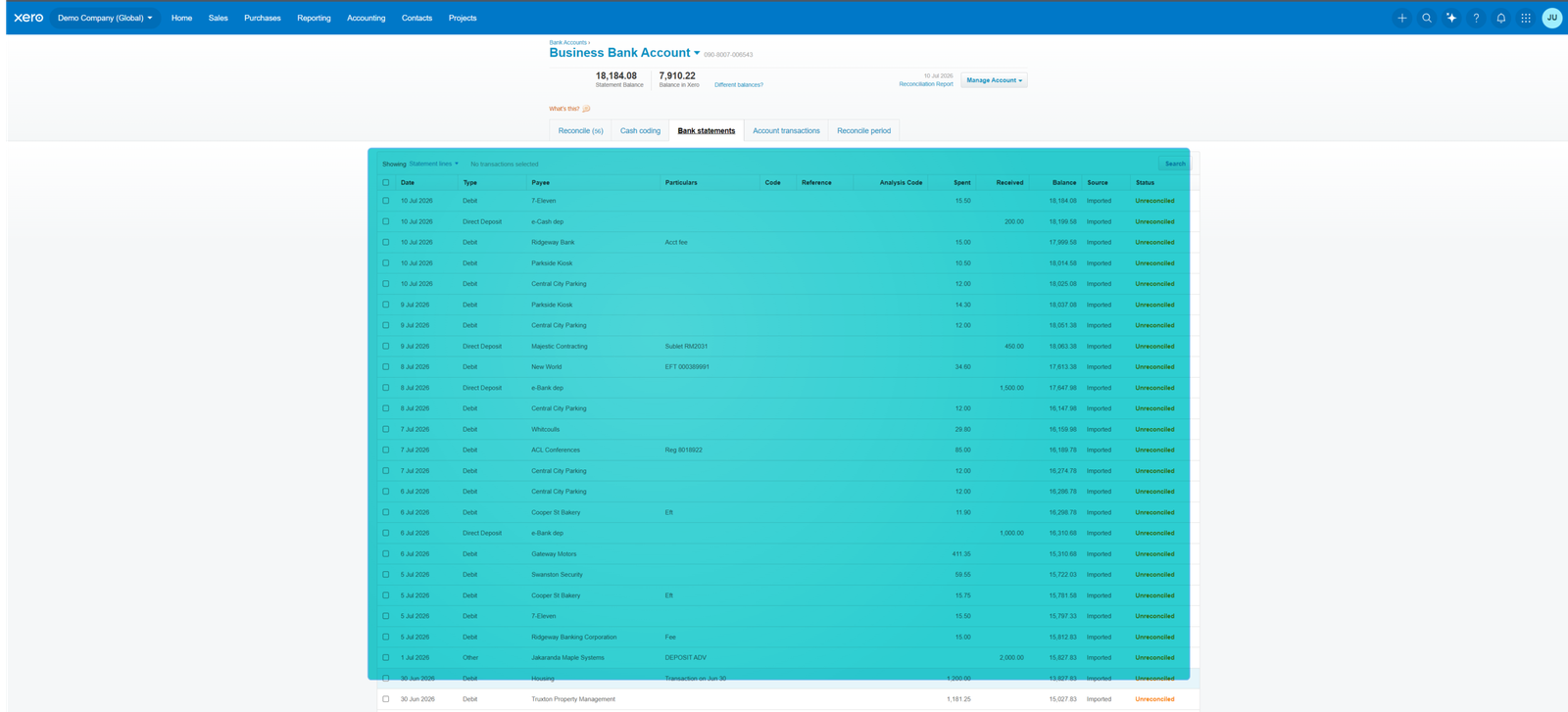
Xero is proper double-entry accounting, so you won’t outgrow it when you hire help or form a company. Unlimited users means your accountant can log in for free, and bank reconciliation is one of its biggest strengths.
For a freelancer, Early at $27 a month works if you send no more than 20 invoices and enter no more than 5 bills a month. Busier than that, and you’ll want Growing at $59.
Pros
- Grows with you from solo to a team.
- Fast bank reconciliation.
- Accountant access at no extra cost.
Cons
- Early’s monthly caps.
- Pricier than FreshBooks or Wave for a solo freelancer.
- Time tracking needs the $97 plan.
More: my Xero review and Xero pricing.
3. Wave: best free option
If you’re just starting out, Wave Starter is free with unlimited invoicing. That’s a lot better than a spreadsheet.
Just know the trade-off: automatic bank imports are on the paid Pro plan ($19 a month). On Starter you upload statements or enter transactions yourself. Wave also includes 1099 contractor tracking.
Pros
- Free, with unlimited invoices.
- Pro is cheap if you need bank feeds.
- Simple enough for a total beginner.
Cons
- No automatic bank imports on the free plan.
- Basic reports.
- Mainly built for the US and Canada.
More: my Wave review.
4. Zoho Books: free, with your accountant included
Zoho Books Free is the only free plan here that includes accountant access. It allows up to 1,000 invoices a year and revenue under $50,000, which covers a lot of freelancers.
Pros
- Free plan with accountant access.
- Clear upgrade path.
- Good if you already use Zoho apps.
Cons
- Busier screens to learn.
- Free plan has revenue and invoice limits.
- Fewer accountants know it.
More: my Zoho Books review.
5. QuickBooks Online: best if your accountant uses it
QuickBooks is powerful and familiar to most US accountants. For a freelancer, it’s often more than you need. Simple Start at $38 a month covers one user, and the higher plans are aimed at teams.
I’ve written a whole piece on whether it’s overkill: QuickBooks for freelancers.
Which one is right for you?
| If you are… | Start with | Why |
|---|---|---|
| Brand new, low income | Wave Starter | Free, with unlimited invoices |
| Solo, with an accountant you want involved | Zoho Books Free | Free plan with accountant access |
| Billing by the hour or project | FreshBooks Plus | Time tracking and client billing |
| Planning to hire or form a company | Xero Early, then Growing | Won’t need to switch later |
| Working with a QuickBooks accountant (US) | QuickBooks Simple Start | Your accountant already knows it |
| Invoicing clients abroad | Zoho Books or Xero Established | Multi-currency |
Getting set up in one afternoon
- Open a separate business bank account if you haven’t. It makes everything else easier.
- Connect it (or upload a statement on Wave Starter).
- Add your clients and create one invoice template with your logo and payment terms.
- Turn on payment reminders and online payments.
- Set two or three bank rules for regular costs like software subscriptions and your phone.
- Reconcile once a week. Ten minutes on a Friday beats a lost weekend in April.
Then, each quarter, run a profit and loss report and set aside money for tax. Your accountant will thank you.
New to the categories your money goes into? See chart of accounts for small business, or the full small business bookkeeping guide.
My verdict
If you bill for your time, start with FreshBooks. If you expect to grow into a business with staff, start with Xero and save yourself a switch later. If money’s tight, Wave or Zoho Books Free will do the job until it isn’t.
Here’s what I’d do: try your top two for a week each with real client work. Send real invoices, and reconcile real transactions. Pick the one that feels easiest, because you’ll be opening it every week.
Frequently asked questions
Do freelancers need accounting software?
Not on day one, but as soon as you have regular clients it saves time and stops deductions slipping through. A free tool is far better than a spreadsheet.
What is the cheapest accounting software for freelancers?
Wave Starter and Zoho Books Free are both free. Wave has no invoice cap; Zoho includes accountant access.
Is QuickBooks or Xero better for freelancers?
For a solo freelancer, Xero Early ($27) is cheaper than QuickBooks Simple Start ($38), but has invoice and bill caps. If your accountant uses QuickBooks, that usually decides it. See Xero vs QuickBooks.
Can accounting software do my taxes?
It organises your income and expenses and produces the reports you need. Filing is still done by you, your accountant or tax software.
More: the best free accounting software, the best accounting software for small business and the Accounting Software Resource Center.



